WiFi 7 vs WiFi 6
Pick two Wi-Fi generations, the spatial streams and the channel width. The page shows each one's top link rate, how much faster one is, and the bands and features that differ.
Recent
Your last 10 settings, saved only in this browser. Nothing is uploaded.
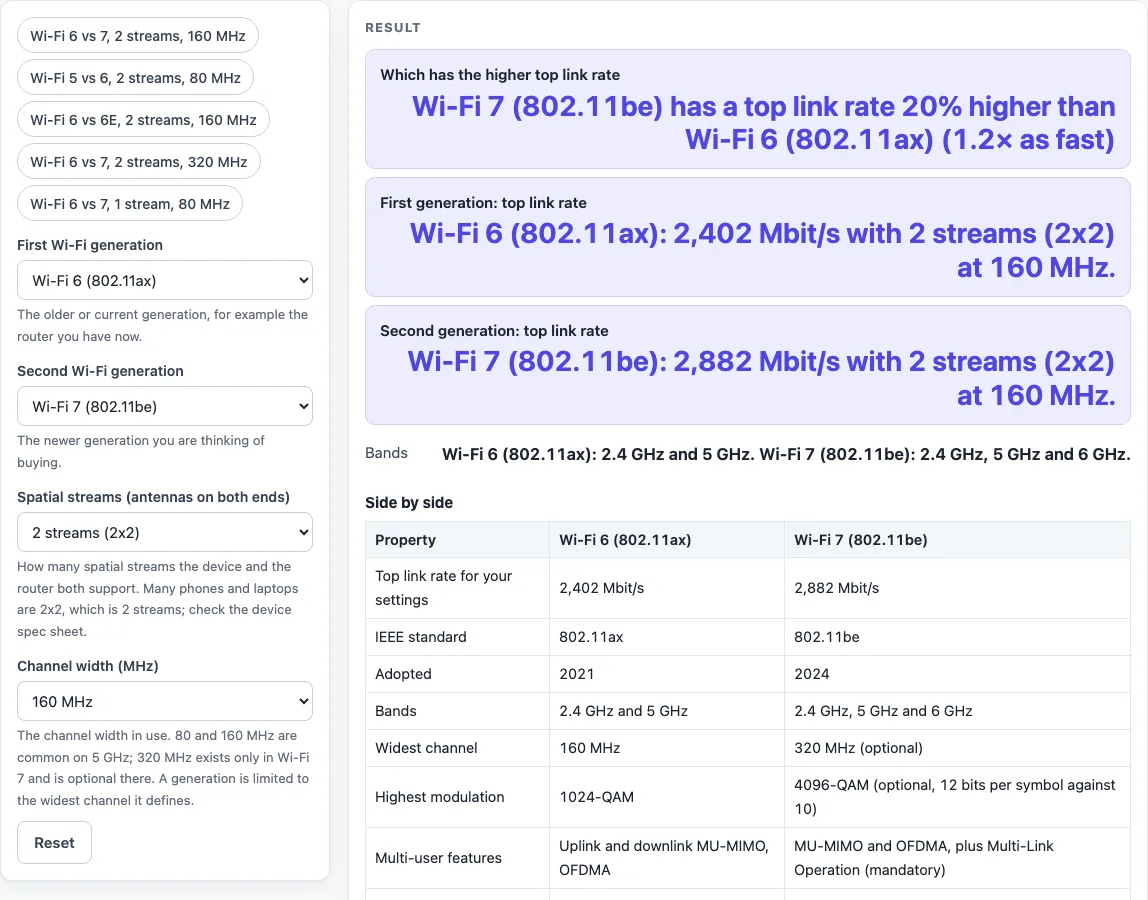
WiFi 7 vs WiFi 6 is a free tool that compares the top link rate of two Wi-Fi generations. On paper, Wi-Fi 7 is faster than Wi-Fi 6: at 2 spatial streams and 160 MHz, the tool calculates 2,882 Mbit/s for Wi-Fi 7 against 2,402 Mbit/s for Wi-Fi 6, which is 20% higher. The gap grows at 320 MHz, where Wi-Fi 6 stays capped at 160 MHz.
You choose two generations, the number of spatial streams and the channel width, and the tool shows the top rate each generation defines. It runs in your browser, is free, and needs no sign-up. Results are calculated from your inputs, so they show what the standards allow, not what your own network will reach. The guide below explains where the numbers come from.
How to use the Wi-Fi 7 vs Wi-Fi 6 tool
The tool opens on Wi-Fi 6 against Wi-Fi 7 with 2 streams at 160 MHz. To compare other settings:
- Open “First Wi-Fi generation” and choose Wi-Fi 4 (802.11n), Wi-Fi 5 (802.11ac), Wi-Fi 6 (802.11ax), Wi-Fi 6E (802.11ax with 6 GHz) or Wi-Fi 7 (802.11be).
- Open “Second Wi-Fi generation” and choose the generation to compare against.
- Set “Spatial streams (antennas on both ends)” to 1, 2, 3, 4 or 8.
- Set “Channel width (MHz)” to 20, 40, 80, 160 or 320.
- Read the result rows: “Which has the higher top link rate”, “First generation: top link rate”, “Second generation: top link rate” and “Bands”.
- Check the “Side by side” table, which lists the IEEE standard, year adopted, bands, widest channel, highest modulation, multi-user features and the highest rate the sources print. Use “All generations at …” to see every generation at your chosen streams and width.
If a generation does not define the stream count or width you chose, the tool caps it at the closest value it defines and says so.
The page also has five presets: ‘Wi-Fi 6 vs 7, 2 streams, 160 MHz’, ‘Wi-Fi 5 vs 6, 2 streams, 80 MHz’, ‘Wi-Fi 6 vs 6E, 2 streams, 160 MHz’, ‘Wi-Fi 6 vs 7, 2 streams, 320 MHz’ and ‘Wi-Fi 6 vs 7, 1 stream, 80 MHz’. Pick one to start from it, then change any control.
Set the streams to match your device’s spec sheet, because the top rate scales with the number of streams, and keep the width the same for both generations so you compare like with like.
Is Wi-Fi 7 faster than Wi-Fi 6?
Yes, at the top link rate the standards define. At 2 streams and 160 MHz, Wi-Fi 6 reaches 2,402 Mbit/s and Wi-Fi 7 reaches 2,882 Mbit/s, which is 20% higher.
The tool finds each rate the same way. It takes the top rate per spatial stream from the standards’ rate tables (the highest modulation and coding rate with the shortest guard interval) and multiplies it by the number of streams. At 160 MHz, Wi-Fi 6 gives 1,201 Mbit/s per stream and Wi-Fi 7 gives 1,441 Mbit/s per stream. Two streams double those figures.
Two things drive the gap. Wi-Fi 7 uses 4096-QAM, which carries 12 bits per symbol against 10 for Wi-Fi 6’s 1024-QAM, and that accounts for the 20%. Wi-Fi 7 also offers 320 MHz channels. At 320 MHz, Wi-Fi 7 doubles to 5,764 Mbit/s, while Wi-Fi 6 stays capped at 160 MHz (2,402 Mbit/s).
Note that 4096-QAM and 320 MHz channels are optional for Wi-Fi 7 certification, so a device sold as Wi-Fi 7 may lack them. The tool uses the 4096-QAM rates and shows a warning saying so.
Is Wi-Fi 6 faster than Wi-Fi 5?
Yes. At 2 streams and 80 MHz, Wi-Fi 5 reaches 866.6 Mbit/s and Wi-Fi 6 reaches 1,201 Mbit/s, which is 38.6% higher.
The per-stream rates show the same gap. At 80 MHz, Wi-Fi 5 gives 433.3 Mbit/s per stream and Wi-Fi 6 gives 600.5 Mbit/s. Wi-Fi 6 uses 1024-QAM where Wi-Fi 5 uses 256-QAM.
Wi-Fi 6 also adds OFDMA and uplink and downlink multi-user MIMO. The tool’s top rate does not measure these features, which matter when several devices share the same channel.
Sources (checked 19 October 2026): en.wikipedia.org · en.wikipedia.org · en.wikipedia.org · en.wikipedia.org · en.wikipedia.org · en.wikipedia.org
Worked examples
| Input | Result |
|---|---|
| Compare Wi-Fi 6 (802.11ax) with Wi-Fi 7 (802.11be) at 2 streams (2x2) and 160 MHz. | Wi-Fi 7 (802.11be) has a top link rate 20% higher than Wi-Fi 6 (802.11ax) (1.2× as fast). |
| Compare Wi-Fi 5 (802.11ac) with Wi-Fi 6 (802.11ax) at 2 streams (2x2) and 80 MHz. | Wi-Fi 6 (802.11ax) has a top link rate 38.6% higher than Wi-Fi 5 (802.11ac) (1.39× as fast). |
| Compare Wi-Fi 6 (802.11ax) with Wi-Fi 6E (802.11ax with 6 GHz) at 2 streams (2x2) and 160 MHz. | Both generations have the same top link rate for these settings. |
| Compare Wi-Fi 6 (802.11ax) with Wi-Fi 7 (802.11be) at 2 streams (2x2) and 320 MHz. | Wi-Fi 7 (802.11be) has a top link rate 140% higher than Wi-Fi 6 (802.11ax) (2.4× as fast). |
Calculated by the tool above; open it with the same values to see each step.
Frequently asked questions
Will a Wi-Fi 7 router work with Wi-Fi 6 devices?
A Wi-Fi 7 router can serve Wi-Fi 6 devices, but each device runs only at a generation that both the device and the router support. A Wi-Fi 6 phone on a Wi-Fi 7 router connects as Wi-Fi 6.
What is the difference between Wi-Fi 6 and Wi-Fi 6E?
Wi-Fi 6E is Wi-Fi 6 (802.11ax) plus the 6 GHz band, which is about 1200 MHz wide. That band allows 160 MHz channels without the DFS restrictions that apply in 5 GHz. The tool gives identical rates for both, because its rate depends on streams and channel width, not on band.
What is Multi-Link Operation?
Multi-Link Operation is a Wi-Fi 7 feature that sends and receives data across the 2.4, 5 and 6 GHz bands at the same time. Unlike 4096-QAM and 320 MHz channels, it is mandatory for Wi-Fi 7. The tool’s rate depends only on streams and channel width, so it does not show this feature.
Why is my real speed lower than the tool’s number?
The tool shows the top link rate the standards define. Real throughput is lower because of distance, walls, interference, how many devices share the channel and the speed of the slower end of the link.
What are the highest link rates the sources print?
The sources print 600 Mbit/s for Wi-Fi 4, 6,933 Mbit/s for Wi-Fi 5, 9,608 Mbit/s for Wi-Fi 6 and 23,059 Mbit/s for Wi-Fi 7. These need 4 or 8 streams and the widest channels, so they are far above the default comparison.
Does the tool test my Wi-Fi speed?
No. Results are calculated from the settings you choose, using the standards’ rate tables and what the named source says. The tool runs in your browser and does not upload your inputs.
Related tools
- DisplayPort vs HDMI: use it when comparing video connection options for a display or AV setup.
- USB-A vs USB-C: use it when checking which USB connector fits a PC or accessory.
- Cat6 vs Cat6A: use it when choosing wired Ethernet cable for a network link.
- Ethernet Cable Length Limit: use it when checking how far an Ethernet run can go.
- HDMI Cable Length Limit: use it when planning how far an HDMI cable can run between devices.
- PoE Power Budget Calculator: use it when working out how much power a PoE switch must supply to connected devices.