VESA Mount Sizes
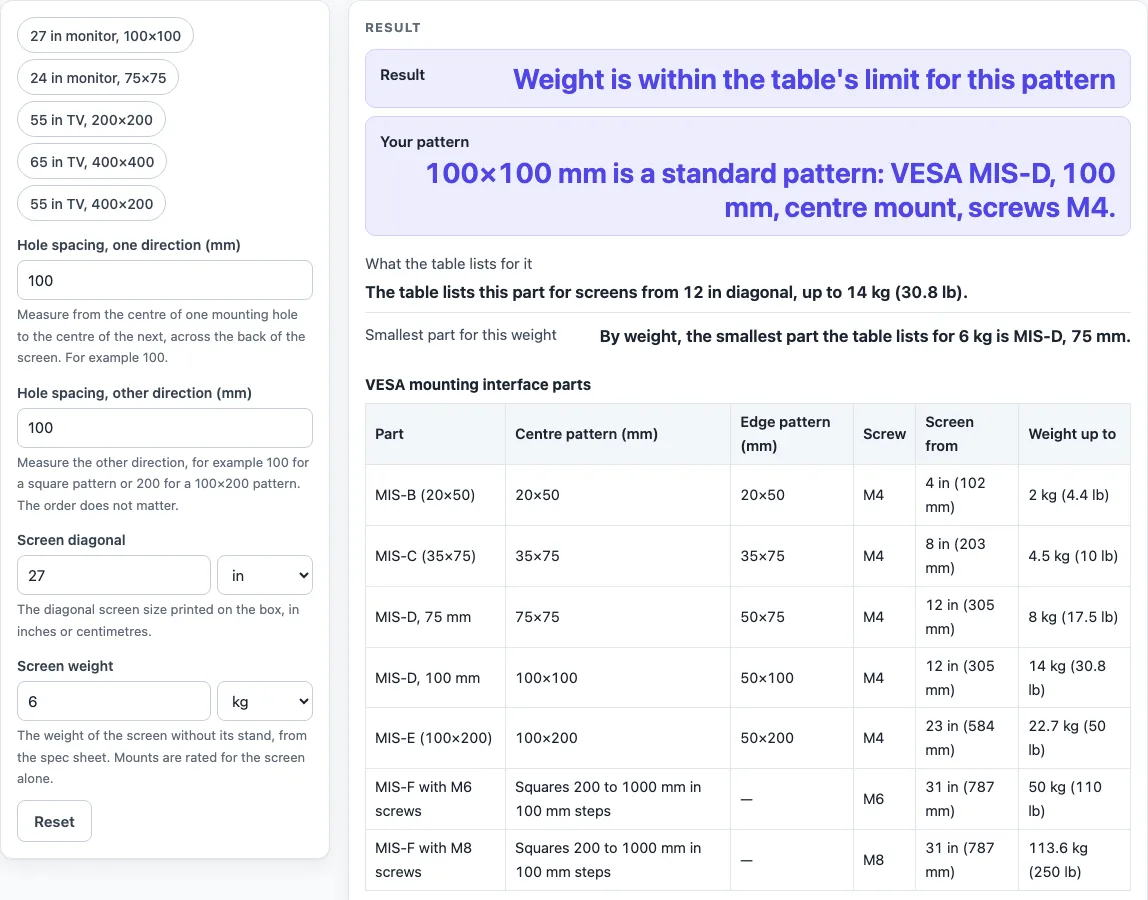
Measure the hole spacing on the back of the screen and type it with the screen size and weight. The page names your VESA part and screws and checks the weight against the standard's table.
Recent
Your last 10 settings, saved only in this browser. Nothing is uploaded.
VESA Mount Sizes is a free tool that checks the mounting-hole spacing on the back of a screen against the VESA mounting interface standard. Enter the hole spacing, screen diagonal and screen weight, and it shows which part of the standard matches your pattern and whether your weight is within that part’s limit. Everything runs in your browser, nothing is uploaded, and no sign-up is needed.
The VESA mounting interface parts table on this page works as a VESA pattern chart for parts B to F, with M4, M6 and M8 screws. Use it when you are choosing a wall mount or monitor arm for a TV, monitor or other display. A VESA pattern shows only where the mounting holes are, so the mount’s own rating still applies.
How to use the VESA Mount Sizes tool
- Measure the distance between the centres of two neighbouring mounting holes on the back of your screen, in millimetres, in both directions.
- Type one number into “Hole spacing, one direction (mm)” and the other into “Hole spacing, other direction (mm)”. Either order works.
- Enter your screen size in “Screen diagonal”, choosing inches or cm.
- Enter your screen’s weight in “Screen weight”, choosing kg or lb.
- Read the result rows: “Result”, “Your pattern”, “What the table lists for it” and “Smallest part for this weight”.
- If a size note appears, read it before you compare the verdict with the mount’s own rating.
The tool opens on a 100 by 100 mm pattern, a 27 in screen and 6 kg, so you can change one control at a time to see how the result shifts. To start from a common setup, use one of the presets: “27 in monitor, 100×100”, “24 in monitor, 75×75”, “55 in TV, 200×200”, “65 in TV, 400×400” or “55 in TV, 400×200”. Each preset fills in all three controls for you, and you can then edit any of them.
Edge patterns such as 50×100 are flagged, and a pattern the standard does not list, for example 400 by 200 mm, gets the verdict “Not a pattern in the standard”.
What VESA size do I need?
Your VESA size is the pair of hole spacings on the back of your screen, written as two numbers in millimetres, such as 100×100. Match those numbers to a pattern in the VESA mounting interface parts table. The numbers are distances between hole centres, not the screen’s diagonal or the mount’s own dimensions. Parts B to E have fixed rectangles, while part F patterns are always square, from 200 to 1000 mm in 100 mm steps, with 300, 500, 700 and 900 mm also allowed.
How do I measure a VESA pattern?
Measure from the centre of one mounting hole to the centre of the next hole in the same direction, in millimetres. Take one measurement across the width and one up the height, because the two numbers can differ. Measure to the centre of each hole, not its edge, since the standard’s figures are centre-to-centre. The tool flags the edge patterns 50×75, 50×100 and 50×200, which the table lists for brackets on one edge of the screen. The standard allows each hole 0.25 mm of position error for parts B to E and 0.5 mm for part F.
What is the most common VESA size?
The sources used here do not rank the sizes, so this page cannot name one pattern as the most common. The first standard, introduced in 1997, used a 100 mm square, which is part D. A 75 mm pattern was added later for smaller displays, and larger patterns for TVs were added in 2006. The 100×100 pattern is where the tool opens, but that is only its starting setting, not a measure of how often it is used.
What weight can a VESA mount hold?
A VESA pattern does not set a weight limit; the mount’s own weight rating does. The table’s limits are: part B up to 2 kg (4.4 lb), part C up to 4.5 kg (10 lb), part D at 75 mm up to 8 kg (17.5 lb), part D at 100 mm up to 14 kg (30.8 lb), part E up to 22.7 kg (50 lb), and part F up to 50 kg (110 lb) with M6 screws or 113.6 kg (250 lb) with M8 screws. The tool compares your weight with these limits, so the table tells you what the standard lists for each part, not what your specific mount can carry.
What screws does a VESA mount use?
In the table, parts B to E use M4 screws. Part F is listed with M6 screws up to 50 kg and with M8 screws up to 113.6 kg. If the screen maker included different screws, you must use those instead of the screws the table lists.
Sources (checked 19 October 2026): en.wikipedia.org
Worked examples
| Input | Result |
|---|---|
| 100×100 mm, 27 in, 6 kg | Result: Weight is within the table's limit for this pattern. |
| 200×200 mm, 55 in, 18 kg | Result: Weight is within the table's limit for this pattern. |
| 400×200 mm, 65 in, 30 kg | Result: Not a pattern in the standard. |
| 100×100 mm, 30 in, 25 kg | Result: Heavier than the table's limit for this pattern. |
Calculated by the tool above; open it with the same values to see each step.
Frequently asked questions
What does “Not a pattern in the standard” mean?
It means your two hole spacings do not match any pattern the standard lists, such as 400 by 200 mm. Check the numbers against the pattern list that comes with your mount.
What does “Fits part F, but only with M8 screws” mean?
It means your screen weight is between 50 kg and 113.6 kg, which is above part F’s M6 limit. The table lists M8 screws for that weight range, so the M8 version of part F is the one the table covers.
What does “Heavier than the table’s limit for this pattern” mean?
It means your screen weighs more than the maximum the table lists for that part. For example, 25 kg on a 100 by 100 mm pattern is heavier than the 14 kg limit for part D at 100 mm.
What is the size note about?
The note appears when the table starts a larger part at or below your screen size. For example, a 27 in screen on a 100 by 100 mm pattern gets a note because the table starts part E at 23 in. The standard’s note says a larger screen should use a larger variant.
Does the tool’s verdict replace the mount’s own rating?
No. The table’s limits are for the standard’s parts, and the mount’s own weight rating and screen size range still apply. Check both before you buy.
Related tools
- TV Viewing Distance Calculator: use it to work out how far to sit from a TV before you choose a size.
- TV Mounting Height Calculator: use it to plan where the mount goes on the wall.
- TV Size Calculator: use it when you are still choosing the screen diagonal.
- TV Size for Room: use it to compare screen size against the room you have.
- DisplayPort vs HDMI: use it to compare the two connections before you connect a mounted monitor or PC.
- HDMI Cable Length Limit: use it to check cable run length from a mounted screen to its source.