USB-A vs USB-C
Pick the port you plug into, the cable and the port on the device. The page says whether they connect, which part sets the speed, and how much power the sources allow.
Recent
Your last 10 settings, saved only in this browser. Nothing is uploaded.
How to use the USB-A vs USB-C tool
- Choose Port you plug into (computer, charger, hub). Pick USB-A at USB 2.0 (480 Mbit/s), USB 3 (5 Gbit/s) or 10 Gbit/s, or USB-C at USB 2.0, 5, 10, 20 or 40 Gbit/s (USB4).
- Choose Port on the device (drive, phone, laptop) from the same list.
- Choose Cable: no cable (the device plugs straight in), USB-A to USB-C cable, USB-C to USB-A adapter, USB-C to USB-C USB 2.0 only (charging cable), or USB-C to USB-C Full-Featured at 5, 10, 20 or 40 Gbit/s.
- If Cable power rating appears, set it. It only appears for a USB-C to USB-C cable.
- If Power the host or charger offers appears, set it. It only appears when the host port is USB-C.
- Read the results: Does it connect?, Data speed, Power and What sets the speed. Then scroll to the two tables below: USB-A and USB-C compared, and the USB speed names with the USB-C cable each one needs.
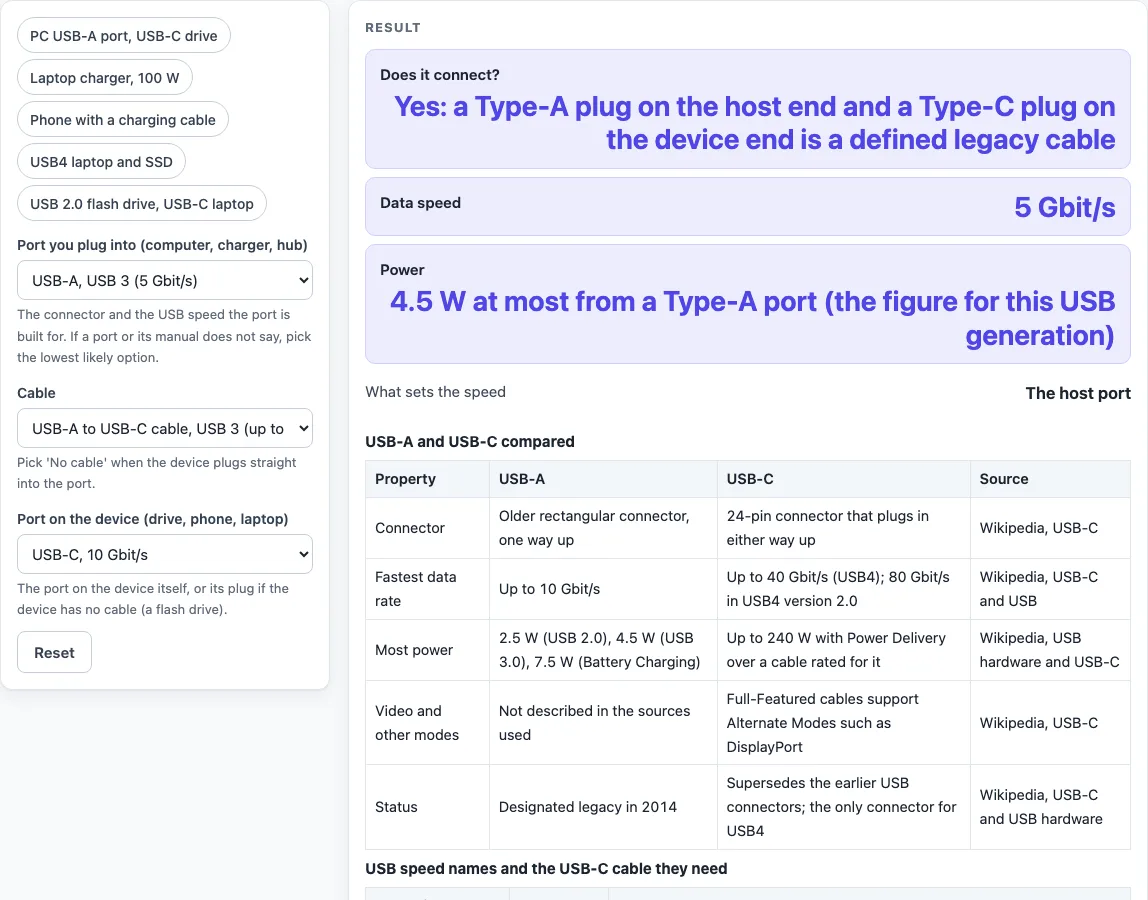
The tool opens on a USB-A 5 Gbit/s host, a USB-C 10 Gbit/s device and a USB-A to USB-C cable. Change one control at a time to see how each choice affects the result. For a quicker start, the presets cover a PC USB-A port with a USB-C drive, a 100 W laptop charger, a phone with a charging cable, a USB4 laptop with an SSD, and a USB 2.0 flash drive on a USB-C laptop.
What is the difference between USB-A and USB-C?
USB-A is the older connector: a rectangular plug that only goes in one way. USB-C is a 24-pin connector that you can insert either way up, and it describes the plug shape, not the data protocol. That is why a USB-C port can be fast or slow depending on what it is connected to.
All Type-A and Type-B connectors were designated legacy in 2014. A legacy cable has a Type-A plug on the host end and a Type-C plug on the device end. Adapters or cables with a Type-C receptacle are not defined or allowed, and two adapters with Type-C plugs are defined: one with a USB 3 Standard-A receptacle and one with a Micro-B receptacle. Some USB-C cables with a USB-A plug wire the configuration channel incorrectly and can damage devices, so avoid cables you cannot verify.
The two connector families also differ in their limits. USB-A reaches up to 10 Gbit/s, while USB-C reaches up to 40 Gbit/s, or 80 Gbit/s in USB4 2.0. USB-A supplies up to 2.5 W, 4.5 W or 7.5 W depending on its generation, while USB-C can supply up to 240 W with USB Power Delivery. Full-Featured USB-C cables support Alternate Modes such as DisplayPort. The sources used here do not describe video over Type-A.
Is USB-C faster than USB-A?
Not automatically. A USB-C port can be USB 2.0 only, which runs at 480 Mbit/s. The connection runs at the slowest of three things: the host port, the cable and the device port. A USB-C 10 Gbit/s device on a USB-A 5 Gbit/s host, joined by a USB-A to USB-C cable, runs at 5 Gbit/s because the host port sets the speed.
Cable type matters as much as the ports. Two 40 Gbit/s USB-C ports joined by a USB 2.0 charging cable connect but run at 480 Mbit/s. Speeds of 20 Gbit/s need devices and Full-Featured cables (and hubs) of that rating between host and device. The 20 Gbit/s mode is optional in USB4, and most USB4 controllers do not implement it, so check the device manual before expecting that speed.
Sources (checked 18 October 2026): en.wikipedia.org · en.wikipedia.org · en.wikipedia.org
Worked examples
| Input | Result |
|---|---|
| Host USB-A, USB 3 (5 Gbit/s); device USB-C, 10 Gbit/s; cable USB-A to USB-C cable, USB 3 (up to 10 Gbit/s) | Yes: a Type-A plug on the host end and a Type-C plug on the device end is a defined legacy cable. Speed 5 Gbit/s. Power: 4.5 W at most from a Type-A port (the figure for this USB generation). |
| Host USB-C, 40 Gbit/s (USB4); device USB-C, 40 Gbit/s (USB4); cable USB-C to USB-C cable, USB 2.0 only (charging cable) | Yes: a USB-C cable joins two USB-C ports. Speed 480 Mbit/s. Power: 60 W: the cable is rated 60 W, so it caps the 100 W the host offers. |
| Host USB-C, 10 Gbit/s; device USB-A, USB 2.0 (480 Mbit/s); cable USB-C to USB-A adapter (USB 3, up to 10 Gbit/s) | Yes: a USB-C to USB-A adapter (Type-C plug, Type-A receptacle) is one of the two adapters the Type-C specification defines. Speed 480 Mbit/s. Power: 2.5 W at most from a Type-A port (the figure for this USB generation). |
| Host USB-C, 20 Gbit/s; device USB-C, 20 Gbit/s; cable USB-C to USB-C, Full-Featured, 20 Gbit/s | Yes: a USB-C cable joins two USB-C ports. Speed 20 Gbit/s. Power: Up to 240 W with Power Delivery. |
Calculated by the tool above; open it with the same values to see each step.
Frequently asked questions
Can I plug a USB-A device into a USB-C port?
Not directly. A USB-A plug going into a USB-C port is not a defined combination. The Type-C specification defines a USB-C to USB-A adapter, which the tool lists at USB 3 with speeds up to 10 Gbit/s.
Does a USB-C cable always charge fast?
No. Charging speed depends on the charger’s offer and the cable’s rating, and the tool caps the offer at the cable rating. For example, a 100 W offer through a 60 W cable is limited to 60 W. A USB 2.0 charging cable also carries only USB 2.0 data and power.
Why is my USB-C cable slow?
The connection runs at the slowest link, so the cable, the host port or the device port may be the limit. Look at What sets the speed in the results. Specifications are not printed on USB-C connectors, so check the device manual to confirm its port speed.
Can USB-A charge a laptop?
In the figures used here, a USB-A port supplies 2.5 W, 4.5 W or 7.5 W depending on its generation, while USB-C with Power Delivery is listed up to 240 W. A laptop that needs more than 7.5 W cannot be powered from a USB-A port in these figures.
Does this tool upload my cable or device details?
No. The tool runs in your browser, is free, needs no sign-up, and nothing you enter is uploaded.
Related tools
- DisplayPort vs HDMI: Compare two video connections when you are choosing a display cable.
- Cat6 vs Cat6A: Compare two network cable categories before running new Ethernet.
- PoE Power Budget Calculator: Check how much power a Power over Ethernet switch can supply to its devices.
- UPS Sizing Calculator: Estimate the battery backup size your equipment needs.
- HDMI Cable Length Limit: Find out how long an HDMI cable can run before signal quality becomes a concern.
- Cables, wiring and installer documents: Find cable guides and installer references in one place.