USB 2.0 vs 3.0
Pick two USB speed grades and a file size. The page shows the fastest copy time at each speed, how much higher one ceiling is than the other, and the bus power each allows.
Recent
Your last 10 settings, saved only in this browser. Nothing is uploaded.
How to use the USB 2.0 vs 3.0 tool
- Open the “First USB speed” list and choose a speed. The tool opens on USB 2.0 (480 Mbit/s).
- Open the “Second USB speed” list and choose the speed to compare against. The tool opens on USB 3.0 / USB 3.2 Gen 1x1 (5 Gbit/s).
- Enter your file or backup size in “File or backup size (GB)”. The tool opens on 50 GB.
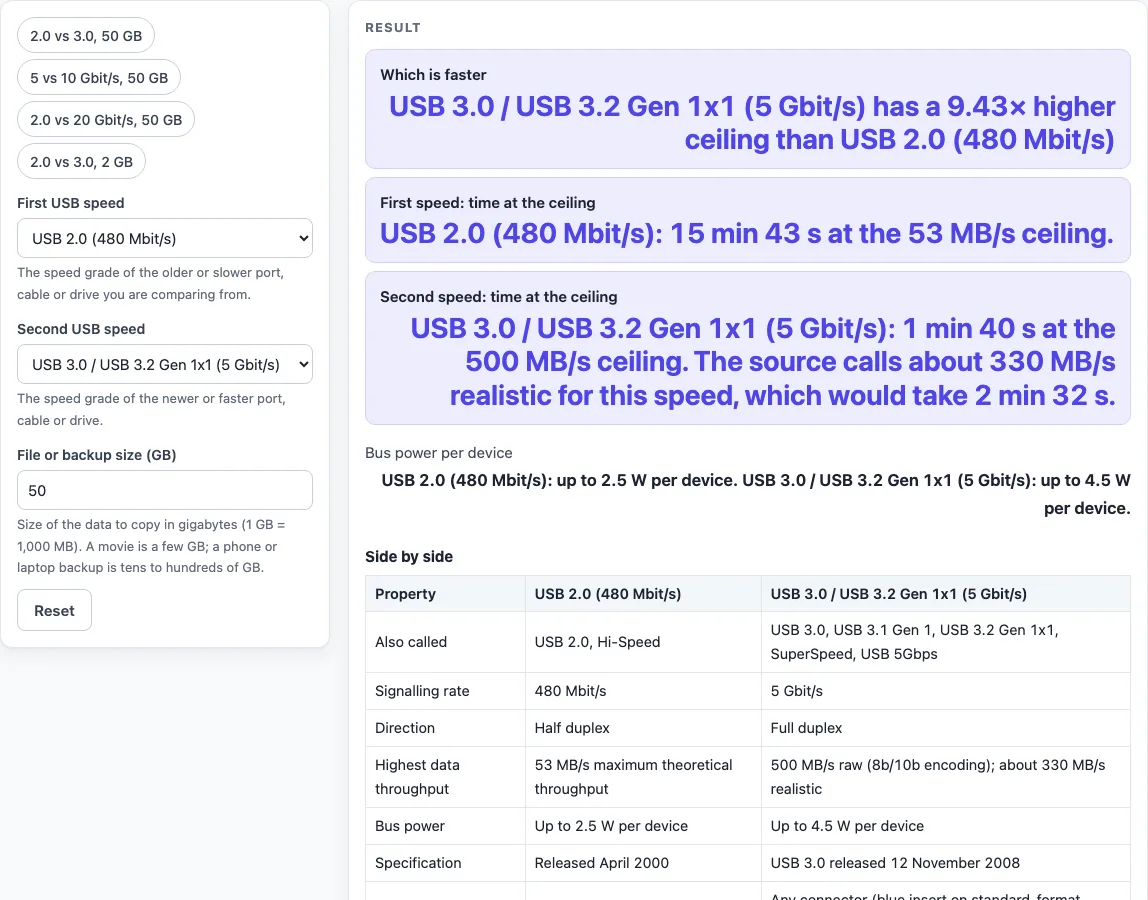
- Read “Which is faster” first, then check “First speed: time at the ceiling” and “Second speed: time at the ceiling”.
- Check “Bus power per device” to compare the power each device can draw at each speed.
- Scroll to “Side by side” to see names, signalling rate, direction, highest data throughput, bus power, specification date and connector needed.
- Scroll to “All four speeds for N GB” to see every grade for your chosen size.
- Read the warning about the slowest link before you rely on a result.
The page also has presets: “2.0 vs 3.0, 50 GB”, “5 vs 10 Gbit/s, 50 GB”, “2.0 vs 20 Gbit/s, 50 GB” and “2.0 vs 3.0, 2 GB”. Use “Copy result” to copy the numbers, “Copy link” to share the current settings, or “Print / save as PDF” to print the page.
Change one control at a time to see how each choice moves the times. The two speeds can be set in either order, since the result names the faster one.
Is USB 3.0 faster than USB 2.0?
Yes. USB 2.0 has a maximum theoretical data throughput of 53 MB/s at its 480 Mbit/s signalling rate, while the 5 Gbit/s grade of USB 3.0 has a raw rate of 500 MB/s. The time to copy a file is its size divided by the throughput ceiling, so a higher ceiling means a shorter copy.
The tool uses 1 MB = 1,000,000 bytes, so 50 GB is 50,000 MB. At 53 MB/s, 50 GB takes 15 min 43 s. At 500 MB/s, it takes 1 min 40 s. The source also calls about two-thirds of the 500 MB/s figure, 330 MB/s, realistic once protocol overhead is counted. At that figure, the same 50 GB takes 2 min 32 s.
How much faster is USB 3.0 than USB 2.0?
At their ceilings, the 5 Gbit/s grade is 9.43 times faster than USB 2.0 (500 ÷ 53). Using the 330 MB/s figure the source calls realistic, the ratio is 6.23 (330 ÷ 53). The times above show the fastest the signalling rate allows. Real copies are often slower, because the drive, the file system and many small files usually set the speed before the port does.
The names follow the speed grade. The 5 Gbit/s mode was called USB 3.0, then USB 3.1 Gen 1, then USB 3.2 Gen 1x1, and since 2023 it is marketed as USB 5Gbps. The 10 Gbit/s mode is USB 3.1 Gen 2 or USB 3.2 Gen 2x1 (USB 10Gbps). The 20 Gbit/s mode is USB 3.2 Gen 2x2 (USB 20Gbps). So a comparison of USB 3.0 with USB 3.2 comes down to which speed grade a port or cable has. USB 3.1 was released on 26 July 2013 and added the 10 Gbit/s mode. USB 3.2, from September 2017, added the two-lane modes.
Sources (checked 19 October 2026): en.wikipedia.org
Worked examples
| Input | Result |
|---|---|
| Compare USB 2.0 (480 Mbit/s) with USB 3.0 / USB 3.2 Gen 1x1 (5 Gbit/s) for a 50 GB copy. | USB 3.0 / USB 3.2 Gen 1x1 (5 Gbit/s) has a 9.43× higher ceiling than USB 2.0 (480 Mbit/s). |
| Compare USB 3.0 / USB 3.2 Gen 1x1 (5 Gbit/s) with USB 3.1 Gen 2 / USB 3.2 Gen 2x1 (10 Gbit/s) for a 100 GB copy. | USB 3.1 Gen 2 / USB 3.2 Gen 2x1 (10 Gbit/s) has a 2.42× higher ceiling than USB 3.0 / USB 3.2 Gen 1x1 (5 Gbit/s). |
| Compare USB 2.0 (480 Mbit/s) with USB 3.2 Gen 2x2 (20 Gbit/s) for a 8 GB copy. | USB 3.2 Gen 2x2 (20 Gbit/s) has a 45.7× higher ceiling than USB 2.0 (480 Mbit/s). |
| Compare USB 2.0 (480 Mbit/s) with USB 2.0 (480 Mbit/s) for a 1 GB copy. | Both are the same speed grade, so the ceiling is the same. |
Calculated by the tool above; open it with the same values to see each step.
Frequently asked questions
Why is my USB 3.0 drive slow?
A transfer runs at the speed of the slowest part of the chain: the host port, the cable and the device. A USB 3 drive in a USB 2.0 port or on a USB 2.0 cable runs at USB 2.0 speed. The drive, the file system and many small files can also hold the speed back.
How can I tell a USB 3.0 port from a USB 2.0 port?
USB 3.0 standard-format receptacles use blue inserts, so a blue insert is a useful clue. The tool does not check your computer’s ports. For a firm answer, check your device’s or maker’s spec sheet.
Does USB 3.0 give devices more power than USB 2.0?
Yes, according to the figures used here. A USB 2.0 host or hub provides up to 2.5 W per device, and a SuperSpeed (USB 3.x) host or hub provides up to 4.5 W (900 mA). The “Bus power per device” row shows these values for the speeds you pick.
Can I get 20 Gbit/s from any USB-C port?
No. The 20 Gbit/s mode, USB 3.2 Gen 2x2, is only possible with Full-Featured USB-C on the host, the cable and the device. The source says such ports are rarely implemented. The related page on USB-A and USB-C covers connectors and cables in more depth.
Does this tool measure my USB ports or devices?
No. Results are calculated from the speeds and size you enter, using the throughput ceilings described above. The times show the fastest the signalling rate allows, so use them as a guide, not a test of your hardware.
Related tools
- DisplayPort vs HDMI: use it to compare the two display connections you might choose for a screen or AV setup.
- USB-A vs USB-C: use it to compare connectors, cables and power before you buy USB gear.
- Cat6 vs Cat6A: use it to compare two copper Ethernet cable grades for a network run.
- Ethernet Cable Length Limit: use it to check how long an Ethernet cable run can be.
- HDMI Cable Length Limit: use it to check how long an HDMI cable run can be.
- PoE Power Budget Calculator: use it to check how much power your PoE devices need from a switch.