UPS Sizing Calculator
List what you want to keep running, choose your headroom, and see the total watts and the VA rating the numbers point to.
Recent
Your last 10 settings, saved only in this browser. Nothing is uploaded.
How to use the UPS Sizing Calculator
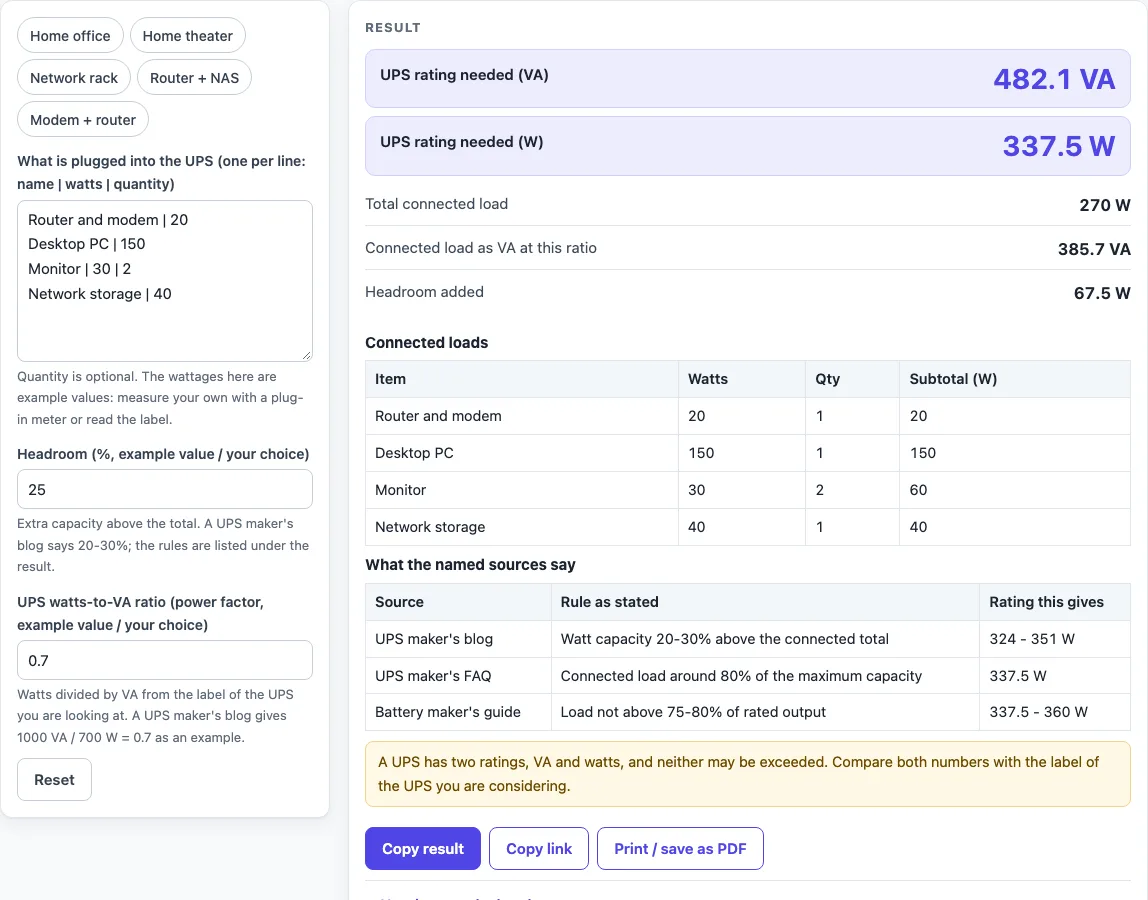
- Pick a preset chip if one fits your setup: “Home office” (the default list), “Home theater”, “Network rack”, “Router + NAS” or “Modem + router”. You can edit any preset.
- In “What is plugged into the UPS (one per line: name | watts | quantity)”, type one device per line. Use the format name | watts, or name | watts | quantity.
- Check the lines. Watts must be 0 or more, and the quantity must be a whole number of 1 or more. Leave out a line only by deleting it.
- Set “Headroom (%, example value / your choice)”. The default is 25%.
- Set “UPS watts-to-VA ratio (power factor, example value / your choice)”. The default is 0.7.
- Read the output rows: “UPS rating needed (VA)”, “UPS rating needed (W)”, “Total connected load”, “Connected load as VA at this ratio” and “Headroom added”.
- Compare the figures in the rating table shown under the result. Each row uses your total with a different source’s rule.
- Read the warnings. A UPS has two ratings, VA and watts, and neither may be exceeded. A second warning appears when headroom is under 20%.
Blank lines and lines starting with # are skipped, so you can label groups of devices. A tab also works as a separator. The tool accepts up to 40 lines; more than that shows an error.
How does a UPS sizing calculator work out the required watts?
The calculator multiplies each device’s watts by its quantity, then adds all the results to give the total connected watts. It then adds headroom to that total, so required W = total W x (1 + headroom%). For the default list, the total is 270 W and the required figure is 270 x 1.25 = 337.5 W.
What does the power factor do in a UPS sizing calculator?
The power factor is the watts-to-VA ratio. It converts watts into VA, the other rating a UPS carries, using required VA = required W / power factor. The default of 0.7 gives 337.5 / 0.7 = 482.1 VA. The page also shows the connected load as VA at the same ratio.
The default 0.7 comes from a UPS maker’s blog, where 1000 VA and 700 W are paired, so 700 / 1000 = 0.7. The same blog gives no typical value for every UPS, so treat 0.7 as an example and use the ratio printed for the UPS you are considering.
Why is headroom added to a UPS load, and how much should I use?
Headroom is extra capacity above your connected load, so the UPS is not run at its limit all the time. The tool adds it as a percentage of your total. The default is 25%, labelled as an example value, and the page shows the amount added as “Headroom added”. For the default list that is 67.5 W.
The sources given on the page do not agree on a single figure. A UPS maker’s blog says UPS watt capacity should be 20-30% above the connected total. A UPS maker’s FAQ says the load should be around 80% of the maximum, which equals +25%. A battery maker’s sizing guide says the load should not be above 75-80% of rated output, which equals +25% to +33%. The tool shows each as a separate row rather than picking one.
Why do the rows in the rating table differ for the same total?
Each row applies one named source’s rule to your total. For 100 W, the blog’s 20-30% gives 120-130 W, the UPS maker’s FAQ gives 125 W, and the battery maker’s guide gives 125-133.3 W. These are calculated from the sources’ stated percentages, not measured values. Use the row that matches the guidance you trust, or check the UPS maker’s own documentation for the model you plan to buy.
Why does a UPS have both a VA and a watts rating?
A UPS carries two ratings, VA (volt-amperes) and watts, and the two figures can differ. The UPS maker’s blog says to check the VA rating as well as the watts. The tool therefore gives the required figure in both units, and a warning on the page reminds you that neither rating may be exceeded. Compare both numbers with the label of the UPS you are considering.
Sources (checked 16 October 2026): cyberpower.com · se.com · enersys.com
Worked examples
| Input | Result |
|---|---|
| 4 load lines, 25% headroom, power factor 0.7 | 270 W total, 337.5 W and 482.1 VA needed |
| 2 load lines, 25% headroom, power factor 0.7 | 60 W total, 75 W and 107.1 VA needed |
| 3 load lines, 30% headroom, power factor 0.6 | 590 W total, 767 W and 1,278 VA needed |
| 3 load lines, 20% headroom, power factor 0.9 | 143 W total, 171.6 W and 190.7 VA needed |
Calculated by the tool above; open it with the same values to see each step.
Frequently asked questions
What is the difference between VA and watts on a UPS?
Watts and VA are the two ratings a UPS carries. The watts-to-VA ratio (power factor) links them: watts divided by VA, from 0 to 1. The tool shows the required figure in both units.
Why are the defaults 25% headroom and 0.7 power factor?
Both are example values. The 25% headroom sits inside the ranges given by the sources on the page, and the 0.7 ratio comes from a UPS maker’s blog pairing 1000 VA with 700 W. Replace them with the figures for your own setup.
What does the warning about headroom under 20% mean?
The tool shows a second warning when headroom is set below 20%, the low end of the 20-30% range a UPS maker’s blog gives. A lower headroom leaves less spare capacity above your connected load.
Why does the tool show an error for a decimal quantity?
A quantity counts devices, so it must be a whole number of 1 or more. A value such as 1.5 is refused. Type a whole number, or list the device on separate lines.
Does the tool recommend a specific UPS model?
No. The page gives the calculated rating in VA and W and does not list standard UPS ratings or recommend any brand, because no source it reads provides such a list.
Can I use it for a home theater or network rack?
Yes. Choose the “Home theater” or “Network rack” preset, or type your own devices. The preset values are examples, so replace them with the watts printed on your equipment’s spec sheet.
Related tools
- UPS Battery Calculator: Use it when you want to estimate battery size for a UPS.
- UPS Runtime Calculator: Use it when you want to estimate how long a UPS can power your devices.
- VA to Watts Calculator: Use it when you need to convert a VA rating to watts, or the other way round.
- UPS and Backup Power: the hub with every UPS and backup power tool on this site.
- Home Theater Equipment List Generator: use it when you want a list of your devices with their watt totals before you size a UPS.
- PoE Power Budget Calculator: use it when the load is PoE gear and you need its total watts.