UPS Runtime Calculator
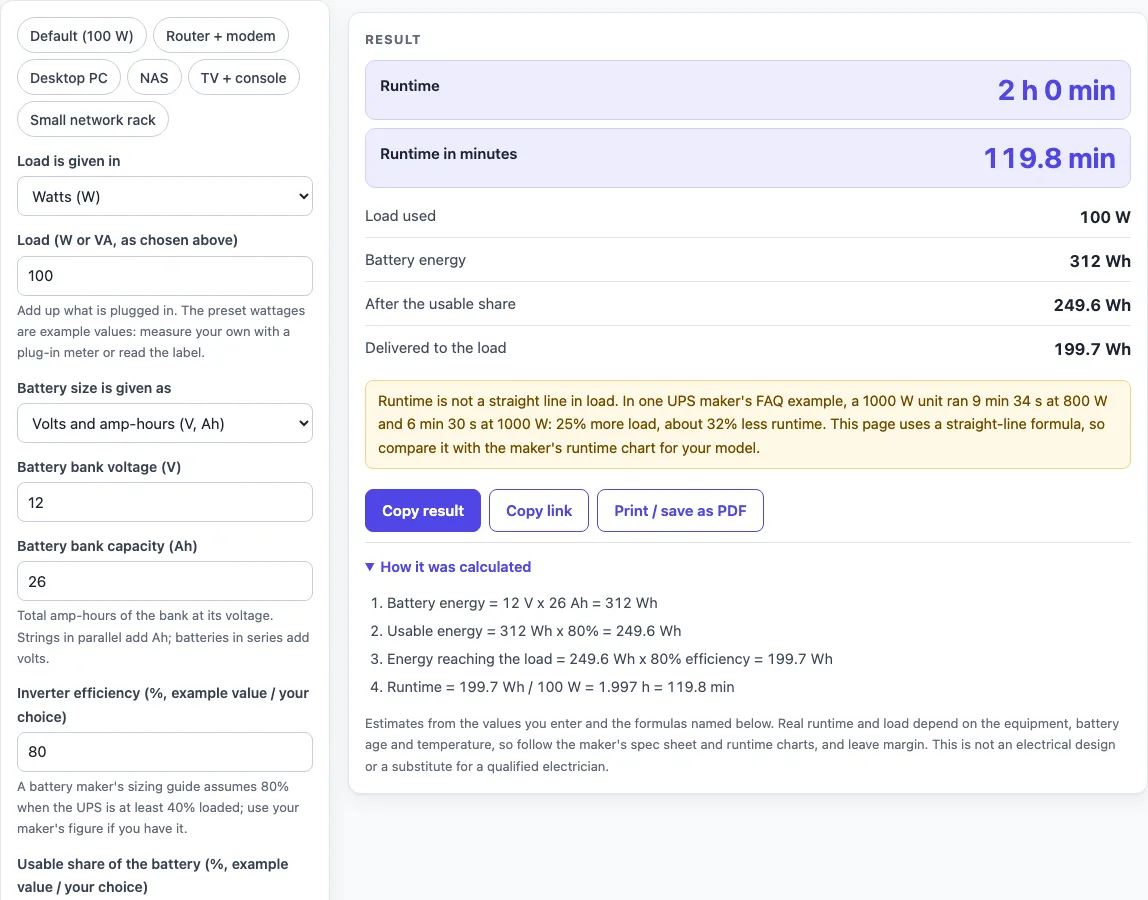
Enter what is plugged in and the size of the battery, and the formula gives the runtime in hours and minutes, with each step written out.
Recent
Your last 10 settings, saved only in this browser. Nothing is uploaded.
How to use the UPS Runtime Calculator
- Under “Load is given in”, choose Watts (W) or VA and a power factor.
- Enter your equipment’s load in “Load (W or VA, as chosen above)”. If you chose VA, set “Power factor (example value / your choice)”. It must be above 0 and at most 1. For example, 600 VA at 0.6 is 360 W.
- Under “Battery size is given as”, choose Volts and amp-hours (V, Ah) or Watt-hours (Wh).
- For volts and amp-hours, enter “Battery bank voltage (V)” and “Battery bank capacity (Ah)”. The tool calculates battery energy as V x Ah. For watt-hours, type the figure into “Battery energy (Wh)”.
- Enter “Inverter efficiency (%, example value / your choice)”. The default is 80%. It must be above 0 and at most 100.
- Enter “Usable share of the battery (%, example value / your choice)”. The default is 80%. This is an example value, so change it if you have a different figure.
- Read the results: “Runtime”, “Runtime in minutes”, “Load used”, “Battery energy”, “After the usable share” and “Delivered to the load”. The steps section shows each multiplication with your typed numbers.
- Optional: open “More options” and enter “UPS rated output (W, optional)” to get load warnings.
The presets are “Default (100 W)”, “Router + modem”, “Desktop PC”, “NAS”, “TV + console” and “Small network rack”. Their wattages are example values, so measure your own equipment and enter those figures instead.
How is UPS runtime calculated?
UPS runtime is the battery energy, multiplied by the usable share and the inverter efficiency, then divided by the load in watts. The answer is in hours, and multiplying by 60 gives minutes. For example, a 1000 Wh battery at 90% efficiency, 100% usable, running a 500 W load gives 1000 x 0.9 / 500 = 1.8 h, which is 108 min or 1 h 48 min.
What is the usable share of a battery?
The usable share is the part of the battery’s energy you count as available. The battery maker’s formula has no depth-of-discharge factor, which is the same as 100%. The 80% default is an example value that you can change, and the tool has no source for it.
Where does the 80% efficiency come from?
A battery maker’s sizing guide assumes 0.80 efficiency when the UPS is at least 40% loaded. No maker’s published typical efficiency was found on the pages read, so this is the only efficiency figure used.
Why is UPS runtime not a straight line with load?
Runtime does not fall in direct proportion to load. In a UPS maker’s FAQ example, a 1000 W unit ran 9 min 34 s at 800 W and 6 min 30 s at 1000 W. That is 25% more load and about 32% less runtime (390 s / 574 s = 0.679, own arithmetic). The calculator uses a straight-line formula, so compare its result with your UPS maker’s runtime chart.
How much of its rating should a UPS carry?
The sources differ. A battery maker’s guide says 75-80% of rated output, and a UPS maker’s FAQ says around 80%. Both figures are shown, not averaged. If you enter “UPS rated output (W, optional)”, the tool warns when the load is above 80% of that rating and again when it is above the rating itself.
How do I convert VA to watts for runtime?
Watts equal VA multiplied by the power factor. For example, 300 VA at power factor 0.7 is 210 W. With a 1000 Wh battery, 90% efficiency and 100% usable, the runtime is 4.29 h, or 257.1 min (4 h 17 min).
What does the calculator leave out?
Peukert’s law is not used, because it needs a battery-specific exponent and a rated discharge time. Battery age, cold weather and battery replacement intervals are also not modelled.
Sources (checked 16 October 2026): enersys.com · se.com · cyberpower.com
Worked examples
| Input | Result |
|---|---|
| 100 W, 12 V 26 Ah battery, 80% efficiency, 80% usable | 2 h 0 min (119.8 min) |
| 20 W, 12 V 7 Ah battery, 80% efficiency, 80% usable | 2 h 41 min (161.3 min) |
| 300 VA at power factor 0.7, 1000 Wh battery, 90% efficiency, 100% usable | 4 h 17 min (257.1 min) |
| 250 W, 24 V 26 Ah battery, 80% efficiency, 80% usable | 1 h 36 min (95.85 min) |
Calculated by the tool above; open it with the same values to see each step.
Frequently asked questions
How do I calculate UPS runtime?
Enter your load, battery size, inverter efficiency and usable share, then read “Runtime”. The calculator multiplies battery energy by the efficiency and usable share, and divides by the load.
Does the UPS runtime calculator upload what I type?
No. It runs in your browser and nothing you type is uploaded.
Why can my UPS run for a different time than the result?
Runtime is not a straight line in load, and the calculator uses a straight-line formula. Check your result against your UPS maker’s runtime chart.
What do the 80% defaults mean?
The 80% inverter efficiency is the figure a battery maker’s guide assumes for a UPS at least 40% loaded. The 80% usable share is an example value that you can change.
Can I enter VA instead of watts?
Yes. Choose VA under “Load is given in”, then enter a power factor above 0 and at most 1. The load in watts is VA multiplied by the power factor.
Why does the calculator show a warning?
A warning is always shown, because runtime is not linear in load. Other warnings appear if efficiency is below 50%, or if your load is above 80% of the rated output or above the rating itself.
Related tools
- UPS Battery Calculator: Use it when you want to find the battery size you need for a load and a target runtime.
- UPS Sizing Calculator: Use it when you are choosing a UPS for a set of equipment.
- VA to Watts Calculator: Use it when your equipment label gives VA and you need the watt figure for the load.
- UPS and Backup Power: the hub with every UPS and backup power tool on this site.
- Home Theater Equipment List Generator: use it when you want a list of your devices with their watt totals before you size a battery.
- PoE Power Budget Calculator: use it when the load is PoE gear and you need its total watts.