TV Viewing Distance Calculator
Enter the TV size and aspect ratio to see the viewing distance each source gives and the distance for a viewing angle you choose, or start from your seating distance.
Recent
Your last 10 settings, saved only in this browser. Nothing is uploaded.
How to use the TV Viewing Distance Calculator
- Under “What do you want to find?”, choose “Viewing distance for a TV size” if you know the TV, or “TV size for a viewing distance” if you already know where you will sit.
- In “TV screen size (diagonal)”, type the diagonal in inches. Sizes are the picture diagonal without the frame. Class sizes can be slightly smaller than the label.
- Set “Aspect ratio” to match the TV. If you choose 21:9, a note appears that it is the nominal ratio.
- For viewing distance mode, check “Your viewing angle (horizontal)”. The default is 40 degrees. If you change it, a flag appears when your angle is outside 26 to 40 degrees, the range used by the online calculator.
- For TV size mode, enter “Distance from your eyes to the screen” instead, and the page works out the screen size that fills your chosen angle.
- Read the results table. Each row is one source or one calculated angle. Distances appear in feet and inches (rounded to the nearest inch) and in metres. Sizes appear in inches and centimetres.
- Read any warning before you compare rows. A note says when the sources do not agree, and guide 2’s figure is tuned for 4K.
- To start from an example, pick a preset: 55 in TV, 65 in TV, 85 in TV, 65 in at 36 degrees, Sitting 10 ft away, or Sitting 3 m away at 36 degrees.
Use the presets to see how the numbers change, then enter your own measurements.
How far should you sit from a TV?
There is no single correct distance on this page. Each source gives its own range or single value, tied to a screen size and, in some cases, an angle.
Guide 1, a TV maker’s viewing-distance guide, gives a range of 1.2 to 1.9 times the screen size. For a 55 in TV, that is 66 in (5.5 ft) to 104.5 in (about 8.7 ft). A TV maker’s buying guide gives 1.2 times the screen size, which it says is tuned for 4K and aims at about 40 degrees of field of view.
How is TV viewing distance calculated?
A screen of width W seen from distance D fills a horizontal angle of 2 × atan(W / (2D)). Rearranged, the distance is D = W / (2 × tan(angle / 2)), and the width is W = 2D × tan(angle / 2). The page states this as geometry, not as a standard.
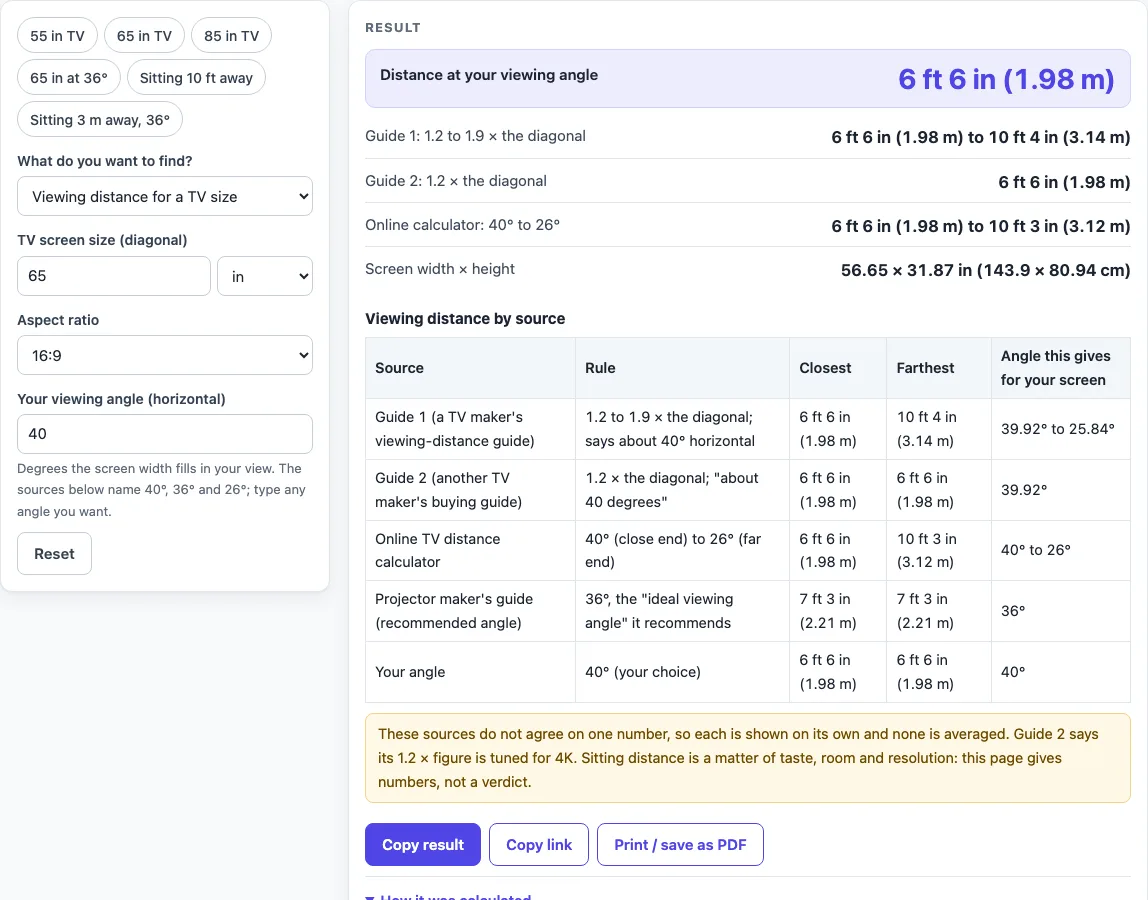
For a 16:9 screen, the width is 0.8716 times the diagonal. A 65 in TV is therefore 56.65 in wide. At 1.2 times the diagonal, the angle is 39.92 degrees, which matches the “about 40 degrees” of the 4K guide. At 36 degrees the distance is 1.34 times the diagonal, at 30 degrees it is 1.63 times, and at 26 degrees it is 1.89 times. The page uses these computed values. A projector maker’s page names 36 degrees as its recommended angle, and the page lists that distance as its own row.
How do TV size and distance work in reverse?
Set the calculator to “TV size for a viewing distance” and the same formula runs the other way. Suppose you sit 10 ft (120 in) away and want a 40 degree horizontal angle. The 16:9 diagonal is 100.2 in.
Guide 1, turned around, gives 63.16 in (120 ÷ 1.9) to 100 in (120 ÷ 1.2). The online calculator’s angles give 63.57 in at 26 degrees to 100.2 in at 40 degrees. Each row is a different assumption about how much of your view the screen should fill, so the spread is expected.
With the defaults (65 in, 16:9, 40 degrees) the tool gives 6 ft 6 in at your angle, while guide 1 gives 6 ft 6 in to 10 ft 4 in. The two agree at the close end because 40 degrees is where guide 1’s range starts. Change the angle and the first row moves while the source rows stay fixed, so you can see which angle each source implies for your screen.
Sources (checked 16 October 2026): us.dynabook.com · samsung.com · benq.com · support.tcl.com · blog.bestbuy.ca
Worked examples
| Input | Result |
|---|---|
| 65 in TV, 40° viewing angle | 6 ft 6 in (1.98 m) at your angle; guide 1: 6 ft 6 in (1.98 m) to 10 ft 4 in (3.14 m) |
| 55 in TV, 40° viewing angle | 5 ft 6 in (1.67 m) at your angle; guide 1: 5 ft 6 in (1.68 m) to 8 ft 9 in (2.65 m) |
| 85 in TV, 36° viewing angle | 9 ft 6 in (2.9 m) at your angle; guide 1: 8 ft 6 in (2.59 m) to 13 ft 6 in (4.1 m) |
| Sitting 10 ft away, 40° viewing angle | 100.2 in at your angle; guide 1: 63.16 to 100 in |
| Sitting 3 m away, 36° viewing angle | 88.06 in at your angle; guide 1: 62.16 to 98.43 in |
Calculated by the tool above; open it with the same values to see each step.
Frequently asked questions
What distance does the tool give for a 55 inch TV?
Guide 1 gives 66 in (5.5 ft) to 104.5 in (about 8.7 ft). The online calculator gives 5 ft 6 in to 8 ft 8 in for a 55 in 16:9 TV. Both figures come from the named sources, so compare the rows rather than choosing one.
Why do the sources give different numbers?
Each source uses its own range or angle. Guide 1 uses 1.2 to 1.9 times the screen size, guide 2 uses 1.2 times and is tuned for 4K, and the online calculator uses 26 to 40 degrees. The page shows each result and does not average them.
Does the calculator pick a distance for me?
No. It prints each source’s numbers and lets you choose the viewing angle. The page does not say which distance suits your room.
What does the viewing angle flag mean?
A flag appears when your horizontal angle is outside 26 to 40 degrees. That is the range the online calculator uses, so the flag tells you the angle is outside that source’s range.
Does the TV size include the frame?
No. The sizes are the picture diagonal without the frame, as a TV maker’s support page and a retailer guide state. Class sizes can be slightly smaller than the label, so measure if the exact size matters.
Is anything I type sent to a server?
No. Everything runs in your browser, nothing is uploaded, and no sign-up is needed. The tool is free.
Related tools
Projector Screen Size Calculator: use it when you are sizing a projected image rather than a flat-screen TV.
Projector Throw Distance Calculator: use it to find how far a projector should sit from the screen.
TV Mounting Height Calculator: use it to work out where to hang the TV on the wall.
TV Size for a Room: use it to compare TV sizes against the space you have.
TV and projector placement: use when you want every placement tool in one list.
TV Size Calculator: use when you want to pick a TV size from your seat distance.
How to Measure TV Screen Size: use when you need to check the diagonal you enter.
TV Size Chart: use when you want sizes and screen dimensions side by side.