TV Size for a Room
Enter how far you sit from the TV, or the room length, to see the screen sizes that fit by viewing angle and by each guide, plus a table of listed sizes.
Recent
Your last 10 settings, saved only in this browser. Nothing is uploaded.
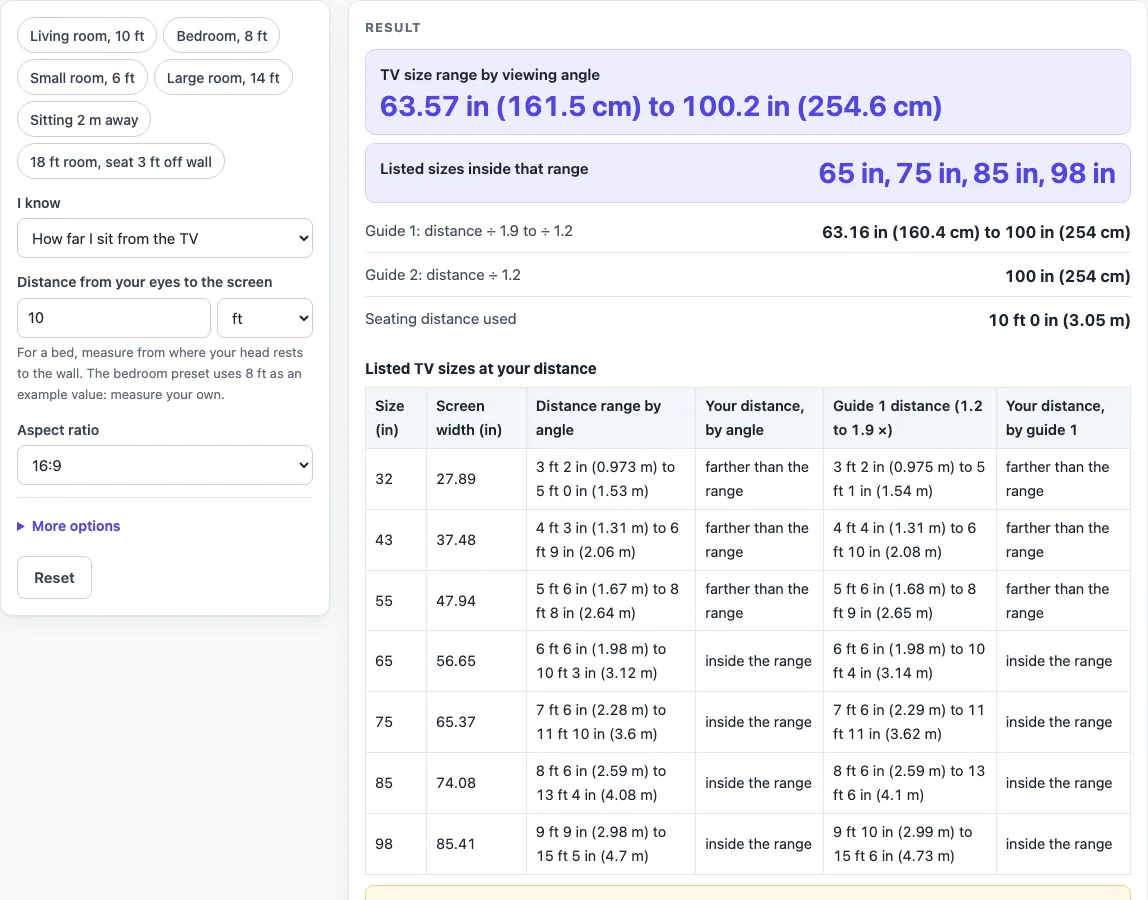
How to use the TV Size for Room Calculator
- Under “I know”, choose “How far I sit from the TV” or “The length of the room”.
- If you chose “How far I sit from the TV”, type your distance in “Distance from your eyes to the screen”. Measure from where your head rests.
- If you chose “The length of the room”, type the room length in “Room length”. Then type the space between your seat and the back wall in “Space between your seat and the back wall”. The example value is 2 ft. The tool subtracts that space to get your seating distance.
- Choose an option under “Aspect ratio”: 16:9, 16:10, 4:3, 21:9 or Custom.
- Optional: open “More options” to change the close-end angle (40) and far-end angle (26). The close end must be larger than the far end.
- Read the results. The table shows each listed size with its screen width, its distance range by the angles, and whether your distance is inside, closer than or farther than that range. It also shows the guide 1 range and the same mark for guide 1.
To save time, pick a preset first: Living room 10 ft, Bedroom 8 ft, Small room 6 ft, Large room 14 ft, Sitting 2 m away, or “18 ft room, seat 3 ft off wall.” Then adjust the values if your room differs.
How is the TV size range for a room calculated?
The tool starts from your seating distance, called D. The screen width at a viewing angle is 2 × D × tan(angle ÷ 2), and the diagonal is the width × √(a² + b²) ÷ a, where a and b are the parts of the aspect ratio. For a 4:3 screen, the width is 0.8 of the diagonal.
For example, the default is 10 ft (120 in) at 16:9. The 40° angle gives a diagonal of 100.2 in, and the 26° angle gives 63.57 in. The range is therefore 63.57 to 100.2 in, and the listed sizes inside it are 65, 75, 85 and 98 in.
How far should I sit from a TV?
The page does not give one fixed distance. It uses viewing angles instead, with 40° at the close end and 26° at the far end. Two TV makers’ guides give 40°, and an online calculator’s range runs from 26° to 40°, which is where the defaults come from.
You can change these angles under “More options” if a different range suits your setup. The results change with them.
Why do two guides give different TV sizes?
The sources disagree, so the page shows each one separately rather than averaging them. Guide 1 gives a range: the diagonal is distance ÷ 1.9 to distance ÷ 1.2. At 120 in, that is 63.16 to 100 in.
Guide 2 gives a single figure: the diagonal is distance ÷ 1.2, which is 100 in at 120 in. Its own examples reverse the same way: a 78 in distance gives a 65 in TV, and a 117.6 in distance gives a 98 in TV. Guide 2’s 1.2 figure is tuned for 4K. Each result should be read on its own terms.
Are the TV sizes in the table exact?
Not always. The table lists only the sizes 32, 43, 55, 65, 75, 85 and 98 in, which are the sizes found in the pages read. No read source lists every size sold. Sizes are the picture diagonal without the frame, and class sizes can be slightly smaller than the label. Follow the equipment maker’s spec sheet for the final size.
Sources (checked 16 October 2026): samsung.com · us.dynabook.com · en.wikipedia.org · support.tcl.com · blog.bestbuy.ca · samsung.com
Worked examples
| Input | Result |
|---|---|
| 10 ft from the TV, 16:9 | 63.57 to 100.2 in by angle; listed sizes inside: 65 in, 75 in, 85 in, 98 in |
| 8 ft from the TV, 16:9 | 50.86 to 80.18 in by angle; listed sizes inside: 55 in, 65 in, 75 in |
| 6 ft from the TV, 16:9 | 38.14 to 60.13 in by angle; listed sizes inside: 43 in, 55 in |
| 2 m from the TV, 16:9 | 41.71 to 65.76 in by angle; listed sizes inside: 43 in, 55 in, 65 in |
| Room 18 ft long, seat 3 ft off the back wall | 95.36 to 150.3 in by angle; listed sizes inside: 98 in |
Calculated by the tool above; open it with the same values to see each step.
Frequently asked questions
What does it mean when no listed size is inside the range?
At 2 ft, no listed size falls inside the range. In that case the page names the nearest smaller and larger listed sizes, so you can see how close your setup is to each one. Your seat distance may be too short for the listed sizes, so check the distance you typed.
Why is the Bedroom preset 8 ft?
8 ft (96 in) is an example value for a bedroom, not a rule. Measure from where your head rests, and type your own distance if it differs. At 8 ft, the diagonal range is 50.86 to 80.18 in, and the listed sizes inside it are 55, 65 and 75 in.
Can I change the viewing angles?
Yes. Under “More options”, you can edit the close-end angle (default 40) and the far-end angle (default 26). The close end must be larger than the far end, or the range will not make sense. The results update to match the angles you set.
What is the width of a 4:3 screen?
For a 4:3 screen, the width is 0.8 of the diagonal. Choose 4:3 under “Aspect ratio” and the calculation uses that ratio. Other options are 16:9, 16:10, 21:9 and Custom.
Does a result tell me that a TV will fit my room?
No. The results are calculated from your inputs and from what each named source says. They do not check your wall, stand, or cabinet. Follow the equipment maker’s spec sheet before you buy or mount a TV.
Is my information sent anywhere?
No. The tool runs in your browser, nothing you type is uploaded, and you do not need to sign up. It is free to use.
Related tools
TV Viewing Distance Calculator: use it when you want to work out how far to sit from a TV of a size you already have.
TV Mounting Height Calculator: use it when you need to plan where the TV sits on the wall.
Projector Screen Size Calculator: use it when you are choosing a screen size for a projector rather than a TV.
Projector Throw Distance Calculator: use it when you need to know how far a projector should sit from the screen.
TV and projector placement: use when you want every placement tool in one list.
TV Size Calculator: use when you want diagonal, width, height and fit for one size.
TV Size Chart: use when you want screen dimensions for each size side by side.
How to Measure TV Size: use when you need to check a diagonal or class size.