TV Size Calculator
Choose what you know: a diagonal, a measured width and height, a width, or the opening you have. The page gives the matching diagonal, width, height or largest TV that fits.
Recent
Your last 10 settings, saved only in this browser. Nothing is uploaded.
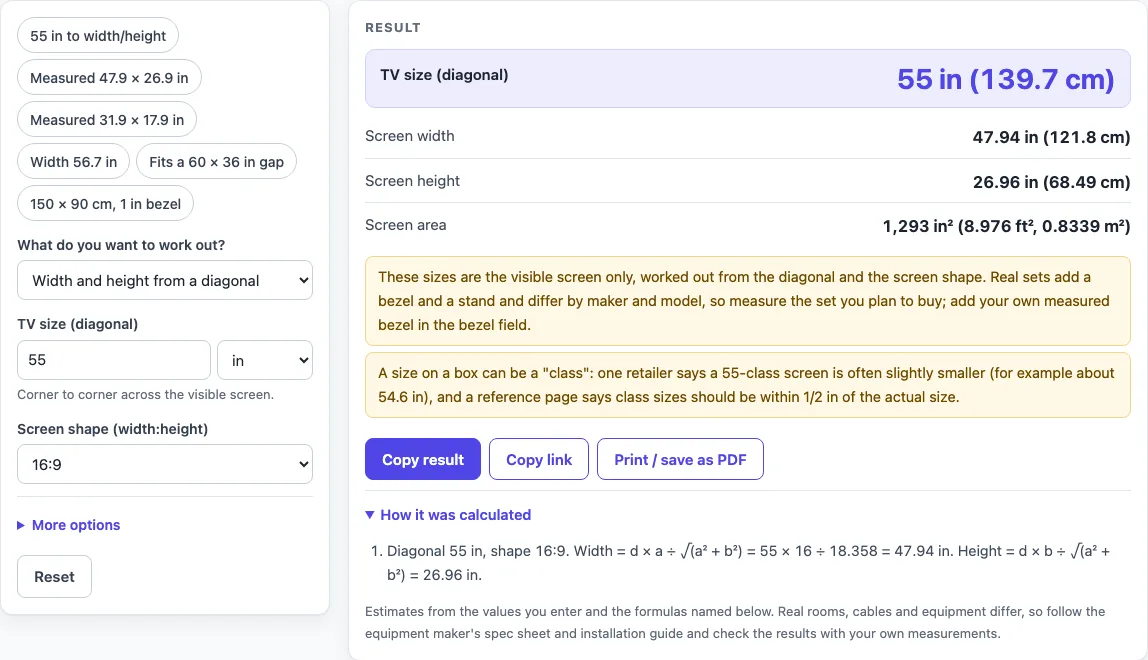
How to use the TV size calculator
- Open the “What do you want to work out?” select and pick one of the four modes: “Width and height from a diagonal”, “Diagonal and shape from a measured width and height”, “Diagonal from a screen width”, or “Largest TV that fits an opening”.
- For “Width and height from a diagonal”, type the size in “TV size (diagonal)”. Leave “Screen shape (width:height)” at 16:9, the default, or choose 21:9 nominal, 4:3, 16:10 or a custom ratio.
- For “Diagonal and shape from a measured width and height”, type the visible picture in “Screen width” and “Screen height”.
- For “Diagonal from a screen width”, type the measured width in “Screen width”, pick the screen shape, and read the diagonal and height outputs.
- For “Largest TV that fits an opening”, type “Opening width” and “Opening height”, then set “Bezel allowance (each side)”. The default is 0, which means the screen alone must fit.
- Choose a unit for each value: in, cm, mm or ft.
- Open “More options” to change “Shape tolerance (%)”. The example value is 1%, and you can set your own.
- Read the outputs. In the width and height mode and the screen width mode, “Nearest listed sizes” gives the two nearest sizes and the difference in inches and millimeters.
The page also has six presets, such as “Fits a 60 × 36 in gap”. If the opening is too small once the bezel is taken off both sides, the page shows an error message instead of a result.
How do you get a TV’s width and height from its diagonal?
The diagonal runs from one corner of the visible screen to the opposite corner, and the width and height form a right triangle with it.
For a shape a:b, the formulas are width = d × a ÷ √(a² + b²) and height = d × b ÷ √(a² + b²). For 16:9, a is 16 and b is 9, so √(a² + b²) is √337, about 18.36. A 55 in diagonal gives a width of 47.94 in (121.8 cm), a height of 26.96 in (68.49 cm), and an area of 1,293 in² (8.976 ft², 0.8339 m²). Area is width × height.
The reverse also works. The diagonal is √(width² + height²). A measured screen of 47.9 × 26.9 in gives a diagonal of 54.94 in (139.5 cm). Its width ÷ height is 47.9 ÷ 26.9 = 1.781:1.
How is the shape of a screen matched to a standard ratio?
The page compares the measured width ÷ height with a ÷ b for four shapes: 16:9, 21:9, 4:3 and 16:10. The nearest one is chosen, but it is only named if the difference is inside the shape tolerance. For the 47.9 × 26.9 in screen, 16 ÷ 9 is 1.778, and the difference is 0.163%, which is inside the example 1% tolerance. If no shape is within the tolerance, the page says so and names the nearest one.
The same mode compares the calculated diagonal with the 16 listed sizes from 32 to 100 in. It shows the two nearest sizes and the difference in inches and millimeters. When the difference is within 1/2 in, the page points to the class tolerance a reference page gives.
Class sizes can be slightly smaller than the label. A retailer’s guide gives about 54.6 in for a 55-class screen as an example. A reference page says class sizes should be within 1/2 in of the actual size. The two sources differ, so the page quotes both and does not choose between them.
How is the largest TV that fits an opening worked out?
The largest diagonal for an opening is the smaller of two limits, one from the width and one from the height. Each limit first subtracts the bezel allowance from both sides.
The formulas are (opening width − 2 × bezel) × √(a² + b²) ÷ a and (opening height − 2 × bezel) × √(a² + b²) ÷ b. The tool takes the smaller of the two results.
For a 60 × 36 in opening at 16:9 with no bezel, the width limit is 60 × 18.36 ÷ 16 = 68.84 in (174.9 cm). The height limit is 36 × 18.36 ÷ 9 = 73.43 in. The smaller value, 68.84 in, is the limit. The largest listed size that fits is 65 in, with a screen of 56.65 × 31.87 in.
The same opening at 4:3 is limited by the height. The height limit is 36 × 5 ÷ 3 = 60 in (152.4 cm), which is smaller than the width limit of 75 in.
These results are calculated from the numbers you enter. They do not confirm that a TV fits your wall, cabinet or mount,.
Sources (checked 16 October 2026): support.tcl.com · blog.bestbuy.ca · en.wikipedia.org · samsung.com · google.com · nist.gov
Worked examples
| Input | Result |
|---|---|
| 55 in diagonal, shape 16:9 | Screen 47.94 × 26.96 in |
| Measured 47.9 × 26.9 in | Diagonal 54.94 in, shape 16:9 |
| Screen width 56.7 in, shape 16:9 | Diagonal 65.05 in |
| Opening 60 in × 36 in | Largest diagonal 68.84 in; largest listed size 65 in |
| Opening 150 cm × 90 cm | Largest diagonal 65.46 in; largest listed size 65 in |
Calculated by the tool above; open it with the same values to see each step.
Frequently asked questions
Is this the same as a screen size calculator?
Yes. The same tool answers the searches “tv size calculator”, “tv screen size calculator” and “screen size calculator”. It has four modes in one select, so you can switch between diagonal, width, height and opening calculations without leaving the page.
Does the result confirm that a TV will fit my space?
No. Results are calculated from the values you enter, and the page does not say that a TV fits. Use the equipment maker’s spec sheet and measure your own space before you buy or mount anything.
Why does my 55-inch result not match the label?
Class sizes can be slightly smaller than the label. A retailer’s guide gives about 54.6 in for a 55-class screen as an example, while a reference page says class sizes should be within 1/2 in of the actual size. The page quotes both sources and does not pick one.
Should I measure the TV frame or only the picture?
Measure only the visible picture. The outputs describe the visible screen, so in the width and height mode, type the picture size and not the outer frame.
Why did I get an error instead of a result?
The opening is too small once the bezel allowance is taken off both sides, so the page shows an error message instead of a result. A different case is an opening that is big enough for a screen but smaller than every listed size: then the page shows a result with a warning that no listed size has a screen narrow enough.
Can I enter measurements in metric units?
Yes. Each value can be entered in in, cm, mm or ft. The tool converts the values to inches and shows the outputs in inches and centimeters.
Related tools
- TV Sizes and Dimensions: use when you want every TV size tool and guide in one place.
- TV Size Chart: use when you want to compare all listed sizes in one table.
- TV Dimensions: use when you already know the diagonal and want the width, height and area.
- How to Measure TV Screen Size: use when you need to check a set’s diagonal yourself.
- TV Size for Room: use when you are matching a size to a room.
- TV Viewing Distance Calculator: use when you want to see how far from the screen sources put the seat.
- 55 Inch TV Dimensions: use when you want to see a 55 in screen next to the published figures.
- 65 Inch TV Dimensions: use when you are checking the dimensions of a 65 in screen.