TV Mounting Height Calculator
Enter the TV size, your eye height, the distance and a center-height rule to see where the center, bottom and top edges land and the angle up to the top edge.
Recent
Your last 10 settings, saved only in this browser. Nothing is uploaded.
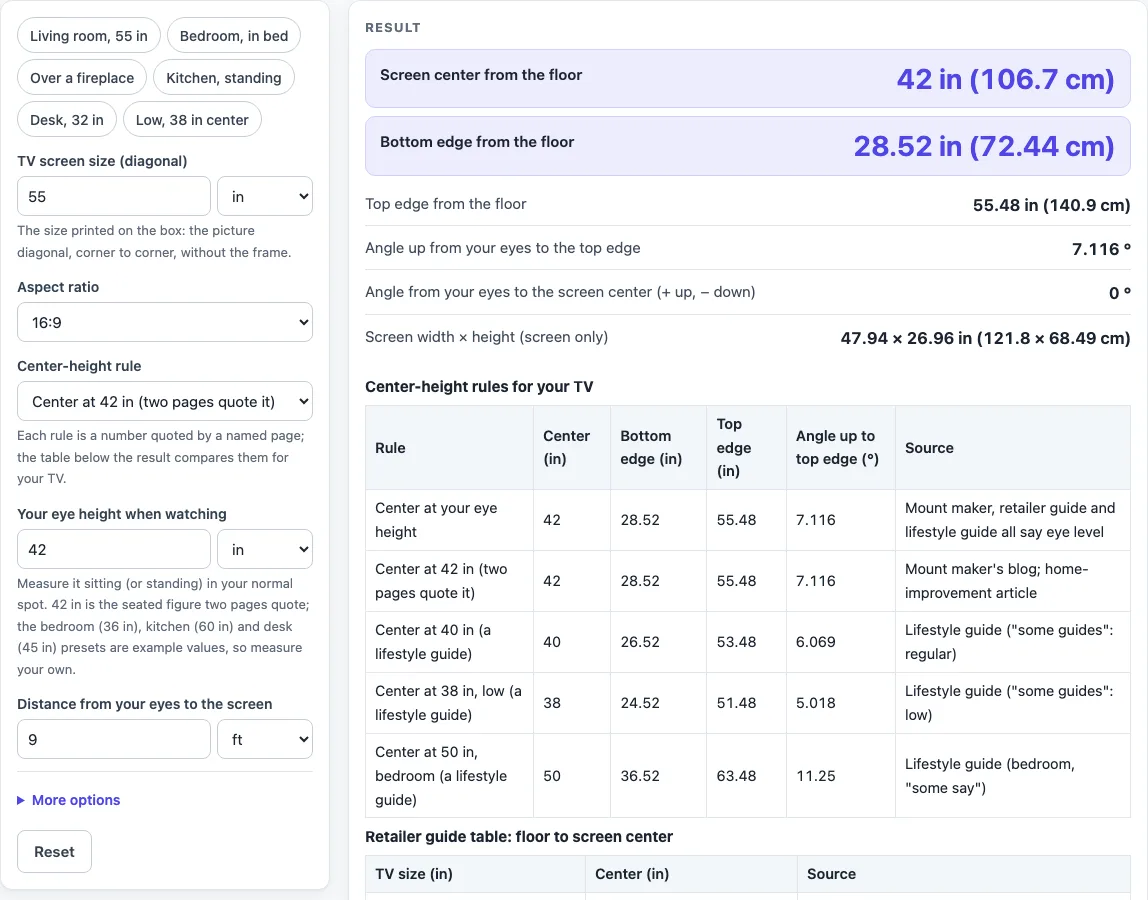
How to use the TV Mounting Height Calculator
- Enter the “TV screen size (diagonal)”, the picture diagonal. Choose the unit (in, ft, cm or m). The default is 55 in.
- Pick an “Aspect ratio”: 16:9, 16:10, 4:3, 21:9 nominal, or “Custom ratio” with a width and height you type.
- Choose a “Center-height rule.” Options are your eye height, 42 in, 40 in, 38 in, 50 in for a bedroom, above a mantel, or a height you type.
- Enter “Your eye height when watching.” Measure from the floor to your eyes while seated, or use the preset value as a starting point.
- Enter “Distance from your eyes to the screen.” The default is 9 ft.
- If you want the outer edges of the frame, open “More options” and set “Bezel allowance (each side).” The default of 0 gives the screen only.
- Read the results: the center, bottom edge and top edge heights from the floor, and the angle up to the top edge.
- Check the “Center-height rules for your TV” table. It shows the center, bottom, top and angle for each rule, with the source named beside it.
- Watch for warnings. They appear when the angle to the top edge is high, when the bottom edge is below the floor, or when a result conflicts with a listed source.
Presets: “Living room, 55 in,” “Bedroom, in bed,” “Over a fireplace,” “Kitchen, standing,” “Desk, 32 in” and “Low, 38 in center.” Replace the example eye heights with your own measurement.
How do you work out the right TV mounting height?
The height is set by the screen center, which is placed relative to your eye height and the sources you choose to follow. The calculator starts from the screen size, then uses the aspect ratio to find the picture’s width and height. Screen size is the diagonal, so width = diagonal x a / sqrt(a^2 + b^2) and height = diagonal x b / sqrt(a^2 + b^2), where a and b are the parts of the ratio. A 55 in 16:9 screen is 47.94 in wide and 26.96 in high.
Half the screen height is added above and below the center to give the bottom and top edges. The default setup uses a center at 42 in and an eye height of 42 in. That gives a bottom edge of 28.52 in and a top edge of 55.48 in. The 42 in figure is the value a mount maker’s blog and a home-improvement article quote, and the page uses it as the default. The lifestyle guide’s 38, 40 and 42 in options are also shown, but none is treated as the correct answer.
Sources do not agree. A retailer’s table lists floor-to-center heights of 56, 61, 65 and 67 in for 43, 55, 65 and 70 in TVs. Those figures are far above the 42 in value, so the page shows the table as a reference and adds a warning when your TV is one of those sizes.
How is the angle up to the top edge calculated?
The angle is found from the height difference between the top edge and your eyes, and the distance to the screen. The formula is angle = atan((edge height - eye height) / distance). For a 55 in TV centered at 42 in, seen from 9 ft with eyes at 42 in, the calculation is atan(13.48 / 108), which equals 7.116 degrees.
The page uses the top edge because it is the highest point you need to look at. Warnings start at 15 degrees, which is the limit a TV maker’s viewing guide gives for keeping the vertical line of sight within 15 degrees. Above 35 degrees, the page quotes a home-improvement article that cites an industry body, second-hand, for not tilting the head up more than 35 degrees.
Bezel allowance changes the result. Each side adds its value twice to the screen height to give the outer edges. Real sets have stands and differ by maker and model, so measure your own TV before you use the frame figures.
Sources (checked 16 October 2026): blog.sanus.com · bobvila.com · blog.bestbuy.ca · slashgear.com · us.dynabook.com · support.tcl.com · blog.bestbuy.ca
Worked examples
| Input | Result |
|---|---|
| 55 in 16:9 TV, rule: Center at 42 in (two pages quote it) | center 42 in, bottom 28.52 in, top 55.48 in from the floor; 7.116° up to the top edge |
| 43 in 16:9 TV, rule: Center at 50 in, bedroom (a lifestyle guide) | center 50 in, bottom 39.46 in, top 60.54 in from the floor; 10.93° up to the top edge |
| 55 in 16:9 TV, rule: Above a mantel: gap above the mantel | center 79.48 in, bottom 66 in, top 92.96 in from the floor; 23.01° up to the top edge |
| 32 in 16:9 TV, rule: Center at your eye height | center 60 in, bottom 52.16 in, top 67.84 in from the floor; 4.671° up to the top edge |
| 140 cm 16:9 TV, rule: Center at your eye height | center 43.31 in, bottom 29.8 in, top 56.82 in from the floor; 7.816° up to the top edge |
Calculated by the tool above; open it with the same values to see each step.
Frequently asked questions
Is 42 inches the right height to mount a TV?
The 42 in figure is the default in the calculator. A mount maker’s blog and a home-improvement article quote it. A lifestyle guide lists 38, 40 and 42 in, and a retailer’s table gives much higher floor-to-center figures. The page shows all of them without averaging, so you can compare them against your room.
Does the bezel change the height result?
By default the result covers the screen only, because the bezel allowance is 0. If you set “Bezel allowance (each side)” under “More options,” the outer edges move out by twice that value. Measure your own TV, since stands and frame sizes vary by maker and model.
Why does the page show a warning about the angle?
The page compares the angle to the top edge with two limits. Above 15 degrees it shows a TV maker’s viewing guide limit for the vertical line of sight. Above 35 degrees it shows the home-improvement article’s second-hand citation of an industry body for head tilt. These are shown as sources, not as pass or fail results.
Can I mount a TV over a fireplace?
The “Above a mantel” rule adds a gap you type to the mantel top, with a default of 12 in. A home-improvement article gives at least 6 to 12 in above the mantel. A lifestyle guide says not to mount over a fireplace. The article also mentions a noncombustible barrier and a possible warranty issue. The fireplace preset gives a top edge of 92.96 in and an angle of 23.01 degrees, which triggers both warnings. Check your equipment maker’s spec sheet before you decide.
Should I use the preset eye heights?
No. The bedroom (36 in), kitchen standing (60 in) and desk (45 in) presets use example eye heights, and the page labels them that way. Measure your own eye height while seated or standing, then enter it. The results change with that value, so the measurement matters.
Does the tool store my numbers?
Everything runs in your browser and nothing is uploaded. The tool is free and needs no sign-up.
Related tools
TV and projector placement: use when you want every placement tool, from TV height to projector distance, in one list.
Projector Screen Size Calculator: Use it when you are choosing a projected picture size rather than a TV.
Projector Throw Distance Calculator: Use it when you need to know how far a projector sits from the screen.
TV Size for a Room: Use it when you are still choosing which TV size fits your space.
TV Viewing Distance Calculator: Use it when you want to plan how far to sit from the screen before setting the height.
How to Measure TV Screen Size: use when you need to confirm the diagonal you enter above.
TV Size Calculator: use when you want a size suggestion from your seat distance.