TV Dimensions
Pick a TV size or type a diagonal, choose the screen shape and an optional bezel allowance, and see the width, height and area of the screen, with a table of common sizes beside it.
Recent
Your last 10 settings, saved only in this browser. Nothing is uploaded.
How to use the TV dimensions tool
- Open the “TV size (diagonal)” select and choose a common size from 32 to 100 in. For another diagonal, choose “Custom size”, type it in the diagonal box and pick in, cm, mm or ft.
- Pick a screen shape: “16:9” (the default), “21:9”, “4:3” or “16:10”. For any other ratio, choose the custom ratio and fill in its two number boxes.
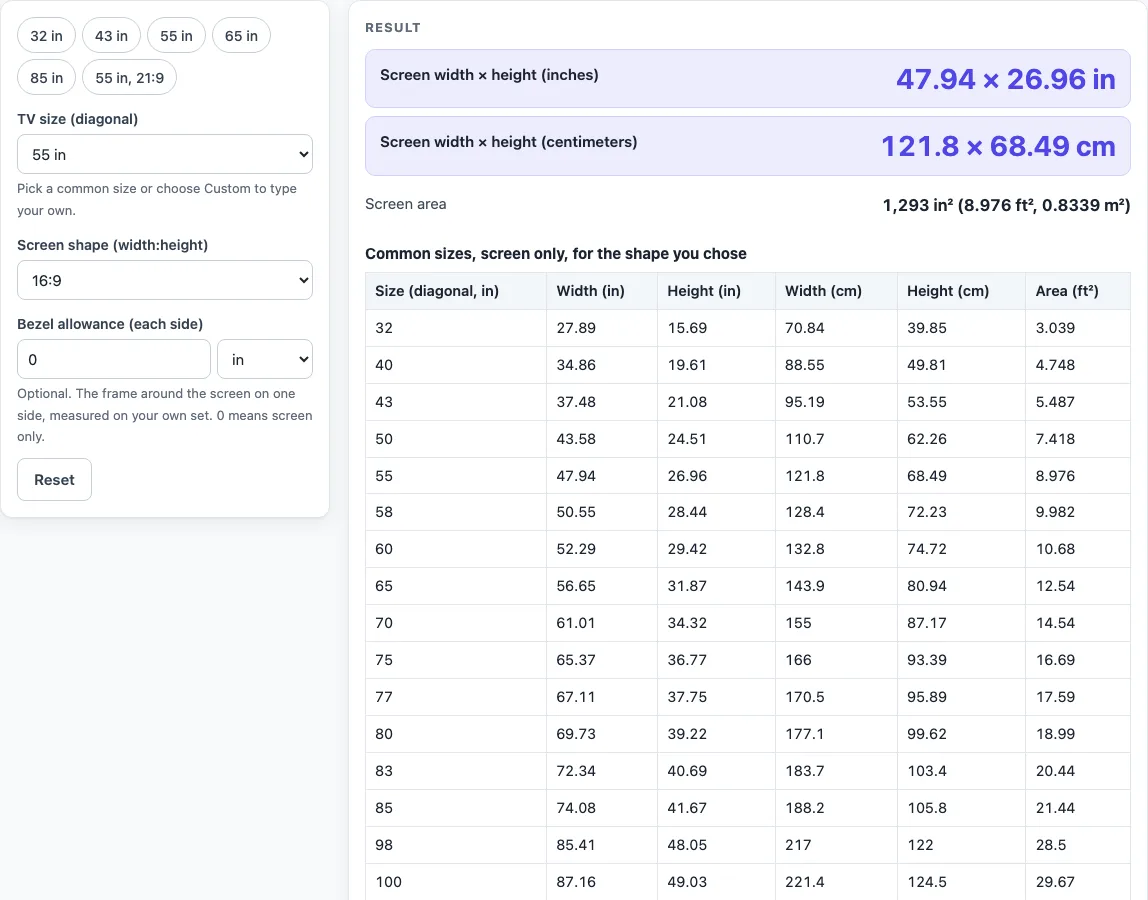
- Read the width, height and area in the result. The default, 55 in at 16:9, shows 47.94 × 26.96 in.
- Scan the table beside the result. It lists 16 sizes for your chosen shape, with width and height in inches and centimeters and area in ft².
- To estimate the outer size, enter a “Bezel allowance (each side)”. Measure the frame on one side of your own set, because the tool cannot know it. The page adds twice that value to the width and height and shows it as “Outer size with your bezel allowance”. At the default of 0, this row stays hidden.
- At 16:9, compare the second table. It sets published figures for your selected size beside the calculated numbers.
The numbers are the screen only, and depth is not given, so check the maker’s spec sheet for depth, stand and weight before you mount anything. Presets are the quickest route: 32 in, 43 in, 55 in, 65 in, 85 in and 55 in at 21:9 each load with one click. Choosing 21:9 triggers a warning, because the page treats that shape as exactly 21:9, about 2.33:1.
How does the tool work out a TV’s width and height from its diagonal?
The diagonal is the straight line across the screen, and the screen shape sets how it splits into width and height. For a shape a:b, the page uses width = diagonal × a ÷ √(a² + b²) and height = diagonal × b ÷ √(a² + b²). These follow from Pythagoras, since diagonal² = width² + height². Area is width × height.
Take 55 in at 16:9. The square root of 16² + 9² is √337, about 18.358. Width = 55 × 16 ÷ 18.358 = 47.94 in. Height = 55 × 9 ÷ 18.358 = 26.96 in. Area is 47.94 × 26.96, about 1,293 in², or 8.976 ft² and 0.8339 m². Centimeters use the exact conversion 1 in = 2.54 cm (NIST SP 811), so the same screen measures 121.8 × 68.49 cm.
The shape changes the result a lot. The same 55 in diagonal at 21:9 gives 50.55 × 21.67 in, and at 4:3 it gives 44 × 33 in.
Why do published sizes differ from the calculated numbers?
Published sources can differ from each other and from the calculation, so this tool shows them side by side and does not average them or pick a winner. For 55 in at 16:9, the calculated screen is 47.94 × 26.96 in. A reference page’s rounded table gives 48.03 × 26.77 in, and a manufacturer’s approximate table gives 48.5 × 27.88 in. The page does not state why these figures differ, and it does not claim which cause applies.
A class size can also sit a little under its label. A retailer’s guide gives about 54.6 in for a 55-class screen as an example, and a reference page says class sizes should be within 1/2 in of the actual size. Treat that as a warning, not a correction to the numbers above.
The numbers cover the visible screen only. A TV maker’s support page says the listed size excludes the frame or bezel, and a retailer’s guide says it excludes the bezel, casing and stand, so a real set adds these and differs by maker and model. Depth is not given at all. It depends on the model, the stand or wall mount and the connections, and it cannot be worked out from the diagonal.
Sources (checked 16 October 2026): support.tcl.com · blog.bestbuy.ca · en.wikipedia.org · samsung.com · google.com · nist.gov
Worked examples
| Input | Result |
|---|---|
| 55 in diagonal, shape 16:9 | 47.94 × 26.96 in (121.8 × 68.49 cm) |
| 65 in diagonal, shape 16:9 | 56.65 × 31.87 in (143.9 × 80.94 cm) |
| 32 in diagonal, shape 16:9 | 27.89 × 15.69 in (70.84 × 39.85 cm) |
| 55 in diagonal, shape 21:9 | 50.55 × 21.67 in (128.4 × 55.03 cm) |
| 55.12 in diagonal, shape 16:9 | 48.04 × 27.02 in (122 × 68.64 cm) |
Calculated by the tool above; open it with the same values to see each step.
Frequently asked questions
Will this tool tell me if a TV fits my wall or stand?
No. The result is calculated from the diagonal and shape you choose, and it does not say that a TV fits a space. Measure the set and the space yourself.
Which numbers should I use to order a mount?
Use the equipment maker’s spec sheet for mount size, weight and depth. The figures here cover the visible screen only, so they are not a replacement for that sheet.
Can the diagonal tell me how deep a TV is?
No. Depth depends on the model, the stand or wall mount and the connections, so it cannot be worked out from the diagonal. Check the maker’s spec sheet for the exact figure.
What does the 21:9 warning mean?
The page treats 21:9 as exactly 21:9, about 2.33:1, and shows a warning when you pick it. If your set uses a different ratio, choose the custom ratio and enter its two numbers.
Why is there no 84 inch option?
The size select uses 83 in, while a reference page’s table lists 84 in. If you need 84 in, choose “Custom size” and type 84 in the diagonal box.
Can I use the second table for other shapes?
No. The second table is shown only for 16:9, so compare published figures only at that shape.
Related tools
- TV Sizes and Dimensions: use when you want every TV size tool and guide in one place.
- TV Size Chart: use when you want all listed sizes in one table.
- How to Measure TV Screen Size: use when you need to check a set’s diagonal yourself.
- 100 Inch TV Dimensions: use when you are checking a very large screen at a fixed diagonal.
- 32 Inch TV Dimensions: Use this for a small screen such as a bedroom or kitchen set.
- 43 Inch TV Dimensions: Use this to see the exact width and height of a 43 in screen.
- 50 Inch TV Dimensions: Use this when you are choosing between 50 in and nearby sizes.
- 55 Inch TV Dimensions: Use this for the default size, with the calculated and published figures side by side.
- 65 Inch TV Dimensions: Use this to check a 65 in screen before you measure the wall space.