Thunderbolt 3 vs 4
Pick what you need Thunderbolt for and type the cable length. The page shows what each version requires for that job and what the sources say about cables at that length.
Recent
Your last 10 settings, saved only in this browser. Nothing is uploaded.
Thunderbolt 3 vs 4 is a free tool that shows which Thunderbolt version covers the job you need and what your cable length means for that choice. You pick what you need it for, such as two 4K displays, fast external storage, a dock or hub, or charging a laptop, then enter a cable length. The tool shows which version covers it, what each version does for that job, and what the cable length means.
Both versions have the same maximum bandwidth of 40 Gbit/s, so the choice depends on the specific requirements covered below rather than on raw speed. The tool is built for people choosing home AV, network, PC and display gear. It runs in your browser, nothing is uploaded, there is no sign-up, and it is free to use.
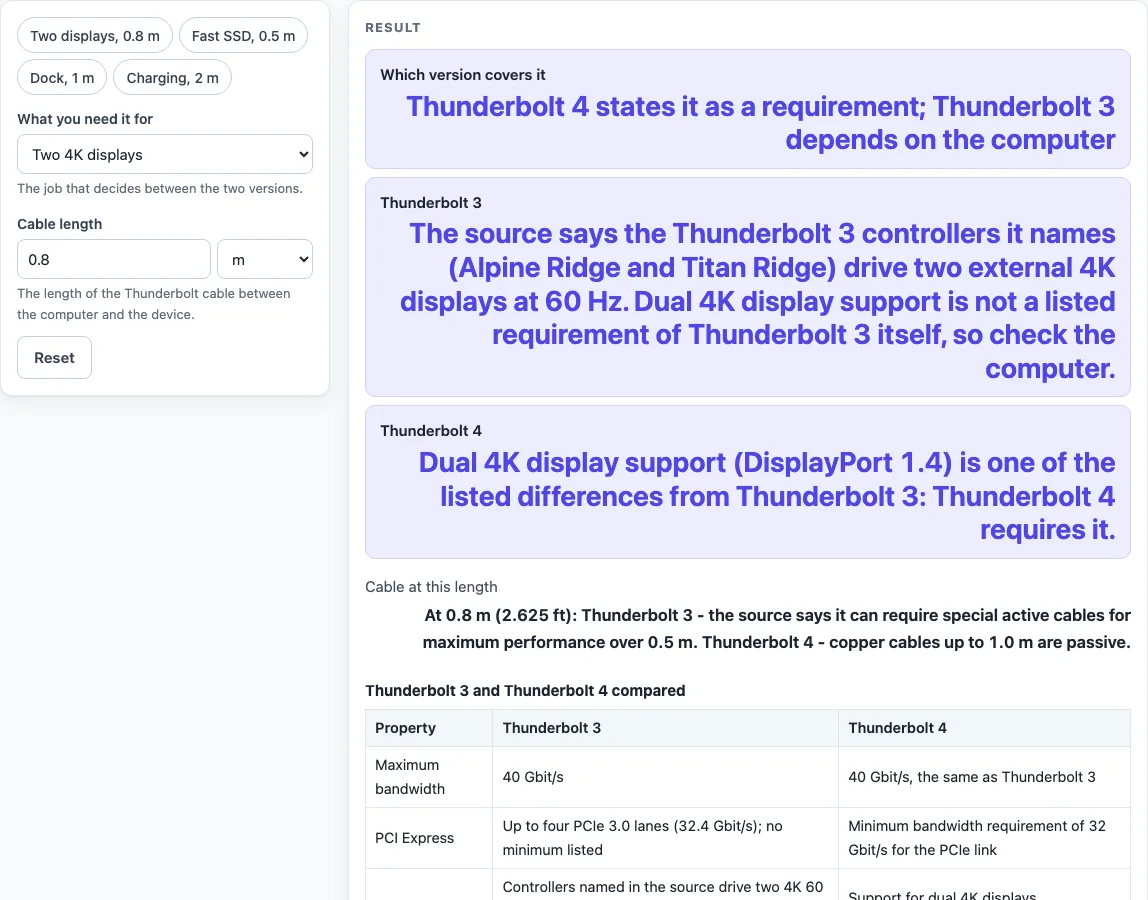
How to use the Thunderbolt 3 vs 4 tool
- Open the tool. It starts on two displays at 0.8 m.
- Under “What you need it for”, choose one option: “Two 4K displays”, “Fast external storage (PCIe)”, “A dock or hub with several Thunderbolt ports” or “Charging a laptop over the cable”.
- Under “Cable length”, enter your length and choose metres or feet.
- Read “Which version covers it” first. This is the overall result for your choice.
- Check the “Thunderbolt 3” and “Thunderbolt 4” rows to see what each version does for that job.
- Read “Cable at this length” to see what your length means for the cable you plan to use.
For a quick start, use one of the presets: “Two displays, 0.8 m”, “Fast SSD, 0.5 m”, “Dock, 1 m” or “Charging, 2 m”. The table “Thunderbolt 3 and Thunderbolt 4 compared” lists eight rows side by side: maximum bandwidth, PCI Express, displays, hubs, DMA protection, copper cables, charging and compatibility.
Lengths from just above zero up to 60 m are accepted, and feet are converted at 0.3048 m per foot. For charging the result is “Both versions cover it”; for the other three jobs it is “Thunderbolt 4 states it as a requirement; Thunderbolt 3 depends on the computer”.
The results update as you change either control, so you can compare the same job at several cable lengths.
Is Thunderbolt 4 faster than Thunderbolt 3?
No. Both versions have the same maximum bandwidth, 40 Gbit/s, so Thunderbolt 4 is not faster on that measure. Thunderbolt 3 allows up to four lanes of PCI Express 3.0 (32.4 Gbit/s), with a combined rate capped at 40 Gbit/s.
What is the difference between Thunderbolt 3 and Thunderbolt 4?
The main differences are in the requirements. Thunderbolt 4 sets a minimum bandwidth of 32 Gbit/s for the PCI Express link, requires dual 4K display support over DisplayPort 1.4, requires VT-d based direct memory access protection, and supports Thunderbolt Alternate Mode USB hubs, not just daisy chaining. Thunderbolt 3 (2015) shares USB-C connectors and supports USB 3.1 Gen 2, but the source does not list these four as Thunderbolt 3 requirements.
Charging does not separate them. Both can charge a notebook up to 100 W with USB Power Delivery on copper cables, which is why the tool returns “Both versions cover it” for charging.
Can I use a Thunderbolt 3 cable with Thunderbolt 4?
Thunderbolt 4 is backward compatible with Thunderbolt 3. Whether a given cable suits your setup depends on its length and type, because Thunderbolt 3 can require active cables over 0.5 m for maximum performance. Check the cable’s spec sheet and use “Cable at this length” to see the length rule that applies.
Does Thunderbolt 4 support two 4K displays?
Yes. Dual 4K display support over DisplayPort 1.4 is a listed requirement of Thunderbolt 4. For Thunderbolt 3, the controllers the source names drive two external 4K displays at 60 Hz, but dual 4K support is not listed as a requirement of Thunderbolt 3 itself, so the tool asks you to check the computer’s spec sheet.
How long can a Thunderbolt cable be?
Thunderbolt 4 copper cables up to 1.0 m are passive, and longer ones must contain active signal conditioning. The specified lengths are 0.2 m, 0.8 m and 2 m. Beyond 2 m, the source says 2 m is the longest active copper cable from most makers (one maker sells 3 m), and optical cables were targeted at about 5 m to 50 m, so the tool warns that longer copper cables are not part of the specified lengths. The tool accepts lengths up to 60 m.
Sources (checked 19 October 2026): en.wikipedia.org
Worked examples
| Input | Result |
|---|---|
| Two 4K displays, 0.8 m | Thunderbolt 4 states it as a requirement; Thunderbolt 3 depends on the computer |
| Fast external storage (PCIe), 2 m | Thunderbolt 4 states it as a requirement; Thunderbolt 3 depends on the computer |
| A dock or hub with several Thunderbolt ports, 3 ft | Thunderbolt 4 states it as a requirement; Thunderbolt 3 depends on the computer |
| Charging a laptop over the cable, 1 m | Both versions cover it |
Calculated by the tool above; open it with the same values to see each step.
Frequently asked questions
Is Thunderbolt 4 faster than Thunderbolt 3?
No. Both versions have a maximum bandwidth of 40 Gbit/s. The differences are in the listed requirements, not the top speed.
Can I use a Thunderbolt 3 cable with Thunderbolt 4?
Thunderbolt 4 is backward compatible with Thunderbolt 3. Check the cable’s spec sheet, since Thunderbolt 3 can require active cables over 0.5 m for maximum performance.
Does Thunderbolt 4 support two 4K displays?
Yes, dual 4K display support over DisplayPort 1.4 is a listed Thunderbolt 4 requirement. For Thunderbolt 3, check the computer’s spec sheet, because dual 4K support is not listed as a Thunderbolt 3 requirement.
How long can a Thunderbolt cable be?
Thunderbolt 4 passive copper cables go up to 1.0 m, and longer copper cables need active signal conditioning. The tool accepts lengths up to 60 m and warns when a copper length falls outside the specified lengths.
Does Thunderbolt 4 give more charging power than Thunderbolt 3?
The sources used here describe both as able to charge a notebook up to 100 W with USB Power Delivery on copper cables, so the tool treats charging as the same for both versions.
Does the tool test my cable or computer?
No. It states the published requirements of each version and the cable rules the source gives; what your own laptop, dock or cable does is on its spec sheet.
Related tools
- DisplayPort vs HDMI: use it when you are choosing between two display connection types for a monitor or TV.
- USB-A vs USB-C: use it when you need to compare the two USB connector types before buying a cable or port.
- Cat6 vs Cat6A: use it when you are choosing network cable for a wired connection.
- Ethernet Cable Length Limit: use it when you need to check how far an Ethernet cable run can go.
- HDMI Cable Length Limit: use it when you are planning a display run and need to check HDMI length limits.
- PoE Power Budget Calculator: use it when you are working out how much power your PoE devices need.