Surround Sound Speaker Placement
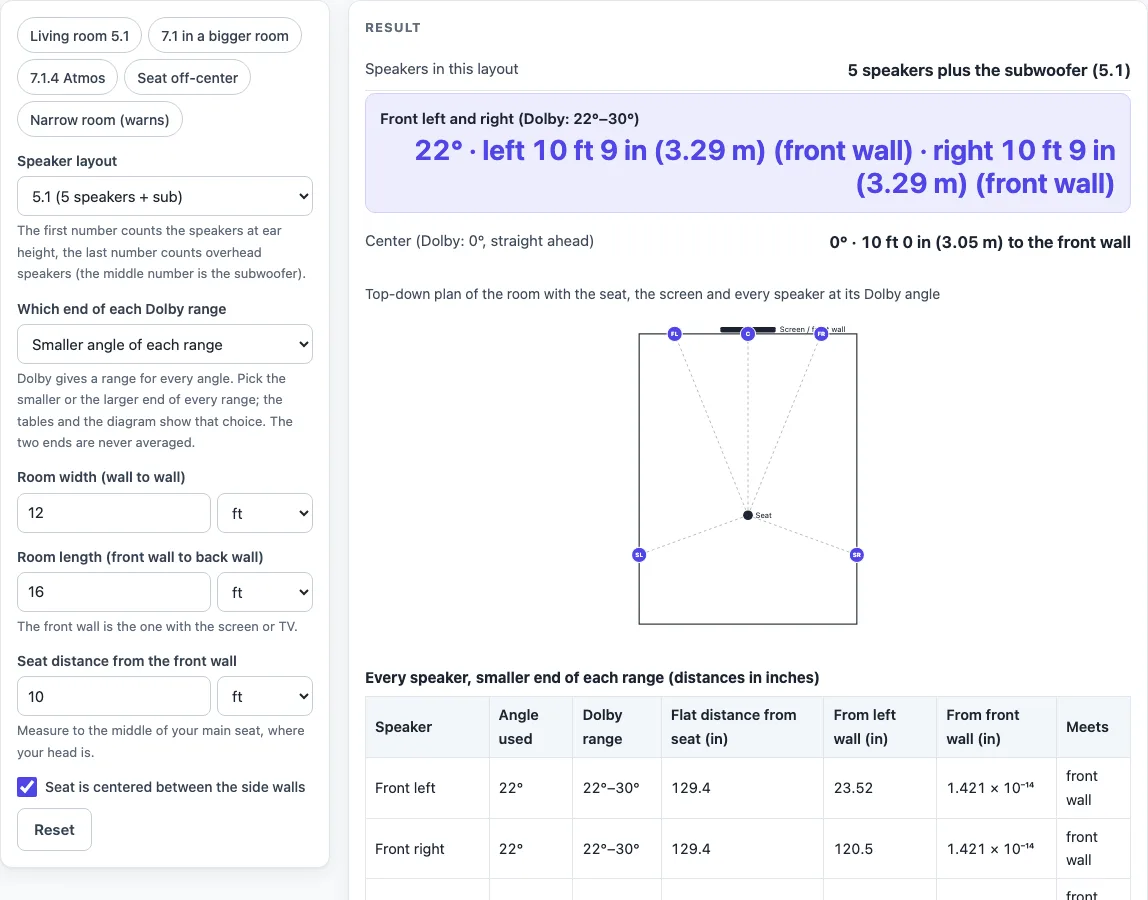
Pick a layout, enter the room and your seat position, and see each speaker's angle from the seat, where that angle meets a wall, and a top-down plan, using the ranges in Dolby's speaker guide sheets.
Recent
Your last 10 settings, saved only in this browser. Nothing is uploaded.
How to use the Surround Sound Speaker Placement Tool
- Choose a Speaker layout: 5.1, 7.1, 5.1.2, 7.1.2, 5.1.4 or 7.1.4. You can also click a preset chip such as “Living room 5.1” or “7.1.4 Atmos” to load an example.
- Pick an option for Which end of each Dolby range: “Smaller angle of each range” or “Larger angle of each range.”
- Enter the Room width (wall to wall) and the Room length (front wall to back wall).
- Enter the Seat distance from the front wall, meaning the wall with the screen.
- Leave Seat is centered between the side walls checked. If your seat is off-center, clear it and enter Seat distance from the left wall.
- For layouts with overhead speakers, enter Ceiling height and Ear height when seated. The values 8 ft and 40 in are examples, so measure your own.
- Read the results for each speaker: its angle, its distance to the wall, and its position from the left and front walls. Check the plan. A speaker outlined in red has a warning.
- Switch the Which end of each Dolby range setting to see the other end of each range.
Use Copy result to copy the numbers, Print to print the page, and Copy link to save the layout in the page link so you can share it. Reset clears the inputs.
Where should surround speakers go?
Front left and right speakers sit 22 to 30 degrees either side of the center speaker in every layout. Side surround speakers sit beside the seat, at 110 to 120 degrees from straight ahead in 5.1 layouts and 90 to 110 degrees in 7.1 layouts. The angle is measured from the seat, where 0 degrees is straight at the screen. The tool extends the line from the seat at that angle until it meets a wall, and it reports the distance along that line. The speaker can sit anywhere on the line, nearer than the wall.
What angle should the rear surround speakers be?
In 7.x layouts, rear surrounds sit at 135 to 150 degrees, which is behind the seat. The tool checks the side wall and the back wall for that line and uses whichever one it meets first. In a 14 ft by 18 ft room with a centered seat 11 ft from the front wall (7 ft from the back wall), a 150 degree line meets the back wall 8 ft 1 in (2.46 m) away. The side wall is 168 in away along that 150 degree line, so the back wall comes first.
What do 5.1, 7.1 and 5.1.4 mean?
The first number counts the speakers at ear height, which is 5 or 7. The middle number counts subwoofers. The last number counts overhead speakers, either ceiling or Dolby Atmos-enabled. A 5.1 system has front left, center, front right, two side surrounds and one subwoofer. A 7.1 system adds two rear surrounds. Adding .2 adds two top middle overheads, and .4 adds two top front and two top rear overheads.
How high should overhead Atmos speakers be and where?
The tool does not choose a height. It uses your ceiling height and ear height, and the drop between them sets how far forward or back each overhead sits for a given elevation. Dolby gives elevation angles measured from the listener’s head. Top middle overheads range from 65 to 100 degrees, top front from 30 to 55 degrees, and top rear from 125 to 150 degrees. An angle above 90 degrees places the speaker behind the seat. In a room with an 8 ft ceiling and ears at 40 in, the drop is 56 in. A top front speaker at 55 degrees sits 39.21 in in front of the seat.
What if my room is too narrow or my seat is off-center?
If the seat is off-center, the left and right distances differ, because each angle is measured from the seat. Dolby’s sheets show a centered seat, so the tool flags this case. In a narrow room, a front speaker’s line can meet a side wall before the front wall. For example, the 30 degree end in a 10 ft wide room with a centered seat 9 ft from the front wall meets a side wall first. The tool shows a warning and outlines that speaker in red on the plan.
Does the tool upload my room size?
No. The tool runs entirely in your browser, and nothing is uploaded or stored on a server. The layout is kept in the page link, so if you share that link, the room measurements in it go with it.
Sources (read 17 October 2026): Dolby Home Theater Speaker Guide, 5.1 and 7.1 · 5.1.2 and 7.1.2 · 5.1.4 and 7.1.4 (each links to a per-layout PDF sheet; the angles are printed inside its diagrams)
Worked examples
| Input | Result |
|---|---|
| 5.1, room 12 ft × 16 ft, seat 10 ft from the front wall, smaller end of each range | fronts 22° at 10 ft 9 in (3.29 m), side surrounds 110° at 6 ft 5 in (1.95 m) (left), 5 speakers |
| 7.1, room 14 ft × 18 ft, seat 11 ft from the front wall, larger end of each range | fronts 30° at 12 ft 8 in (3.87 m), side surrounds 110° at 7 ft 5 in (2.27 m) (left), 7 speakers |
| 5.1.2, room 4 m × 5 m, seat 3 m from the front wall, smaller end of each range | fronts 22° at 10 ft 7 in (3.24 m), side surrounds 110° at 7 ft 0 in (2.13 m) (left), 7 speakers |
| 7.1.4, room 14 ft × 20 ft, seat 12 ft from the front wall, larger end of each range | fronts 30° at 13 ft 10 in (4.22 m), side surrounds 110° at 7 ft 5 in (2.27 m) (left), 11 speakers |
| 5.1.4, room 12 ft × 16 ft, seat 10 ft from the front wall, smaller end of each range | fronts 22° at 10 ft 8 in (3.25 m), side surrounds 110° at 4 ft 3 in (1.3 m) (left), 9 speakers |
Calculated by the tool above; open it with the same values to see each step.
Frequently asked questions
Are these Dolby’s official rules?
The angles and overhead elevations come from Dolby’s Home Theater Speaker Guide sheets, which were read on 17 October 2026. Dolby’s sheets give no distances and no subwoofer angle. The ITU-R BS.775, CEDIA/CTA and THX guidance were not read, so this page quotes only Dolby.
Does the tool account for room acoustics or a soundbar?
No. The tool does not model room acoustics, speaker types such as direct versus bipole or dipole, in-ceiling versus upward-firing Atmos modules, toe-in, or soundbars. It also does not say which angle sounds best in a given room.
Does the tool give a subwoofer position?
No. Dolby’s sheets give no subwoofer angle, so the tool shows none for the subwoofer.
Why does Dolby give a range instead of one angle?
Dolby gives ranges, not one best number. The tool never averages the two ends of a range. Choose an end with “Which end of each Dolby range,” and switch it to compare the other end.
Which end of Dolby’s range should I pick?
Dolby’s sheets do not say, and this page does not choose for you. Try both: the warnings and the red outlines on the plan show which end does not fit your room. Where both ends fit, the choice is yours.
Does it cover upward-firing Atmos speakers?
Not separately. The overhead angles are the elevations Dolby prints on its sheets for overhead speakers, and the tool only works out where that line meets the ceiling plane from your ear and ceiling heights. Check your speaker maker’s manual for how upward-firing modules are placed.
Is the tool free to use?
Yes. It is free, runs in your browser and needs no sign-up.
Related tools
- TV and Projector Placement: Use this hub to plan where the screen goes before you place the speakers around the seat.
- TV Viewing Distance Calculator: Use this to check how far the seat should sit from the screen.
- Subwoofer Wiring Calculator: Use this when you are wiring the subwoofer and need to plan the connections.
- Speaker Wire Gauge Chart: Use this to choose a wire gauge for the speaker runs once you know their lengths.
- TV Size for a Room: Use this when you are still choosing the screen that the front speakers will frame.
- HDMI Cable Length Limit: Use this to check the cable run from the receiver to the screen.
- Equipment List Generator: Use this to list the speakers and cables you need for the layout you chose.