Subwoofer Wiring Diagram
Choose how many subwoofers you have, single or dual voice coils and the coil impedance. You get every series and parallel option with its exact load and a wiring diagram.
Recent
Your last 10 settings, saved only in this browser. Nothing is uploaded.
How to use the Subwoofer Wiring Calculator
- Set “Number of subwoofers” from 1 to 8.
- Choose “Voice coils per subwoofer”: single or dual.
- Pick “Impedance of each coil (nominal)”: 1, 2, 4 or 8 ohm.
- Type your amplifier’s minimum load into “Amplifier minimum load (Ω)”, using the number on its spec sheet. The default of 2 is only an example. Clear the box to skip the comparison.
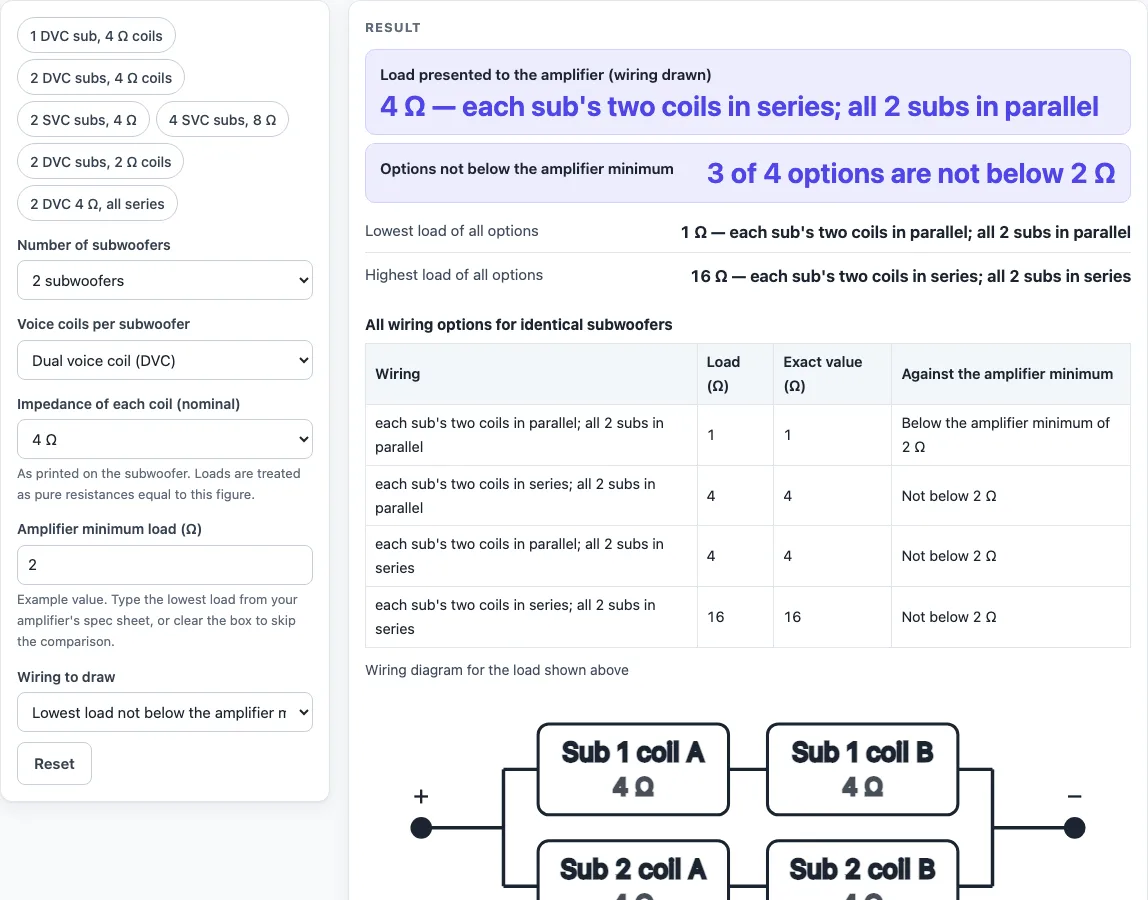
- Read the big result rows. The first shows the load of the wiring you drew, and the second shows how many options are not below your minimum, such as “3 of 4 options are not below 2 Ω”.
- Check the rows for the lowest and highest load across all options.
- Set “Wiring to draw” to “Lowest load not below the amplifier minimum” (the default), “Everything in series” or “Everything in parallel”. With the defaults the diagram shows each sub’s two coils in series and the two subs in parallel, which is 4 Ω.
- Look at the diagram. Each box is one coil, labelled with its sub, coil A or B for dual coils, and its impedance.
- Look for any row marked “Below the amplifier minimum of X Ω” and read any warning shown.
The presets fill the five controls for common setups, such as “2 DVC subs, 4 Ω coils” and “4 SVC subs, 8 Ω”. Start with a preset that is close to your system, then change the controls to match your own equipment.
How is the load of subwoofer coils calculated in series and parallel?
Series and parallel wiring combine impedances by fixed rules. In series, the impedances add: Z = Z1 + Z2 + … In parallel, the reciprocals add: 1/Z = 1/Z1 + 1/Z2 + …, the rule given in the OpenStax textbook.
For one dual-coil subwoofer with 4 ohm coils, wiring the two coils in series gives 8 ohm and wiring them in parallel gives 2 ohm. With 2 ohm coils, the same sub gives 4 ohm in series and 1 ohm in parallel. Three 4 ohm subs in parallel give exactly 4/3 ohm, which is 1.333 ohm. The tool keeps these values as exact fractions and rounds only for display.
The tool builds every option for identical subwoofers wired alike. For a dual-coil sub, each sub’s two coils are placed in series or in parallel. Then the subs are split into equal strings. The strings are wired in series, and the strings are wired in parallel with each other. The number of subs per string must divide the total evenly, so the tool only uses the divisors of the sub count. For two 2 ohm dual-coil subs, the four options are 0.5, 2, 2 and 8 ohm. For four 4 ohm single-coil subs, the options are 1 ohm (all parallel), 4 ohm (two strings of two) and 16 ohm (all series). Four 4 ohm dual-coil subs with coils in parallel and two strings of two give 2 ohm.
How does the amplifier minimum load decide which wiring to use?
The amplifier minimum load is a number you type from the amplifier’s spec sheet. The tool compares each option’s load with that number and marks any option lower than it as “Below the amplifier minimum of X Ω”. Options equal to or above the number are marked “Not below X Ω”. This is only a number comparison, and the tool does not judge whether the amplifier is stable at any load.
Take two 4 ohm dual-coil subs with a 2 ohm minimum. Their options are 1, 4, 4 and 16 ohm. The 1 ohm option is below the minimum, so the lowest load not below it is 4 ohm. Four 8 ohm single-coil subs with a 4 ohm minimum give options of 2, 8 and 32 ohm. The lowest load not below the minimum is 8 ohm.
Sources can differ on this point. An installer’s guide advises matching the wiring to the amplifier’s lowest stable impedance rather than the lowest theoretical load, so the lowest number that passes the comparison is not always the right choice. The same guide’s four-driver table lists 1 ohm for four 4 ohm dual-coil drivers with coils paralleled. Its own method gives 2 ohm, and the tool calculates 2 ohm from the inputs. Both values are shown here so you can compare them. Mixed impedances, using only one coil of a dual-coil sub, and uneven strings are not listed.
Sources (checked 16 October 2026): phys.libretexts.org · audiointensity.com
Worked examples
| Input | Result |
|---|---|
| 2 sub(s), Dual voice coil (DVC), 4 Ω coils, amplifier minimum 2 Ω | 4 Ω — each sub's two coils in series; all 2 subs in parallel |
| 1 sub(s), Dual voice coil (DVC), 2 Ω coils, amplifier minimum 1 Ω | 1 Ω — each sub's two coils in parallel; one subwoofer |
| 4 sub(s), Single voice coil (SVC), 8 Ω coils, amplifier minimum 4 Ω | 8 Ω — 2 strings of 2 subs in series, the strings in parallel |
| 4 sub(s), Dual voice coil (DVC), 4 Ω coils, amplifier minimum 2 Ω | 2 Ω — each sub's two coils in series; all 4 subs in parallel |
| 3 sub(s), Single voice coil (SVC), 4 Ω coils, no amplifier minimum | 1.333 Ω (exactly 4/3 Ω) — all 3 subs in parallel |
Calculated by the tool above; open it with the same values to see each step.
Frequently asked questions
Does this subwoofer wiring diagram handle mixed subwoofers?
No. The options assume identical subs wired alike. Mixed impedances, using only one coil of a dual-coil sub, and uneven strings are not listed.
What does “Below the amplifier minimum of X Ω” mean?
It means the load of that option is lower than the minimum you typed. It is a number comparison only, and the tool does not check the amplifier for you.
Why does the default show 4 ohm?
The default asks for the lowest load not below the 2 ohm example minimum. Of the options 1, 4, 4 and 16 ohm, that is 4 ohm. The drawing wires each sub’s two 4 ohm coils in series, which gives 8 ohm per sub, and the two subs in parallel, which gives 4 ohm.
Is the amplifier minimum the same as the lowest load I can use?
Not always. An installer’s guide says to match the wiring to the amplifier’s lowest stable impedance rather than the lowest theoretical load, so check the amplifier’s spec sheet.
Can I use the diagram as my wiring plan?
The diagram shows the wiring between the amplifier’s plus and minus terminals. Follow the equipment maker’s spec sheet for your amplifier and subwoofers before you connect anything.
Does the tool send my numbers anywhere?
No. Everything runs in your browser, and nothing is uploaded.
Related tools
- Home Theater Equipment List Generator: use it to list the equipment for a home theater setup.
- Ethernet Cable Length Limit: use it to check the length limit for an Ethernet cable run.
- HDMI Cable Length Limit: use it to check the length limit for an HDMI cable run.
- Security Camera Installation Quote Generator: use it to put together a quote for a camera installation.
- PoE Power Budget Calculator: use it to add up the power a PoE setup needs.
- Speaker Wire Gauge Chart: use it to look up the wire gauge for speaker runs.
- Cables and Wiring: the hub with every cable and wiring tool on this site.