Speaker Wire Gauge Chart
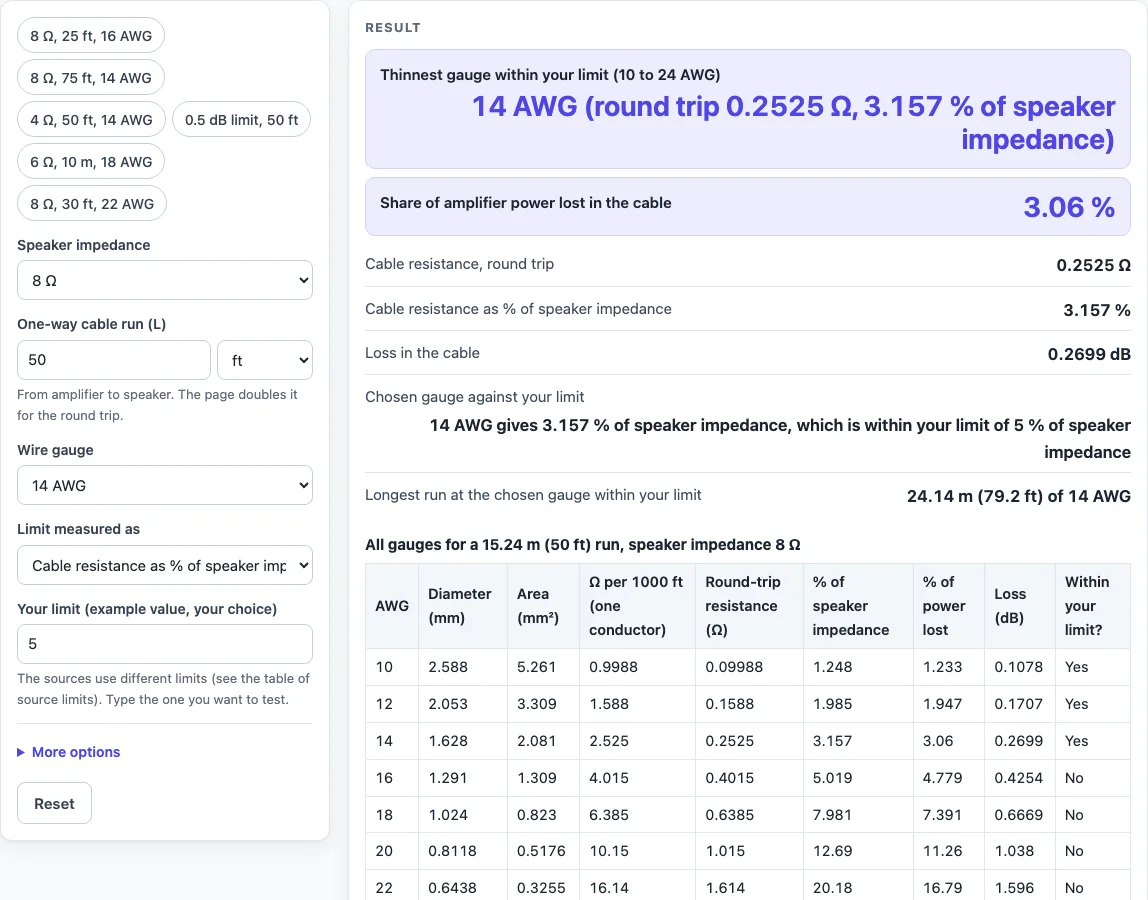
Choose your speaker impedance, the one-way run and a gauge. You get the cable resistance, the power lost and the dB loss, with every gauge side by side.
Recent
Your last 10 settings, saved only in this browser. Nothing is uploaded.
How to use the Speaker Wire Gauge Chart
- Open the tool. It starts on 8 ohm, a 50 ft run, 14 AWG and a limit of 5 % of the speaker impedance, and it shows the answer on the first screen.
- Set “Speaker impedance” to 4, 6, 8 or 16 ohm.
- Enter the “One-way cable run (L)” and choose ft or m. The tool doubles this length for the round trip, so enter the length from the amplifier to the speaker only.
- Choose a “Wire gauge” from 10 to 24 AWG in even steps.
- Choose a “Limit measured as” option: cable resistance as a % of speaker impedance, % of amplifier power lost in the cable, or loss in dB.
- Type your own value in “Your limit (example value, your choice)”. The page does not set one for you.
- Read the first big result row. It names the thinnest gauge within your limit.
- Check the other rows. They say whether your chosen gauge is within the limit and give the longest run at that gauge within it.
- Read the warnings. They appear for a run above 50 ft, a chosen gauge above your limit, no gauge within your limit, and half or more of the amplifier power ending up in the cable.
- Under More options, you can change “Copper resistivity” between the default 1.724e-8 ohm m and 1.68e-8 ohm m for pure copper.
To test a setup quickly, use one of the presets: ‘8 Ω, 25 ft, 16 AWG’, ‘8 Ω, 75 ft, 14 AWG’, ‘4 Ω, 50 ft, 14 AWG’, ‘0.5 dB limit, 50 ft’, ‘6 Ω, 10 m, 18 AWG’ or ‘8 Ω, 30 ft, 22 AWG’.
How does a speaker wire gauge chart work?
A speaker wire gauge chart converts each AWG size into a resistance, then compares that resistance with the speaker impedance. The wire’s diameter comes from the AWG definition: d = 0.005 × 92^((36 − n)/39) inches, where n is the gauge number. The area follows from that diameter, and the resistance is R = ρ × length ÷ area. The length is doubled for the round trip, because current travels to the speaker and back.
Thicker wire has a larger area and therefore lower resistance. Thinner wire has a higher resistance, so a long run in a high-numbered gauge loses more of the signal. The chart’s published figures, such as 1.588 ohm per 1000 ft for 12 AWG, come from the same arithmetic. The default copper resistivity of 1.724e-8 ohm m reproduces that published table.
What formula sits behind a speaker wire gauge calculator?
The speaker and cable form a series divider, so the same current flows through both. The share of amplifier power lost in the cable is R ÷ (R + Z), where Z is the speaker impedance. The loss in dB is 20 × log10(Z ÷ (Z + R)). The tool’s percentage of speaker impedance is simply R ÷ Z.
Sources do not agree on an acceptable loss. A common rule of thumb limits cable resistance to 5 % of the speaker impedance, which is about 0.42 dB on 8 ohm. A pro-audio tech tip quoting a loudspeaker maker uses insertion loss below 0.5 dB, which is about 11 % less power reaching the speaker. The same tip says a 3 dB loss means half the amplifier power is dissipated in the wire. The tool shows both limits in a table, and it tests whichever limit you type.
The formula and published figures also differ slightly. For 8 ohm at 5 %, the formula gives 49.81 ft for 16 AWG, while a published maximum-length table gives 48 ft. The same tech tip’s 4 ohm dB figures are a little higher than the formula’s, for example 0.44 dB against 0.42 dB for 10 AWG. The tool shows both values side by side without averaging them.
The tool does not calculate damping factor, aluminium or copper-clad wire, or stranded-wire effects. It is a planning aid, not an electrical design, so follow your equipment maker’s spec sheet for the speaker cable it names.
Sources (checked 16 October 2026): en.wikipedia.org · prosoundweb.com · en.wikipedia.org · en.wikipedia.org
Worked examples
| Input | Result |
|---|---|
| 8 Ω speaker, 50 ft run, 14 AWG | Round trip 0.2525 Ω, 3.157 % of the impedance, 0.2699 dB |
| 4 Ω speaker, 25 ft run, 16 AWG | Round trip 0.2008 Ω, 5.019 % of the impedance, 0.4254 dB |
| 8 Ω speaker, 15 m run, 18 AWG | Round trip 0.6284 Ω, 7.855 % of the impedance, 0.6568 dB |
| 6 Ω speaker, 100 ft run, 12 AWG | Round trip 0.3176 Ω, 5.294 % of the impedance, 0.4481 dB |
| 8 Ω speaker, 30 ft run, 22 AWG | Round trip 0.9438 Ω, 11.8 % of the impedance, 0.9686 dB |
Calculated by the tool above; open it with the same values to see each step.
Frequently asked questions
What does the default setting show?
The default is 8 ohm, a 50 ft one-way run, 14 AWG and a 5 % limit. The calculated round-trip resistance is 0.2525 ohm, which is 3.157 % of the speaker impedance. About 3.06 % of the amplifier power is lost in the cable, which is 0.2699 dB.
Which limit should I type?
That depends on the standard you are working to. The tool accepts any value you enter and tests it. If your equipment maker’s spec sheet gives a limit, follow that.
Why do the sources give different answers?
The named sources use different loss limits and different published tables. The tool does not pick a winner. It shows the calculated figures and the figures each named source gives.
Is 50 ft a hard limit?
No. A reference article on speaker wire says household use should not exceed 50 ft. The tool shows a warning for any run above that length.
Can I use the tool for aluminium or stranded wire?
No. It calculates solid copper only, using the resistivity you select. Aluminium, copper-clad wire and stranded-wire effects are not included.
Is my data uploaded?
No. The tool runs entirely in your browser, and nothing you enter is uploaded.
What do the three limit options mean?
“Limit measured as” offers cable resistance as a % of speaker impedance (R ÷ Z), the % of amplifier power lost in the cable (R ÷ (R + Z)) and the loss in dB (20 × log10(Z ÷ (Z + R))). Pick one and type your own value.
Related tools
- Home Theater Equipment List Generator: use it to list the devices in a home theater setup before you plan the cable runs.
- Ethernet Cable Length Limit: use it to check the maximum length of a network cable run.
- HDMI Cable Length Limit: use it to check how long an HDMI cable run can be.
- Security Camera Installation Quote Generator: use it to draft a quote for a camera installation.
- PoE Power Budget Calculator: use it to check the power budget for devices powered over Ethernet.
- Subwoofer Wiring Diagram: use it to plan how a subwoofer is wired to the amplifier.
- Cables and Wiring: the hub with every cable and wiring tool on this site.