SATA vs NVMe
Enter the amount of data and the PCI Express version and lanes of the NVMe slot. The page shows the fastest copy time over SATA III and over NVMe, and how the two differ.
Recent
Your last 10 settings, saved only in this browser. Nothing is uploaded.
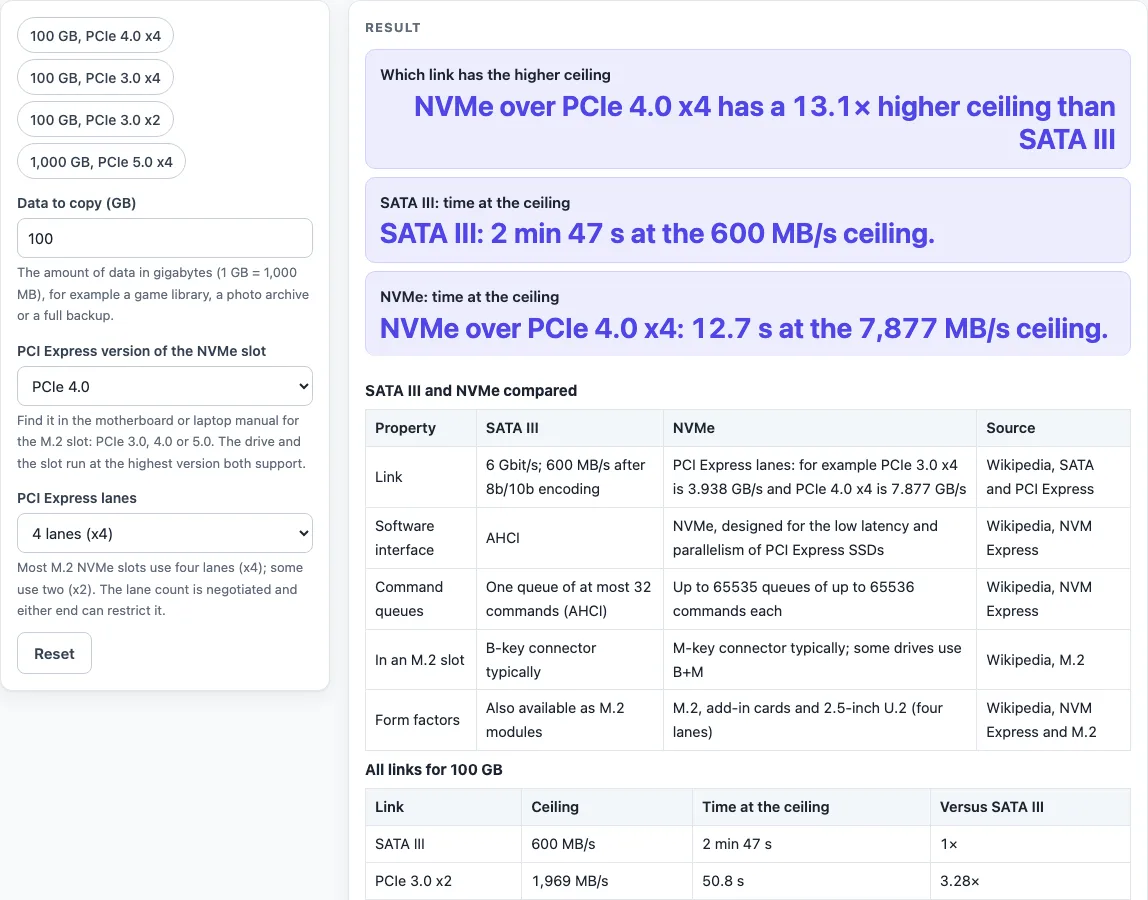
How to use the SATA vs NVMe tool
The tool opens on 100 GB over PCIe 4.0 x4, so you can read a result straight away. To try your own case:
- Type the size of your copy into “Data to copy (GB)”.
- Set “PCI Express version of the NVMe slot” to PCIe 3.0, 4.0 or 5.0, matching the slot you plan to use.
- Set “PCI Express lanes” to 2 lanes (x2) or 4 lanes (x4).
- Read “Which link has the higher ceiling” to see which link is faster in one direction.
- Compare “SATA III: time at the ceiling” with “NVMe: time at the ceiling” to see how long each link needs.
- Scroll to the “All links for N GB” table to see the ceiling, time and ratio for SATA III and all six PCIe 3.0, 4.0 and 5.0 x2 and x4 links together.
For a quick start, choose one of the four presets: ‘100 GB, PCIe 4.0 x4’, ‘100 GB, PCIe 3.0 x4’, ‘100 GB, PCIe 3.0 x2’ or ‘1,000 GB, PCIe 5.0 x4’. A preset fills the controls with its settings, and you can change any control after that.
The times are the fastest each link allows, so use them to compare links rather than to predict one drive. If you are unsure of the slot’s PCI Express version or lane count, check the board manual; the tool cannot read your hardware.
Is NVMe faster than SATA?
NVMe has a higher link ceiling than SATA III in the figures this tool uses. SATA III carries up to 600 MB/s in one direction, while PCIe 3.0 x4 carries 3,938 MB/s and PCIe 4.0 x4 carries 7,877 MB/s. A drive’s flash and controller usually reach less than the link ceiling, so the ceiling is an upper limit, not a promised speed.
The interfaces also handle commands differently. The older AHCI interface has one command queue of at most 32 commands. NVMe supports up to 65535 queues of up to 65536 commands each, and it was designed for the low latency and parallelism of PCI Express SSDs.
Ceilings are maximums for one direction, and the real rate depends on the whole chain. Many small files copy more slowly than one large file, and the PCI Express lane count is negotiated, so either end can limit it. An x4 drive in an x2 slot runs at x2 speed.
How much faster is NVMe than SATA?
Divide the data size by the ceiling to get the time, and divide one ceiling by the other to get the ratio. With the default 100 GB over PCIe 4.0 x4, SATA III at 600 MB/s takes 2 min 47 s, while PCIe 4.0 x4 at 7,877 MB/s takes 12.7 s. That is a 13.1 times higher ceiling. PCIe 3.0 x4 is 6.56 times SATA III, and PCIe 3.0 x2 is 3.28 times.
The size changes the times but not the ratio. For 500 GB, SATA III takes 13 min 53 s and PCIe 3.0 x4 takes 2 min 7 s.
The 600 MB/s figure for SATA III comes from 6 Gbit/s signalling. After 8b/10b encoding, 4.8 Gbit/s remains for data, which is 600 MB/s.
Sources (checked 19 October 2026): en.wikipedia.org · en.wikipedia.org · en.wikipedia.org · en.wikipedia.org
Worked examples
| Input | Result |
|---|---|
| 100 GB over PCIe 4.0 x4 | NVMe over PCIe 4.0 x4 has a 13.1× higher ceiling than SATA III |
| 500 GB over PCIe 3.0 x4 | NVMe over PCIe 3.0 x4 has a 6.56× higher ceiling than SATA III |
| 50 GB over PCIe 3.0 x2 | NVMe over PCIe 3.0 x2 has a 3.28× higher ceiling than SATA III |
| 2000 GB over PCIe 5.0 x4 | NVMe over PCIe 5.0 x4 has a 26.3× higher ceiling than SATA III |
Calculated by the tool above; open it with the same values to see each step.
Frequently asked questions
Can I put an NVMe drive in a SATA slot?
The answer depends on the slot, not only the drive. An M.2 slot may support SATA, PCIe or both, so check the board manual before you buy.
Is an M.2 SSD always NVMe?
No. An M.2 connector can expose up to four PCI Express lanes and one SATA 3.0 port, so both SATA and PCIe SSDs come as M.2 modules. M.2 SATA SSDs typically use a B-key connector and M.2 NVMe SSDs typically an M-key, and some drives use B+M.
Does PCIe 4.0 matter for NVMe?
It matters when the drive, the slot and the lane count all support it. PCIe 4.0 x4 carries 7,877 MB/s in one direction, about double the 3,938 MB/s of PCIe 3.0 x4. PCIe 4.0 x2 matches PCIe 3.0 x4 at 3,938 MB/s.
What does “time at the ceiling” mean?
It is the time a copy would take if it ran at the link’s maximum rate for the whole copy. The figure is calculated from your inputs, so it shows the link limit and not a timed transfer.
Does lane count change the ceiling?
Yes. At the same PCI Express version, x4 doubles the ceiling of x2. For example, PCIe 3.0 x2 carries 1,969 MB/s and PCIe 3.0 x4 carries 3,938 MB/s. The “All links for N GB” table shows each combination side by side.
Does the tool test my drive?
No. Results are calculated from the data size, PCI Express version and lane count you enter.
Related tools
- DisplayPort vs HDMI: use it to compare two display connection types before you pick a cable or port.
- USB-A vs USB-C: use it to compare the two USB connector types for a PC or device.
- Cat6 vs Cat6A: use it to compare two Ethernet cable categories for a network run.
- Ethernet Cable Length Limit: use it to check how far an Ethernet cable can run.
- HDMI Cable Length Limit: use it to check how far an HDMI cable can run.
- PoE Power Budget Calculator: use it to check the power budget for devices powered over Ethernet.