Projector Throw Distance Calculator
Enter the image size and the throw ratio from the spec sheet to see how far the projector sits from the screen, or enter the distance to see the image size, with lens shift.
Recent
Your last 10 settings, saved only in this browser. Nothing is uploaded.
How to use the Projector Throw Distance Calculator
- Under “What do you know?”, choose “The image size: find the throw distance” or “The distance: find the image size”.
- If you chose “The image size”, open “Image size given as” and pick “Diagonal” or “Width”.
- Type your size, with its unit, into “Image diagonal” or “Image width”, depending on the choice you just made.
- Set “Image aspect ratio” to match your picture, such as 16:9 or 4:3.
- Type the “Throw ratio (or the short end of the zoom range)” from your spec sheet.
- If your lens lists two ratios, type the second one into “Long end of the zoom range (optional)”. Leave it empty for a fixed lens.
- If you chose the distance mode, type the “Throw distance (lens to screen)” you have available.
- To position the image, open “More options” and enter the vertical and horizontal lens shift. You can also type your projector’s shift maximums, and the page warns you if a shift is above them.
- Read the result. Image mode shows the distance range. Distance mode shows the width and diagonal range. The table lists each image’s width, height, diagonal and its edges relative to the lens in inches.
The presets are example values, not your projector: “Zoom 1.2 to 1.5,” “Standard, 1.5,” “Short throw, 0.5,” “Ultra short, 0.25,” “From 12 ft away,” and “Lens shift 50% up.” Load one to see how the fields change, then replace the numbers with those from your own spec sheet.
How is projector throw distance worked out?
Throw distance is found by multiplying the throw ratio by the image width, and it is measured from the lens to the screen. The tool uses the definition throw ratio = distance / image width, so throw distance = throw ratio x image width.
A projector maker’s guide gives the example ratio 2.0, which means the projector sits 2 ft from the screen for every 1 ft of image width.
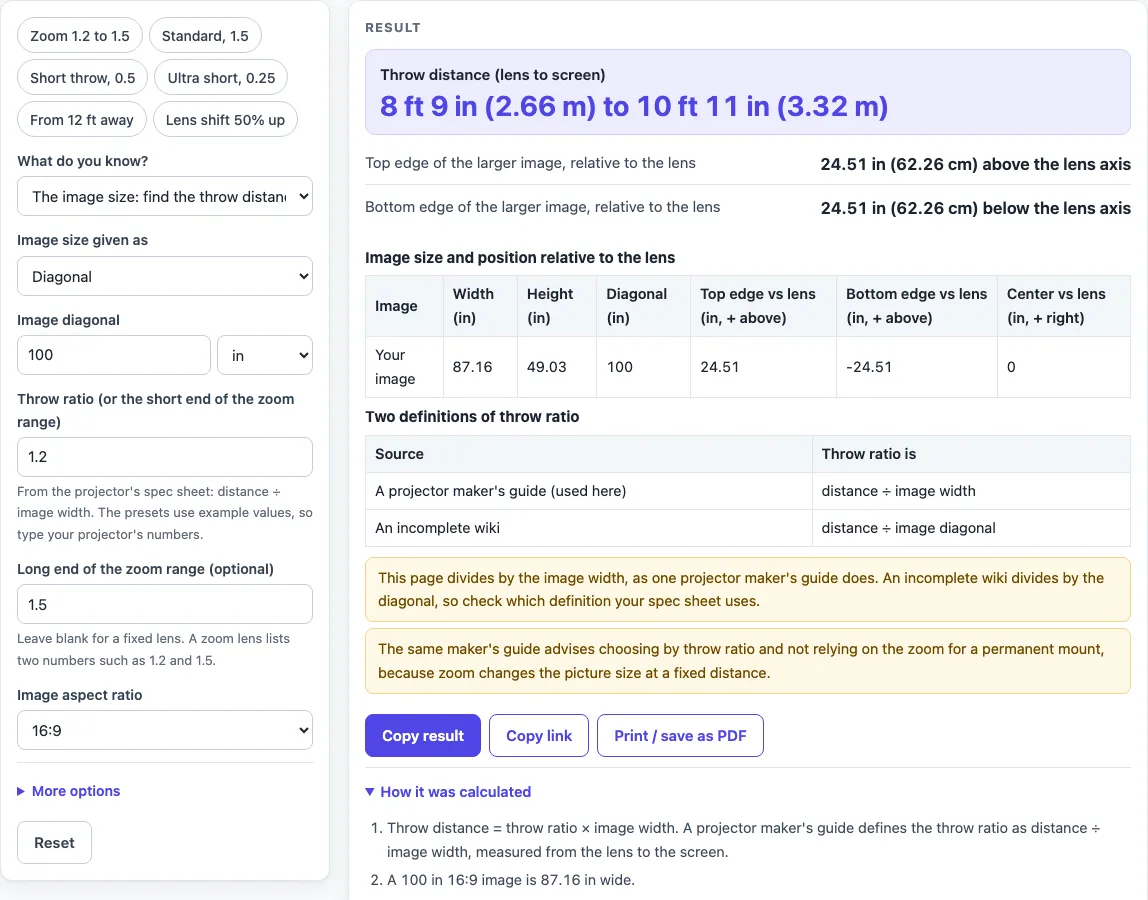
The default example uses a 100 in 16:9 image, which is 87.16 in wide. With a zoom range of 1.2 to 1.5, the throw distance is 104.6 in (8 ft 9 in) to 130.7 in (10 ft 11 in). A fixed ratio of 1.5 gives 130.7 in.
Distance mode reverses the calculation. From 12 ft (144 in) with a ratio of 1.2 to 1.5, the image width is 144 / 1.5 = 96 in to 144 / 1.2 = 120 in.
Two sources define throw ratio differently. A projector maker’s guide divides by image width, which is the definition this page uses. An incomplete wiki divides by image diagonal. The two give different distances for the same image, so the page shows both in a table and asks you to check which one your spec sheet uses.
A zoom lens lists two ratios, and the page shows both ends of the range. The same maker’s guide advises choosing by throw ratio and not relying on zoom for a permanent mount, and the page repeats that advice whenever a range is entered.
What does lens shift mean on this page?
Lens shift moves the image up, down, left or right relative to the lens. This page measures it as a percentage: vertical shift is a percentage of image height, and horizontal shift is a percentage of image width. 0 percent puts the lens axis through the middle of the image, and a plus value moves the image up or right.
The top edge sits at (0.5 + vertical shift) x height above the lens axis, and the bottom edge at (vertical shift - 0.5) x height. A negative result means below the axis. For a 100 in 16:9 image, which is 49.03 in high, at 0 percent the top is 24.51 in above the axis and the bottom is 24.51 in below. At +50 percent the top is 49.03 in above and the bottom sits at the lens axis.
Horizontal shift moves the centre of the image by shift x width. A +15 percent shift of an 87.16 in image moves the centre 13.07 in to the right.
Lens shift percentages are not comparable across makers. One maker defines full width or full height as 100 percent, another’s diagrams use different limits, and some quote inches. This page uses its own convention, so match it to your spec sheet before you rely on the edge positions.
Sources (checked 16 October 2026): benq.com · edutechwiki.unige.ch · helpguide.sony.net · files.support.epson.com
Worked examples
| Input | Result |
|---|---|
| 100 in image, throw ratio 1.2 to 1.5 | Throw distance 8 ft 9 in (2.66 m) to 10 ft 11 in (3.32 m) |
| 100 in image, throw ratio 1.5 | Throw distance 10 ft 11 in (3.32 m) |
| 120 in image, throw ratio 0.25 | Throw distance 2 ft 2 in (0.664 m) |
| 12 ft away, throw ratio 1.2 to 1.5 | Image width 96 in (243.8 cm) to 120 in (304.8 cm); diagonal 110.1 in (279.8 cm) to 137.7 in (349.7 cm) |
| 100 in image, throw ratio 1.5, 50% vertical lens shift | Throw distance 10 ft 11 in (3.32 m); top edge 49.03 in (124.5 cm) above the lens axis |
Calculated by the tool above; open it with the same values to see each step.
Frequently asked questions
Does the projector throw distance calculator need my projector’s model name?
No. It asks for an image size and a throw ratio, and both come from your projector’s spec sheet. A model name is not one of the fields.
Which throw ratio definition should I use?
Check your spec sheet first. A projector maker’s guide divides distance by image width, which this page uses, while an incomplete wiki divides by image diagonal. The page shows both in a table so you can compare them.
What are the two ends of a zoom range?
A zoom lens lists a short end and a long end. Enter the short end in “Throw ratio (or the short end of the zoom range)” and the long end in “Long end of the zoom range (optional)”. For an 87.16 in wide image with a range of 1.2 to 1.5, the distance runs from 104.6 in to 130.7 in.
Can I start from a distance instead of an image size?
Yes. Choose “The distance” under “What do you know?” and enter your throw distance. From 12 ft with ratios of 1.2 to 1.5, the image width is 96 in to 120 in.
Why does the page warn me about lens shift?
If you enter both a vertical and a horizontal shift, the page warns that a projector maker’s support page says you cannot move the image to both the horizontal and vertical maximum values at once. You can also type your projector’s shift maximums, and the page warns when a shift is above them.
What happens if I enter zero, a negative number or text?
The page shows a message for a zero or negative ratio, a zoom end smaller than the short end, text in a field, or a missing size. Everything runs in your browser, and nothing you type is uploaded.
Related tools
Projector Screen Size Calculator: use it when you are still deciding how large the screen should be before you fix the throw distance.
TV Mounting Height Calculator: use it when you are planning where a flat screen TV should be mounted instead of a projected image.
TV Size for a Room: use it to compare TV sizes against the dimensions of a room.
TV Viewing Distance Calculator: use it to estimate how far you should sit from a TV.
TV and projector placement: use when you want every placement tool in one list.
HDMI Cable Length Limit: use when the projector sits far from the source and you are planning the cable run.
TV Size Calculator: use when you are comparing a TV against a projected image.
How to Measure TV Size: use when you need to check how a diagonal is measured.