PoE Power Budget Calculator
List your devices with their watts or PoE class, type the switch's total PoE budget and a headroom you choose. You get the total, what is left and the port type each device needs.
Recent
Your last 10 settings, saved only in this browser. Nothing is uploaded.
How to use the PoE Power Budget Calculator
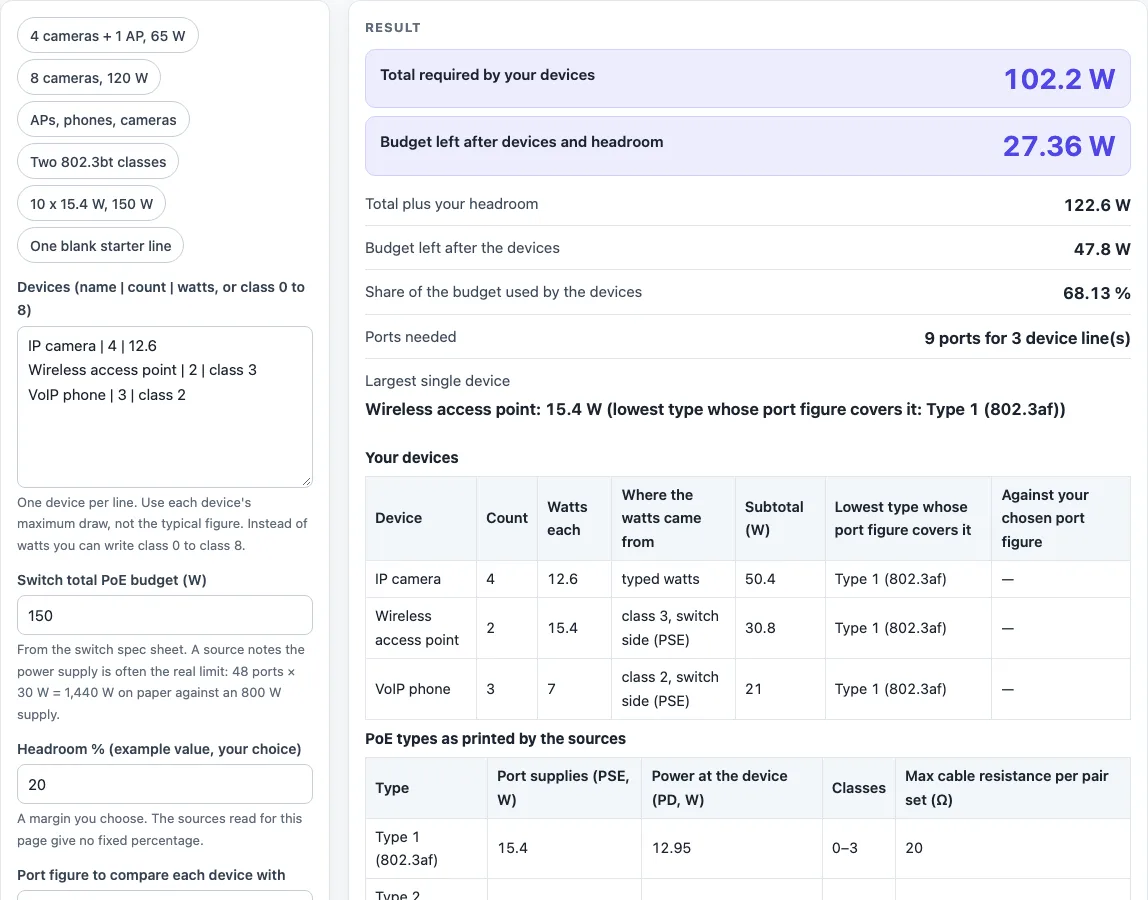
- Open the tool. It starts with three example lines, a 150 W budget and 20 % headroom, and shows answers on the first screen.
- In the “Devices” box, replace the examples with one line per device in the form name | count | watts. For example,
IP cameras | 4 | 12.6. - For a powered device grouped by PoE class, write class 0 to 8 in place of watts, such as
access points | 2 | class 3. - Enter each device’s maximum draw from its maker’s spec sheet, not its typical draw.
- Type your switch’s total PoE budget in “Switch total PoE budget (W)”.
- Set “Headroom % (example value, your choice)”. The 20 % default is only an example.
- Choose a “Port figure to compare each device with”: Type 1 (802.3af) 15.4 W, Type 2 (802.3at) 30 W, Type 3 (802.3bt) 60 W, Type 4 (802.3bt) 90 W, or no comparison.
- If you used class lines, open “More options” and pick the watts to use for a device given as a class.
- Read the big result rows: total required and budget left after devices and headroom. Then check the warnings and the device table.
- If a line is rejected, the error names that line. Fix it and the results update.
The “Presets” buttons load ready-made device lists, such as “4 cameras + 1 AP, 65 W” or “One blank starter line”, so you can edit a close match instead of typing from scratch.
What does a PoE calculator add up?
It adds up the power every device on one switch can draw, then compares that sum with the budget you enter. Each line in the “Devices” box contributes count x watts, and all lines are added together.
How is the total power required worked out?
Total required is the sum of count x watts over all lines. In the default example, 4 cameras at 12.6 W give 50.4 W, 2 access points at class 3 give 30.8 W (15.4 W each), and 3 phones at class 2 give 21 W (7 W each). That totals 102.2 W for 9 ports. With 20 % headroom, the total plus headroom is 122.64 W (102.2 x 1.2). Against a 150 W budget, that leaves 47.8 W, or 27.36 W after headroom.
Why use maximum draw instead of typical draw?
The page asks for each device’s maximum draw. A camera maker’s white paper separates typical and maximum draw; in its example, typical is 4.7 W and maximum is 12.6 W. The calculator plans on the maximum you enter, and its warnings remind you to allow for cable loss.
Which class watts should you use: PSE or PD?
By default the calculator uses PSE values, the power the switch port supplies: 15.4, 4, 7, 15.4, 30, 45, 60, 75 and 90 W for classes 0 to 8, from a switch maker’s page. The PD values, the largest power at the device, are 12.94, 3.84, 6.49, 12.95, 25.5, 40, 51, 62 and 71.3 W, from one online reference. The two sources differ for classes 5 to 8. The page shows both, and you can switch under “More options”.
Why can the power supply limit you before the port count does?
One source notes that the switch power supply is often the real limit. Forty-eight ports at 30 W is 1,440 W on paper, against an 800 W supply. Typing 48 devices of 30 W against 800 W gives a total of 1,440 W and a warning that it is 640 W above the budget. Enter the switch’s total PoE budget, not its port count.
What do the tables under the result show?
Under the result are three tables: your devices with the watts each came from, the four PoE types with their PSE and PD watts, classes and the maximum cable resistance per pair set, and the nine classes. The page states no PoE distance limit.
Sources (checked 16 October 2026): en.wikipedia.org · cisco.com · cablesandkits.com · whitepapers.axis.com
Worked examples
| Input | Result |
|---|---|
| 3 device line(s), 9 ports, 150 W budget, 20 % headroom | Total 102.2 W; 27.36 W left after headroom |
| 1 device line(s), 8 ports, 120 W budget, 20 % headroom | Total 100.8 W; -0.96 W left after headroom |
| 3 device line(s), 11 ports, 240 W budget, 20 % headroom | Total 157.2 W; 51.36 W left after headroom |
| 2 device line(s), 3 ports, 300 W budget, 10 % headroom | Total 173.3 W; 109.37 W left after headroom |
| 1 device line(s), 10 ports, 150 W budget, 0 % headroom | Total 154 W; -4 W left after headroom |
Calculated by the tool above; open it with the same values to see each step.
Frequently asked questions
Does the PoE calculator upload what I type?
No. It runs in your browser and nothing is uploaded.
Does the calculator show a PoE cable distance limit?
No. The pages read for this tool did not print a PoE distance limit, so the page does not state one. The Ethernet cable length page covers the cable.
What are PoE Types 3 and 4 called?
The page uses the type numbers from one online reference, which assigns Types 3 and 4 to 802.3bt. A switch maker calls Type 3 “UPoE” (proprietary, 60 W) and Type 4 “UPoE+”. Match the name on your switch’s label to the type number here.
Why does a device show a warning above 90 W?
90 W is the highest per-port figure in the sources. A shop guide lists 100 W for the highest type, but the page uses the switch maker’s 90 W. Check your device’s spec sheet if it draws more.
What happens if I enter a line incorrectly?
The error names the line. Each line needs three parts separated by |, the count must be a whole number from 1 to 999, and watts must be above 0 and at most 1000, or written as class 0 to class 8. The tool allows at most 60 lines.
What does the default example give?
Three lines, 4 IP cameras at 12.6 W, 2 class 3 access points and 3 class 2 phones, total 102.2 W for 9 ports. With 20 % headroom the total is 122.64 W, which leaves 47.8 W of the 150 W budget, or 27.36 W after headroom.
Does the page say whether my switch is enough?
It shows the numbers and warns when the total is above the budget you typed, or when it fits only without your headroom. Check the switch’s spec sheet for its real PoE budget.
Related tools
- Home Theater Equipment List Generator: use it to list the AV gear you are planning to power or connect.
- Ethernet Cable Length Limit: use it to check how long your Ethernet run can be.
- HDMI Cable Length Limit: use it when you need to check how far a video cable can run.
- Security Camera Installation Quote Generator: use it to draft a quote once you know how many cameras you are powering.
- Speaker Wire Gauge Chart: use it to pick a wire gauge for speaker runs.
- Subwoofer Wiring Diagram: use it to plan how to wire a subwoofer.
- Cables and Wiring: the hub with every cable and wiring tool on this site.