IPS vs VA
Pick what matters most to you and where you sit. The page shows which panel type the sources point to, why, and the differences in blacks, viewing angle, colour and cost.
Recent
Your last 10 settings, saved only in this browser. Nothing is uploaded.
IPS vs VA is a free comparison tool that runs in your browser. You set what matters most to you and where you sit when you watch, and it shows what the named sources point to for IPS and VA panels. Nothing you enter is uploaded, and there is no sign-up.
The result is one of four outcomes: IPS, VA, a split decision, or “The sources do not decide this case.” Below it you get a short reason, a summary of each panel type, and a table that compares how each works, its black level and contrast, viewing angle, colour and cost. The tool compares panel types in general. A particular monitor or TV can differ from its panel type, so check the maker’s spec sheet and reviews of the exact model.
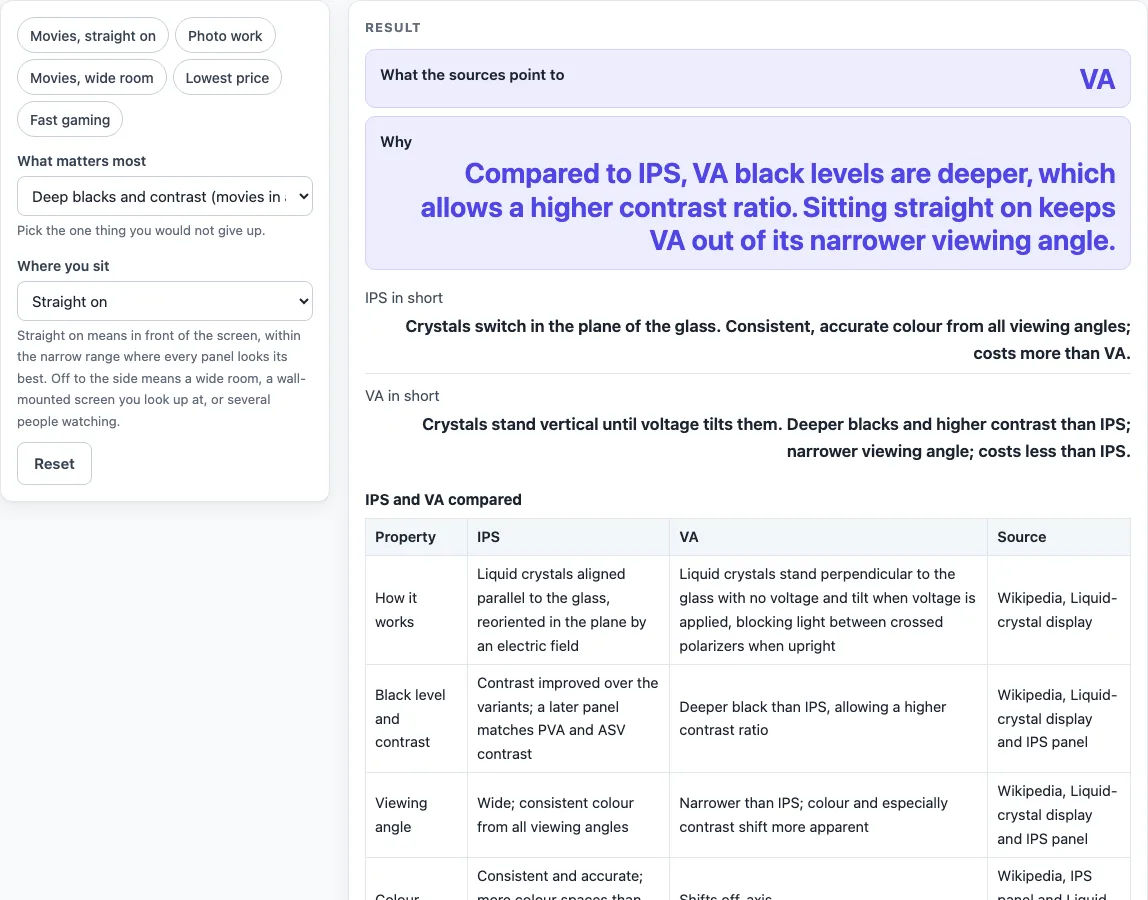
How to use the IPS vs VA tool
The tool opens with “What matters most” set to deep blacks and contrast, and “Where you sit” set to straight on. Change these to match how you will use the screen.
- Under “What matters most”, choose one option: Deep blacks and contrast (movies in a dark room), Accurate colour (photo and design work), Lowest price, or Fast response (competitive gaming).
- Under “Where you sit”, choose Straight on, or Off to the side or several viewers.
- Read the first result row, “What the sources point to.” It shows IPS, VA, a split decision, or “The sources do not decide this case.”
- Read “Why” to see the reason behind that result.
- Compare “IPS in short” and “VA in short” for a quick summary of each panel type.
- Scroll to the table “IPS and VA compared” to check each point: how it works, black level and contrast, viewing angle, colour and cost. Each row shows its source.
The five presets are named for common cases: “Movies, straight on,” “Photo work,” “Movies, wide room,” “Lowest price,” and “Fast gaming.” Pick one as a starting point, then change the controls if your situation is different.
You can change either control at any time and the result updates straight away.
Is IPS better than VA?
The sources do not name one panel type as better overall. IPS fits best when you need accurate colour from any seat, while VA fits best when you need deep blacks and contrast and sit straight on. The tool’s result depends on which of these you rank first and where you sit.
VA (vertical alignment) panels hold their liquid crystals perpendicular to the glass when no voltage is applied. That gives a black screen between crossed polarizers. When voltage is applied, the crystals tilt. The VA source says black levels are deeper than on IPS, which allows a higher contrast ratio. The trade-off is a narrower viewing angle, where colour and especially contrast shift more noticeably when you view the screen from the side.
IPS (in-plane switching) panels align their crystals parallel to the glass, and an electric field turns them within the plane. IPS was designed to fix poor viewing angles and colour reproduction. The IPS source says these panels show consistent, accurate colour from all viewing angles.
Which is better for movies, IPS or VA?
For movies in a dark room with you seated straight on, the tool’s rule points to VA, because deep blacks and contrast favour VA. If you sit off to the side or watch with several people, the rule says it depends: VA for blacks and price, IPS for the viewing angle.
The gap is narrowing on newer IPS panels. The IPS source describes one later variant with contrast second only to some S-PVA panels. It describes another with a wider colour gamut and contrast matching PVA and ASV displays, without off-angle glowing. So the black-level difference can be smaller on these newer IPS models. The sources do not give contrast numbers for IPS and VA, so the tool does not show any.
Sources (checked 19 October 2026): en.wikipedia.org · en.wikipedia.org
Worked examples
| Input | Result |
|---|---|
| Deep blacks and contrast (movies in a dark room); Straight on | Result: VA. |
| Accurate colour (photo and design work); Straight on | Result: IPS. |
| Deep blacks and contrast (movies in a dark room); Off to the side or several viewers | Result: It depends: VA for blacks and price, IPS for the viewing angle. |
| Fast response (competitive gaming); Straight on | Result: The sources do not decide this case. |
Calculated by the tool above; open it with the same values to see each step.
Frequently asked questions
Is VA better for gaming than IPS?
The sources do not decide this. The tool’s “Fast response (competitive gaming)” option finds no response-time comparison between IPS and VA in the sources used here. The IPS source says one later variant reduced response time to 5 ms, but it gives no VA figure to compare against.
Do VA panels have worse viewing angles?
The VA source says the viewing angle is narrower than on IPS. Colour and especially contrast shift more noticeably when you look at the screen from the side. If you sit off to the side or watch with several people, this matters for your choice.
Is VA cheaper than IPS?
According to the VA source, VA costs less than IPS, though it costs more than TN. With “Lowest price” selected and you seated straight on, the tool points to VA. Off to the side, the result depends on your other choices.
Does the tool show contrast or brightness numbers?
No. The sources do not compare contrast, brightness or response time between IPS and VA, so the tool gives no numbers for them.
Does a monitor or TV always match its panel type?
No. A particular monitor can differ from its panel type, because the maker, the backlight and the model matter as much as the panel. Read the spec sheet and reviews for the exact model you plan to buy.
Related tools
- TV Viewing Distance Calculator: use it to check how far you sit from the screen before you choose a panel for that spot.
- TV Size for Room: use it when you are still deciding on screen size for the room you will use.
- TV Size Calculator: use it to compare screen sizes once you know how big you want the picture.
- TV Mounting Height Calculator: use it when you are planning where the screen will sit on the wall.
- DisplayPort vs HDMI: use it to compare the two connection types for a display, PC or player.
- HDMI Cable Length Limit: use it when the display is far from the device sending it the picture.