Security Camera Installation Quote Generator
Type your equipment and labor lines, set tax, discount and deposit, and print or download an estimate sheet whose totals are exact to the cent.
Recent
Your last 10 settings, saved only in this browser. Nothing is uploaded.
How to use the Installation Quote Generator
- Start with a preset chip if you want a model to edit. “Camera install” is the default. “Home theater”, “Smart-home hub” and “Network cabling” load example figures. “Blank” clears the lists and gives you empty rows.
- In “Equipment and materials (one per line: description | quantity | unit price)”, write one item per line in the form description | quantity | unit price. Use up to 40 lines.
- In “Labor (one per line: description | hours | hourly rate)”, write one task per line in the same form, up to 40 lines.
- Type your rate in “Sales tax (%, your rate)”. Then choose the part it applies to in “Sales tax applies to”: Equipment only, Equipment and labor, Labor only, or Nothing (no tax).
- Enter a value in “Discount” and choose “Percent of the subtotal (%)” or “Fixed amount” in “Discount is a”.
- Set “Deposit (% of the total, your choice)”.
- Open More options and fill in “Job description”, “Your business name”, “Your address”, “Your phone”, “Your email”, “Customer name”, “Customer address”, “Estimate number”, “Date (YYYY-MM-DD)”, “Estimate valid for (days, 0 = leave out)”, “Payment terms (your own words)”, “Notes” and “Currency symbol”.
- Read the totals. If a line has the wrong number of parts, a quantity or hours of 0, or a negative or text price, the page shows an error on that line.
- Print the sheet, or choose “Download as CSV (opens in Excel)”.
Empty header cells on the printed sheet are left blank so you can write on them.
How is the total on a security camera installation quote calculated?
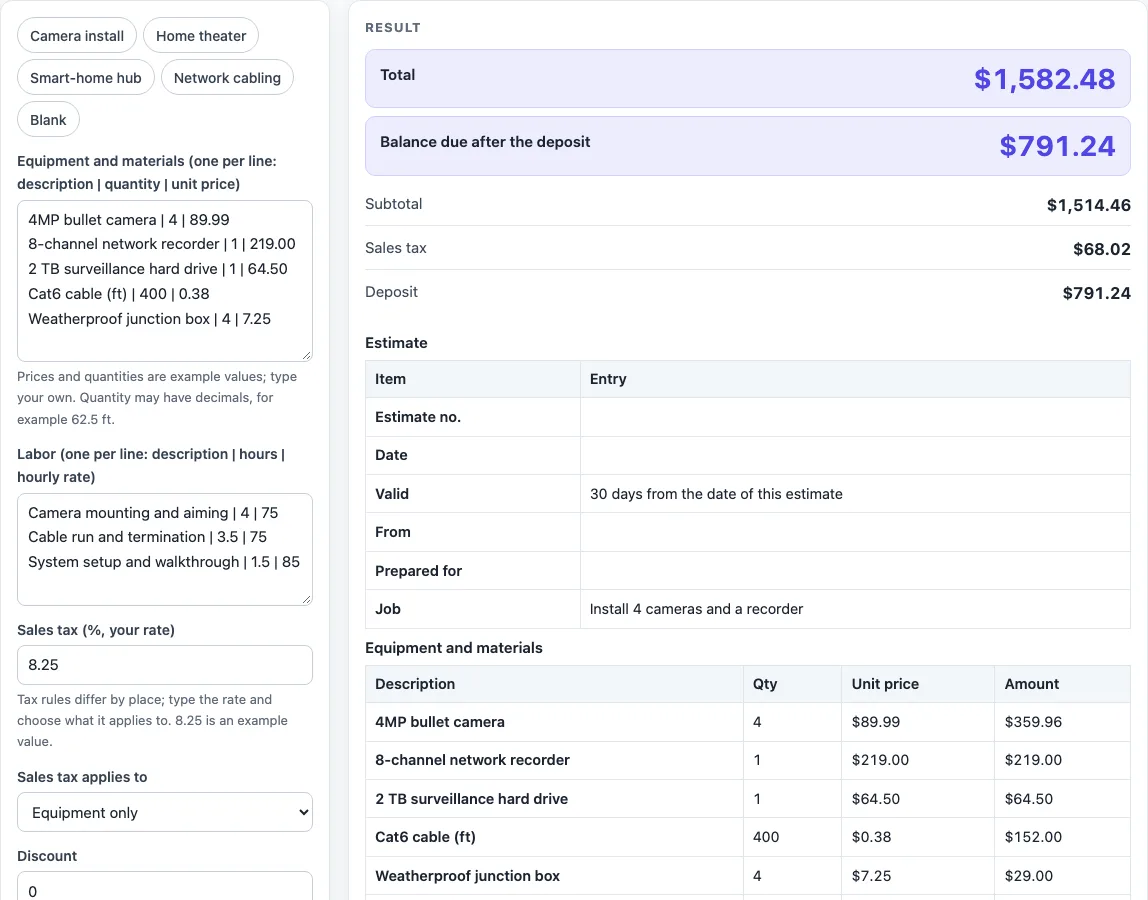
The total is the subtotal minus any discount, plus sales tax. The subtotal is the equipment subtotal plus the labor subtotal, and each of those is the sum of its line amounts.
Each line amount is quantity multiplied by price (or hours multiplied by hourly rate). The page then rounds the result half up to the cent.
How does rounding work on a cctv quote?
The page does its money math in whole cents with exact integer arithmetic, so it does not use floating point. Each line is rounded half up to the cent. For example, 3 × 0.335 = 1.005 becomes $1.01.
Rounding happens line by line, so the printed line amounts add up to the subtotal shown.
What does the default quote add up to?
The default is a camera job with example prices. Equipment is 4 cameras at $89.99, a recorder at $219.00, a drive at $64.50, 400 ft of cable at $0.38 and 4 junction boxes at $7.25, which makes $824.46. Labor is 4 h and 3.5 h at $75 and 1.5 h at $85, which makes $690.00. The subtotal is $1,514.46. Tax of 8.25% on equipment only is $68.02, so the total is $1,582.48. A 50% deposit is $791.24 and the balance due is $791.24. All prices are fictional example values, so type your own.
What does the printed sheet contain?
The sheet runs in this order: Estimate (number, date, validity, from, prepared for, job), Equipment and materials, Labor, Totals, Terms and notes and an Approval block with customer and seller rows for name, signature and date. Empty cells are left blank to write on. If you give a date and the days the estimate is valid, the sheet says, for example, “30 days, until 2026-12-02” for 2026-11-02. The page states no tax law and adds no contract, warranty or legal wording.
How is sales tax applied to equipment and labor?
Sales tax is the rate you type, applied to the part you choose in “Sales tax applies to”. The page does not state a tax rule, and tax rules differ by place, so enter the rate that applies where you work.
In the default example, 8.25% on equipment of $824.46 gives $68.02 (68.01795 rounded). In the wall mount example, 7% on equipment of $74.98 plus labor of $180.00 gives $17.85.
How are discounts and deposits worked out?
A percent discount is a percent of the subtotal, rounded half up to the cent. A fixed discount is a set amount. A discount cannot be larger than the subtotal.
The discount reduces the taxable amount in proportion to the taxable part of the subtotal, and the taxable share is rounded half up.
The deposit is the total multiplied by the deposit percentage, rounded half up. The balance due is the total minus the deposit. In the wall mount example, a total of $272.83 with a 25% deposit gives a deposit of $68.21 and a balance due of $204.62.
Worked examples
| Input | Result |
|---|---|
| 8 line items, tax 8.25% on equipment, discount 0%, deposit 50% | total $1,582.48, deposit $791.24, balance $791.24 |
| 8 line items, tax 0% on equipment, discount 5%, deposit 0% | total $1,438.74, deposit $0.00, balance $1,438.74 |
| 3 line items, tax 7% on both, discount 0%, deposit 25% | total $272.83, deposit $68.21, balance $204.62 |
Calculated by the tool above; open it with the same values to see each step.
Frequently asked questions
Does the installation quote tool upload what I type?
No. It runs in your browser and nothing you type is uploaded.
Can I use this as a cctv quote template?
Yes. Choose a preset, replace the example lines with your own equipment and labor, and fill in the business and customer fields. The sheet can then be printed or downloaded as a CSV file.
Why might my total differ from my own calculation?
The page rounds each line amount half up to the cent, then adds the results. Sales tax applies only to the part you choose, and a discount reduces the taxable amount in proportion to the taxable share of the subtotal.
Does the sheet add contract or warranty wording?
No. Payment terms and notes are printed exactly as you type them, up to 300 characters. The page adds no contract, warranty or legal wording.
What tax rate should I enter?
Enter the sales tax rate that applies where you work, with up to 2 decimals. The page does not decide which rate or which items are taxed, so confirm this with your local rules.
What happens if I need more than 40 lines?
A section holds up to 40 lines. A 41st line is shown as an error rather than dropped, so combine or remove lines to fit.
Related tools
- Home Theater Equipment List Generator: Use it when you need a plain equipment list for a home theater job before you build the quote.
- PoE Power Budget Calculator: use it to add up the power of the PoE cameras and other devices on the job.
- Ethernet Cable Length Limit: use it to check how long a camera cable run can be.
- HDMI Cable Length Limit: use it for the video cable runs on a home theater job.
- Speaker Wire Gauge Chart: use it to compare wire gauges for the speaker runs on an audio job.
- Subwoofer Wiring Diagram: use it to plan how subwoofers are wired on a home theater job.
- Cables and Wiring: the hub with every cable and wiring tool on this site.