How to Measure TV Screen Size
Type what you measured on the visible screen, or the space you have, and see the TV size to the nearest listed sizes with the difference, and the largest diagonal that fits a space.
Recent
Your last 10 settings, saved only in this browser. Nothing is uploaded.
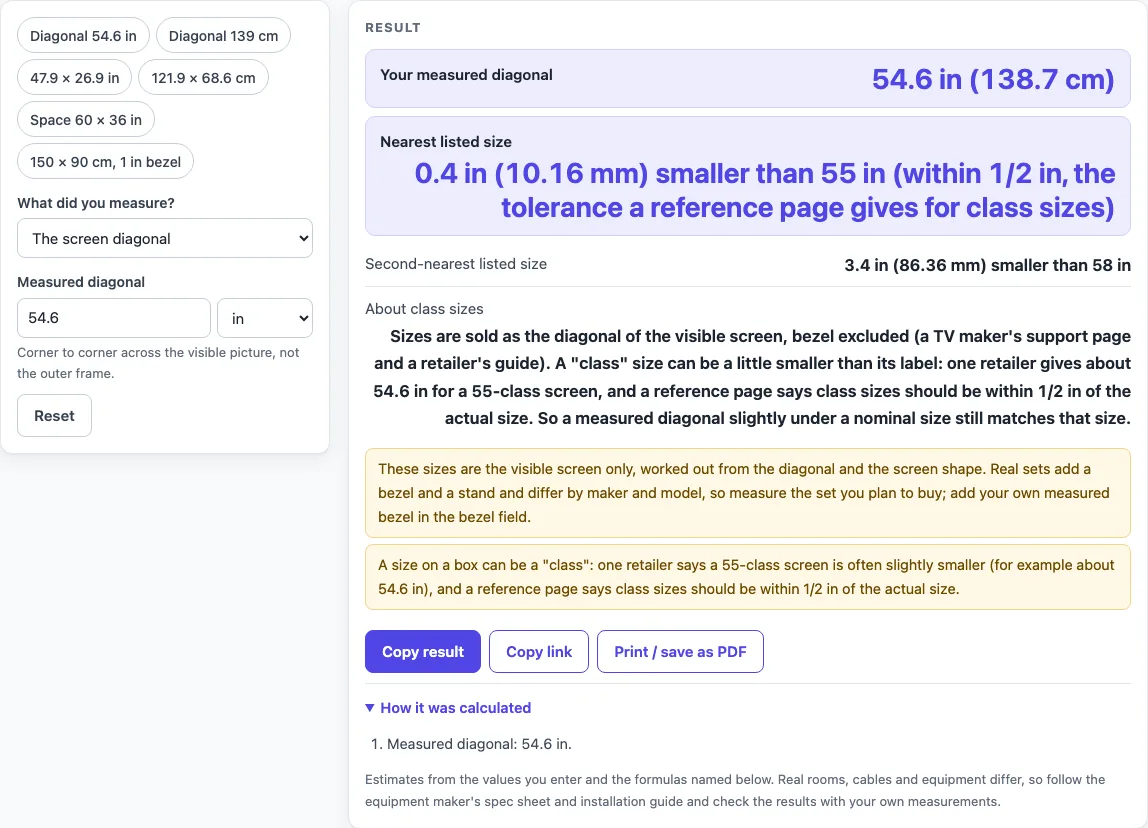
How to use the TV size calculator
- Measure the visible picture, not the outer frame. For a diagonal, measure from one bottom corner of the lit screen to the opposite top corner.
- In the “What did you measure?” select, choose “The screen diagonal” if you have that corner-to-corner number.
- Pick a unit: in, cm, mm or ft.
- Type the diagonal in “Measured diagonal”.
- Read “Nearest listed size” and “Second-nearest listed size”, taken from the 16 listed sizes from 32 to 100 in, with the difference in inches and millimeters, larger or smaller. If the difference is 1/2 in or less, the page notes it is within a reference page’s class tolerance.
- If you do not have a diagonal, select “The screen width and height” and type the visible picture in “Screen width” and “Screen height”. The page calculates the diagonal for you.
- To check a wall or cabinet opening, select “The space (opening) for a TV”. Type “Space width” and “Space height”, choose the “Screen shape of the TV you are considering” (16:9 is the default), and enter the “Bezel allowance (each side)” (the default is 0).
- Read “Largest diagonal that fits the space” and “Largest listed size that fits”. If no listed size fits, or the bezel allowance uses up the space, the page reports that.
The page also has six presets, such as “Diagonal 54.6 in” and “Space 60 × 36 in”. Load one to see the layout first.
How do you measure a TV screen size?
Measure the visible picture from one bottom corner to the opposite top corner. That straight line is the diagonal, and it is the number TV sizes are based on, so the bezel (the frame around the picture) is left out.
Sizes are sold as the visible diagonal. A TV maker’s support page and a retailer’s guide both describe it this way. If you measure in centimeters, convert with 1 in = 2.54 cm, the exact definition given in NIST SP 811. For example, 139 cm converts to 54.72 in, and the calculator shows both.
If you know the width and height instead, the diagonal comes from the Pythagorean theorem: diagonal = √(width² + height²). For a visible picture of 47.9 × 26.9 in, the diagonal is 54.94 in, or 139.5 cm.
Measurements rarely match a listed size exactly. The calculator compares your number with the list and shows the two nearest sizes. A 54.6 in diagonal is 0.4 in (10.16 mm) smaller than 55 in. The second-nearest size, 58 in, is 3.4 in (86.36 mm) away from it.
Sources differ on how close a measurement must be. A retailer’s guide gives about 54.6 in for a 55-class screen as an example. A reference page says class sizes should be within 1/2 in of the actual size. Both are shown here. The calculator does not average them or choose one. When the difference is 1/2 in or less, it notes that the result falls within the reference page’s tolerance.
How is the largest TV size for a space worked out?
Start with the opening’s width and height, the screen shape, and the bezel allowance on each side. The largest diagonal is the smaller of two values: (opening width − 2 × bezel) × √(a² + b²) ÷ a, and (opening height − 2 × bezel) × √(a² + b²) ÷ b. Here a and b are the shape’s width and height parts, such as 16 and 9 for 16:9.
For a 60 × 36 in opening at 16:9 with no bezel allowance, the largest diagonal is 68.84 in (174.9 cm). The largest listed size that fits is 65 in, which gives a screen of 56.65 × 31.87 in.
Two things can change the answer. A wider bezel allowance reduces the usable width and height on both sides, so the largest diagonal gets smaller. The screen shape also matters because it sets the ratio used in both values.
These results describe screen size only. They are calculated from your inputs and do not show whether a particular TV will fit, because depth, mounting hardware, and clearances are not part of the calculation.
Sources (checked 16 October 2026): support.tcl.com · blog.bestbuy.ca · en.wikipedia.org · samsung.com · google.com · nist.gov
Worked examples
| Input | Result |
|---|---|
| Measured diagonal 54.6 in | Diagonal 54.6 in; nearest listed sizes 55 in and 58 in |
| Measured diagonal 139 cm | Diagonal 54.72 in; nearest listed sizes 55 in and 58 in |
| Measured 47.9 × 26.9 in | Diagonal 54.94 in; nearest listed sizes 55 in and 58 in |
| Measured 47.99 × 27.01 in | Diagonal 55.07 in; nearest listed sizes 55 in and 58 in |
| Space 60 in × 36 in | Largest diagonal 68.84 in; largest listed size 65 in |
Calculated by the tool above; open it with the same values to see each step.
Frequently asked questions
How do you measure a TV screen size?
Measure the visible picture corner to corner, from one bottom corner to the opposite top corner. Leave out the outer frame, because TV sizes are sold as the visible diagonal. If you have only the width and height, select “The screen width and height” and type those two numbers.
Why does my measurement come out a little smaller than a listed size?
A measured diagonal slightly under a nominal size can still match it. A retailer’s guide gives about 54.6 in for a 55-class screen as an example, and a reference page says class sizes should be within 1/2 in of actual. The calculator notes when the difference is 1/2 in or less.
Can I type the width and height of the whole TV, including the frame?
No. In “The screen width and height” mode, type the visible picture only. Including the frame will make the calculated diagonal larger than the screen size you want.
Does the calculator tell me whether a TV will fit my space?
No. It measures only the numbers you type. For a space, it reports the largest diagonal and the largest listed size that fits the opening, but it does not say that any particular TV will fit.
What does it mean when the page says no size fits?
The space is too small for any listed size, or the bezel allowance uses up the space. The page reports this instead of a size. Check the opening numbers, the screen shape, and the bezel allowance per side.
Do I need to upload anything or create an account?
No. Everything runs in your browser, nothing is uploaded, there is no sign-up, and the tool is free.
Related tools
- TV Sizes and Dimensions: use when you want every TV size tool and guide in one place.
- TV Size Calculator: use when you want to work out a diagonal, width, height or fit in one tool.
- TV Size Chart: use when you want to compare all listed sizes in one table.
- TV Dimensions: use when you know the diagonal and want the width, height and area.
- TV Size for Room: use when you are matching a size to a room.
- 43 Inch TV Dimensions: use when your result is close to 43 inches.
- 55 Inch TV Dimensions: use when your result is close to 55 inches.
- 65 Inch TV Dimensions: use when your result is close to 65 inches.