HDR vs SDR
Type a screen's peak brightness, black level and colour depth. The page shows how far it sits above SDR white, its contrast, how many colours it can use and which DisplayHDR peak tier it reaches.
Recent
Your last 10 settings, saved only in this browser. Nothing is uploaded.
How to use the HDR vs SDR tool
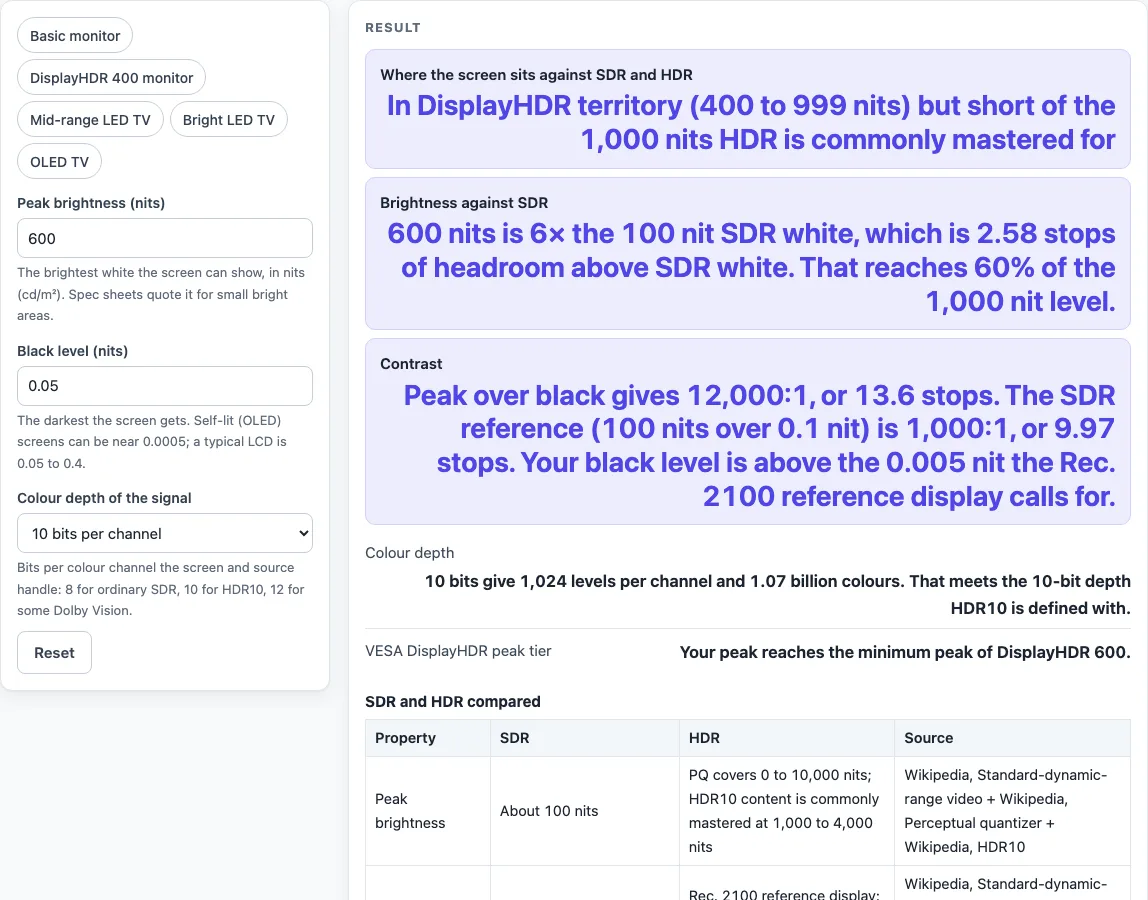
- Set Peak brightness (nits) to the peak figure from your screen’s specification. The tool opens on 600 nits.
- Set Black level (nits) to how dark the screen can get. It opens on 0.05 nit.
- Choose Colour depth of the signal from 8, 10 or 12 bits per channel. It opens on 10 bits. Choosing 8 bits adds a warning, because HDR10 is defined with 10 bits.
- Read the result rows: Where the screen sits against SDR and HDR, Brightness against SDR, Contrast, Colour depth and VESA DisplayHDR peak tier.
- Check any warnings and the steps shown under the results. They remind you that spec-sheet peak brightness is usually quoted for small highlights, and that a DisplayHDR level needs more than peak brightness.
- Scroll to the two tables, SDR and HDR compared and VESA DisplayHDR levels against your N nit peak, to see where your numbers fall. The second table marks each DisplayHDR level as reached or not, using your peak brightness only.
The presets fill in all three controls at once. Basic monitor uses 250 nits, 0.25 nit and 8-bit. DisplayHDR 400 monitor uses 400 nits, 0.4 nit and 8-bit. Mid-range LED TV is the default. Bright LED TV uses 1,500 nits, 0.05 nit and 10-bit. OLED TV uses 800 nits, 0.0005 nit and 10-bit. Treat these as starting points, then replace the values with the figures for your own screen.
What is the difference between HDR and SDR?
SDR, or standard dynamic range, is the older video format. It is built around a maximum of about 100 nits, a black level near 0.1 nit, Rec. 709 colours and a gamma curve. HDR, or high dynamic range, lets a signal describe much brighter highlights, a larger brightness range and wider colours. The tool measures that gap with a few simple formulas.
Contrast ratio is peak brightness divided by black level. Stops of dynamic range are the base-2 logarithm of that ratio, so each doubling of contrast adds one stop. Headroom above SDR white is log2(peak ÷ 100). Levels per channel are 2 to the power of the bit depth, and total colours are the levels cubed. For SDR, the source gives about 6 stops for 8-bit and about 10 stops for professional 10-bit. The eye perceives about 14 stops in one image.
HDR10 uses the PQ curve (SMPTE ST 2084), 10 bits, Rec. 2020 primaries and static metadata. PQ covers 0 to 10,000 nits. HLG is another HDR format that works on SDR displays, but HDR10 is not backward compatible with SDR.
How many nits do you need for HDR?
The sources give no single cutoff. Rec. 2100 says a reference display should peak at 1,000 nits or more for small highlights, with a black level of 0.005 nit or less. HDR10 content is commonly mastered at 1,000 to 4,000 nits. Below 100 nits the tool reports a display under the SDR reference. From 100 to 399 nits, it is brighter than SDR white but below the lowest DisplayHDR peak tier.
The default result shows why black level matters too. At 600 nits, 0.05 nit and 10-bit, the screen is 6 times SDR white, with 2.58 stops of headroom and 60 percent of the 1,000 nit level. Its contrast is 12,000:1, or 13.6 stops. Its black level is above the 0.005 nit reference, so the verdict is that it is in DisplayHDR territory but short of 1,000 nits. By contrast, an OLED example at 800 nits over 0.0005 nit gives 1.6 million:1, or 20.6 stops, and meets the 0.005 nit reference.
Worked examples
| Input | Result |
|---|---|
| 600 nits peak, 0.05 nits black, 10-bit | In DisplayHDR territory (400 to 999 nits) but short of the 1,000 nits HDR is commonly mastered for |
| 400 nits peak, 0.4 nits black, 8-bit | In DisplayHDR territory (400 to 999 nits) but short of the 1,000 nits HDR is commonly mastered for |
| 800 nits peak, 0.0005 nits black, 10-bit | In DisplayHDR territory (400 to 999 nits) but short of the 1,000 nits HDR is commonly mastered for |
| 1500 nits peak, 0.05 nits black, 12-bit | 1,000 nits or more: matches the peak the Rec. 2100 reference display calls for |
Calculated by the tool above; open it with the same values to see each step.
Frequently asked questions
Is HDR better than SDR?
HDR can carry brighter highlights, a larger brightness range and wider colours than SDR. The benefit depends on the content and the display, and a screen with little headroom above SDR white has less room to show a difference.
Is HDR worth it on a monitor or TV?
It is worth it when the screen’s peak brightness and contrast give real headroom above SDR, which the tool’s headroom and DisplayHDR rows help you check. The tool does not say whether any particular TV is good at HDR, so compare the results with reviews and your own viewing.
Do I need 10-bit for HDR?
HDR10 is defined with 10 bits, and the sources say 10 or 12 bits are used to avoid banding across the wider brightness range. The DisplayHDR table on Wikipedia lists 8-bit as the minimum for DisplayHDR 400 and 10-bit for the other levels. The tool warns when you pick 8 bits, because that is SDR-class precision. 10-bit gives 1,024 levels per channel and about 1.07 billion colours.
What does the VESA DisplayHDR peak tier mean?
It is the DisplayHDR level your peak brightness reaches, starting at 400 nits and rising to 1,400 nits. The tool compares peak brightness only. Tiers also depend on colour depth, dimming and black level, so check the VESA listing before you rely on a tier.
Does a higher nit rating always mean better HDR?
No. Contrast depends on black level as well as peak brightness, so a brighter screen with a higher black level can have less contrast than a dimmer screen with deep blacks.
Why can full-screen brightness be lower than the spec?
Peak brightness is usually quoted for small highlights, and full-screen white can be lower. Rec. 2100 itself states its 1,000 nit figure for small-area highlights.
Related tools
- HDR10 vs Dolby Vision: use it when choosing between two HDR formats that differ in their metadata.
- HDMI 2.1 vs 2.0: use it to check whether your port and cable can carry the signal you want.
- IPS vs VA: use it when comparing panel types, which affect contrast and viewing angles.
- 1080p vs 1440p: use it to decide which resolution suits a monitor.
- TV Size for Room: use it to pick a screen size for your room.
- DisplayPort vs HDMI: use it to choose a connection for a PC monitor.