Ethernet Cable Length Limit
Type the cable in the wall and your patch cords, then choose a speed and category. The page shows your channel against the 100 m figure and the reach the sources print.
Recent
Your last 10 settings, saved only in this browser. Nothing is uploaded.
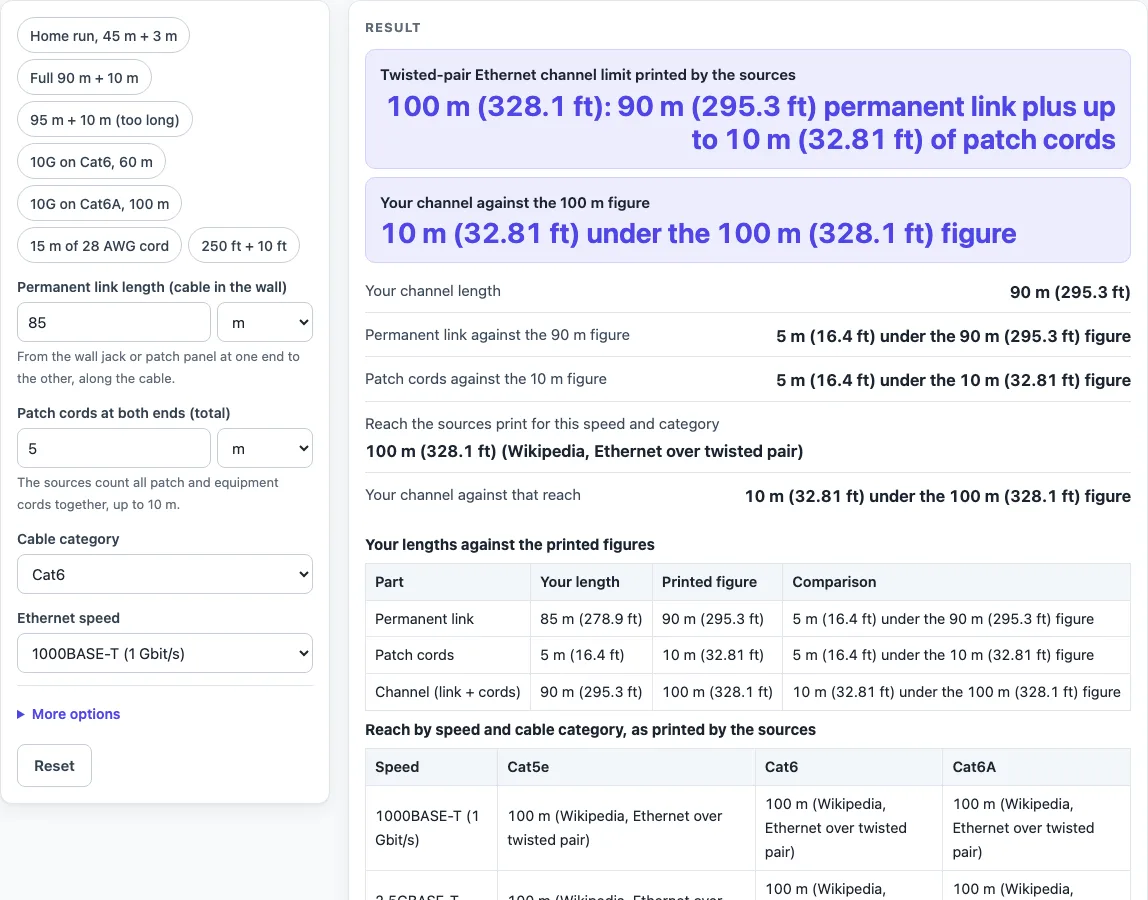
How to use the Ethernet Cable Length Limit Calculator
- Enter the “Permanent link length (cable in the wall)”. Lengths can be given in m or ft. The tool opens on 85 m.
- Enter the “Patch cords at both ends (total)”. The tool opens on 5 m. A length of zero is accepted.
- Choose a “Cable category”: Cat5e, Cat6 or Cat6A. The tool opens on Cat6.
- Choose an “Ethernet speed”: 1000BASE-T, 2.5GBASE-T, 5GBASE-T or 10GBASE-T. The tool opens on 1000BASE-T.
- If your cords are thin, open “More options” and set “Patch cord conductor size” to 24 AWG stranded or 28 AWG.
- Read the first big result row. It shows the channel length in m and ft.
- Read the second big row. It says whether the channel is “under”, “equal to” or “over” the 100 m figure, and by how much.
- Check the reach row for your speed and category. Read any warnings that appear.
- Scroll down to the three tables: your lengths against 90 m, 10 m and 100 m; the reach table; and the PoE cable resistance table.
Presets are available for common setups, including “Home run, 45 m + 3 m”, “Full 90 m + 10 m”, “95 m + 10 m (too long)”, “10G on Cat6, 60 m”, “10G on Cat6A, 100 m”, “15 m of 28 AWG cord” and “250 ft + 10 ft”. A permanent link of zero, a non-number or a negative length shows an error message.
What is the ethernet cable length limit?
The limit the sources print is a 100 m channel. The channel is the permanent link plus the patch cords at both ends, and the printed split is a 90 m permanent link plus up to 10 m of patch cords. In feet, 100 m is 328.1 ft, because the tool converts at 0.3048 m per foot.
How is the channel length calculated?
Add the permanent link to the patch cords. The default setup of 85 m + 5 m makes 90 m, which is 10 m under the 100 m figure. Each part is also compared with its own figure: the permanent link is 5 m under 90 m, and the cords are 5 m under 10 m.
Take a 95 m permanent link with 12 m of cords. That makes 107 m, which is 7 m (22.97 ft) over the 100 m figure. The tool fires three warnings in this case: the permanent link is over 90 m, the cords are over 10 m, and the channel is over 100 m.
Why do speed and category change the reach?
The reach row shows the figure the sources print for your speed and category, then compares your channel with it. The printed figures are 100 m for 1000BASE-T and 2.5GBASE-T on Cat5e, Cat6 and Cat6A, and 100 m for 5GBASE-T on Cat6 and Cat6A. For 10GBASE-T, the printed figures are 100 m on Cat6A and 55 m on Cat6. So 65 m of 10GBASE-T on Cat6 is longer than the printed 55 m, and the tool warns you.
Some combinations have no firm printed figure. For 5GBASE-T on Cat5e, the row says the speed is “expected to work in most cases”. For 10GBASE-T on Cat5e, it says “up to 55 m depending on the installation, not specified in the standard”. The sources also differ here. The 10GBASE-T article gives up to 55 m, while the Ethernet-over-twisted-pair table gives no Cat5e figure for 10G. The page shows the text rather than choosing a number, and it shows a warning in place of a comparison.
How do 28 AWG patch cords change the limit?
Choosing 28 AWG adds a warning. The sources say the 100 m channel must be de-rated when it uses 28 AWG cords, and they recommend keeping those cords under 15 m. One vendor example gives about 88 m of channel with 15 m of 28 AWG cord. The page does not know your cable maker’s derating factor, so it applies none. A second warning fires when the cords total more than 15 m.
Sources (checked 16 October 2026): en.wikipedia.org · flukenetworks.com · structuredcablingnews.com · en.wikipedia.org · en.wikipedia.org · en.wikipedia.org
Worked examples
| Input | Result |
|---|---|
| 85 m link + 5 m cords; Cat6; 1000BASE-T (1 Gbit/s) | Channel 90 m (295.3 ft); 10 m (32.81 ft) under the 100 m (328.1 ft) figure |
| 90 m link + 10 m cords; Cat6; 1000BASE-T (1 Gbit/s) | Channel 100 m (328.1 ft); equal to the 100 m (328.1 ft) figure |
| 60 m link + 5 m cords; Cat6; 10GBASE-T (10 Gbit/s) | Channel 65 m (213.3 ft); 35 m (114.8 ft) under the 100 m (328.1 ft) figure |
| 250 ft link + 15 ft cords; Cat6A; 10GBASE-T (10 Gbit/s) | Channel 80.77 m (265 ft); 19.23 m (63.08 ft) under the 100 m (328.1 ft) figure |
| 80 m link + 15 m cords; Cat5e; 2.5GBASE-T (2.5 Gbit/s) | Channel 95 m (311.7 ft); 5 m (16.4 ft) under the 100 m (328.1 ft) figure |
Calculated by the tool above; open it with the same values to see each step.
Frequently asked questions
Is the ethernet cable length limit 100 m?
The sources print 100 m for the channel, which is the permanent link plus the patch cords. The tool compares your channel total with that 100 m figure and shows the difference in m and ft.
What reach does 10GBASE-T have?
The reach row shows 100 m for 10GBASE-T on Cat6A and 55 m for 10GBASE-T on Cat6. A channel over the printed reach for your category triggers a warning. The page calculates the comparison from your inputs and gives no pass or fail.
What does a zero patch cord length mean?
A zero patch cord length is accepted, so you can check a permanent link with no cords. A zero permanent link gives an error message.
Does the tool check PoE distance?
It does not. The PoE table lists the maximum cable resistance per pair set: 20 ohm for Type 1 and 12.5 ohm for Types 2 to 4. The pages read do not print a separate PoE distance figure, so check your equipment maker’s spec sheet.
Why does a row show a warning instead of a comparison?
Some speed and category pairs have no firm figure in the sources. For 5GBASE-T on Cat5e and 10GBASE-T on Cat5e, the row shows the source’s wording instead of a number.
Is my data sent anywhere?
No. Everything runs in your browser, and nothing is uploaded.
Related tools
Home Theater Equipment List Generator: use it to list the devices and cables for a home theater setup.
HDMI Cable Length Limit: use it when you need to check how long an HDMI cable run can be.
Security Camera Installation Quote Generator: use it to build a quote for installing security cameras.
PoE Power Budget Calculator: use it to total the power your PoE devices draw.
Speaker Wire Gauge Chart: use it to compare speaker wire sizes for a run.
Subwoofer Wiring Diagram: use it to plan how to wire a subwoofer.
Cables, Wiring and Installer Documents: use when you want every cable and wiring tool in one list.