Home Theater Equipment List Generator
Type your items with quantity, cost, room and watts, and get a list grouped by room with totals and tick boxes for ordered, received and installed.
Recent
Your last 10 settings, saved only in this browser. Nothing is uploaded.
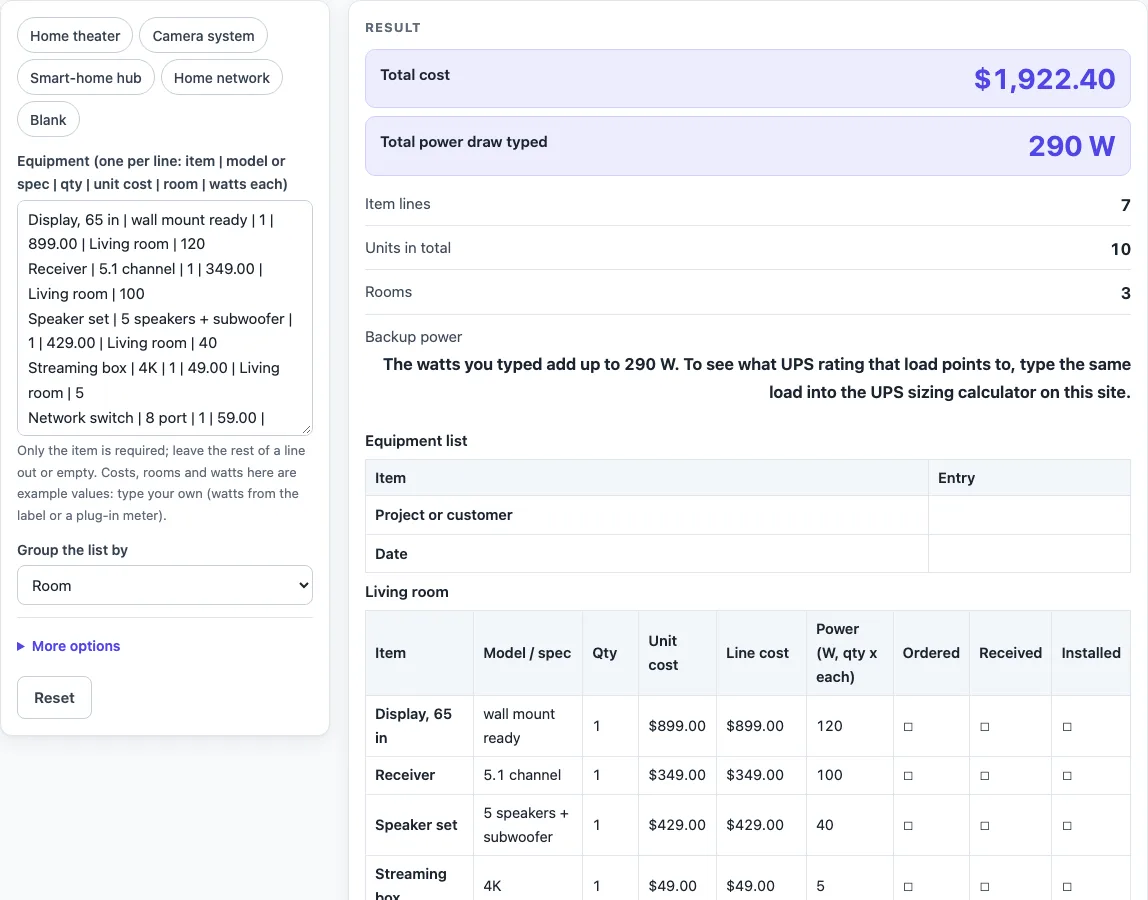
How to use the home theater equipment list tool
- Click in the “Equipment (one per line: item | model or spec | qty | unit cost | room | watts each)” box. To start from an example, choose a preset chip: “Home theater” (the default), “Camera system”, “Smart-home hub”, “Home network” or “Blank”.
- Type the item first. Only the item is required. Add the other parts after a vertical bar, in this order: model or spec, qty, unit cost, room, watts each. Leave out any part you do not need.
- Enter quantity as a whole number of 1 or more; a blank quantity counts as 1. Unit cost takes up to 4 decimals and watts each up to 2.
- Type the room name on each line. Lines with no room go under “No room given”.
- Set “Group the list by” to Room for one table per room with subtotals, or to One list (room as a column) for a single table.
- Check the warnings. Lines without a unit cost count as 0 in the cost total, and lines without watts count as 0 in the power total.
- Read the Totals table: Item lines, Units, Rooms (in room mode), Total cost and Total power draw typed.
- Fix any error shown, such as a quantity of 0 or more than 100 lines.
- Under “More options” add “Project or customer”, “Date” or “Currency symbol”.
Print the page, or select “Download as CSV (opens in Excel)”. Each line has a box (☐) in the Ordered, Received and Installed columns to tick off by hand.
How is the line cost worked out?
Line cost is quantity multiplied by unit cost. The tool uses integer arithmetic, so each line total is exact to the cent and rounded half up. For example, 3 x 0.335 gives $1.01. A unit cost can show more decimals than the total, so 12 clips at $0.375 come to $4.50, and the unit cost appears as $0.3750.
How is the power column calculated?
The Power column is quantity multiplied by watts each, using the numbers you typed. The tool does not look up the wattage of any device. Total power draw typed is the plain sum of those Power values. It is not an electrical design or a circuit load calculation. In the first worked example, 4 network cameras at 6.5 W each give 26 W, and a recorder at 25 W brings the total to 51 W. For the real wattage of a device, follow its maker’s spec sheet.
How do the room tables and totals add up?
In room mode, the tool makes one table for each room, in the order rooms first appear in your lines. Each table ends with a “Subtotal:
What do the other presets add up to?
The “Camera system” preset comes to $742.46, 72 W, 7 units and 2 rooms. “Smart-home hub” comes to $557.70, 10 W, 16 units and 3 rooms. “Home network” comes to $674.00, 80 W, 6 units and 2 rooms. “Blank” starts with an empty list and 8 blank rows to fill in by hand.
Why do blank costs and watts count as zero?
The tool cannot add a value you have not typed, so a missing unit cost is treated as 0 in the cost total, and a missing watts value is treated as 0 in the power total. The warnings show how many lines are affected. Totals with warnings can be lower than the real figures, so fill in the missing values before you rely on the totals.
What is the Backup power line?
When any watts were typed, the output adds a “Backup power” sentence saying the watts add up to that many W. It points you to the UPS sizing calculator on this site, where you can type the same load. The sentence is plain text and is not a recommendation.
Worked examples
| Input | Result |
|---|---|
| 7 lines, grouped by room | $1,922.40 in total, 290 W typed power draw |
| 7 lines, grouped in one list | $1,922.40 in total, 290 W typed power draw |
| 2 lines, grouped by room | $578.96 in total, 51 W typed power draw |
Calculated by the tool above; open it with the same values to see each step.
Frequently asked questions
Can I use this home theater equipment list for a camera system?
Yes. The “Camera system” preset loads a camera list with a cost of $742.46, 72 W, 7 units and 2 rooms. You can change any line to match your own cameras and recorder.
Does the tool upload my list?
No. Everything runs in your browser and nothing is uploaded.
How many lines can I enter?
You can enter up to 100 lines. A 101st line causes an error, so remove a line before you continue.
Why does my total show a warning?
The warning appears when a line has no unit cost or no watts value. Those lines count as 0 in the matching total, and the warning shows how many lines are affected.
Can I print the list or save it?
Yes. You can print the page, or select “Download as CSV (opens in Excel)” to save the list as a file.
Does the power total tell me whether my circuits can handle the load?
No. Total power draw typed is a plain sum of the numbers you entered. If you need backup power, the “Backup power” line in the output says the watts add up to N W and that the same load can be typed into the UPS sizing calculator on this site. Follow each device’s maker’s spec for its real wattage.
Related tools
- Security Camera Installation Quote Generator: Use it when you want a quote for installing security cameras.
- UPS Sizing Calculator: use it to turn the total watts you typed into the VA and W to look for in a UPS.
- UPS Runtime Calculator: use it to see how long a battery can run the load on your list.
- PoE Power Budget Calculator: use it to add up the power of PoE cameras and access points on the list.
- HDMI Cable Length Limit: use it to check the video cable runs between the devices on the list.
- Speaker Wire Gauge Chart: use it to compare wire gauges for the speaker runs.
- Subwoofer Wiring Diagram: use it to plan how subwoofers on the list are wired.
- Cables and Wiring: the hub with every cable and wiring tool on this site.