Cat6 vs Cat7
Choose an Ethernet speed, type your channel length and say what jacks your gear has. The page shows whether Cat 6 and Cat 7 are listed for it, by how much, and what separates the two categories.
Recent
Your last 10 settings, saved only in this browser. Nothing is uploaded.
How to use the Cat 6 vs Cat 7 tool
- Open Ethernet speed and pick one of the four options: 1000BASE-T (1 Gbit/s), 2.5GBASE-T (2.5 Gbit/s), 5GBASE-T (5 Gbit/s) or 10GBASE-T (10 Gbit/s).
- In Channel length (cable plus patch cords), type the total length of the link and choose m or ft. Include the patch cords at both ends, not just the wall or ceiling run.
- In Ports and jacks on your gear, select Standard RJ45 (8P8C) jacks or Class F connectors (GG45, ARJ45, TERA), depending on what your devices have.
- Read the result rows: Which category the sources list, Cat 6, Cat 7 and What your ports mean.
- Check any warnings and the steps listed below the result. They explain what to test or check before you rely on the link.
- Scroll to the tables Channel reach by speed and Cat 6 and Cat 7 compared if you want the full figures and their sources. The first table adds a column that says which categories fit the length you typed at each speed.
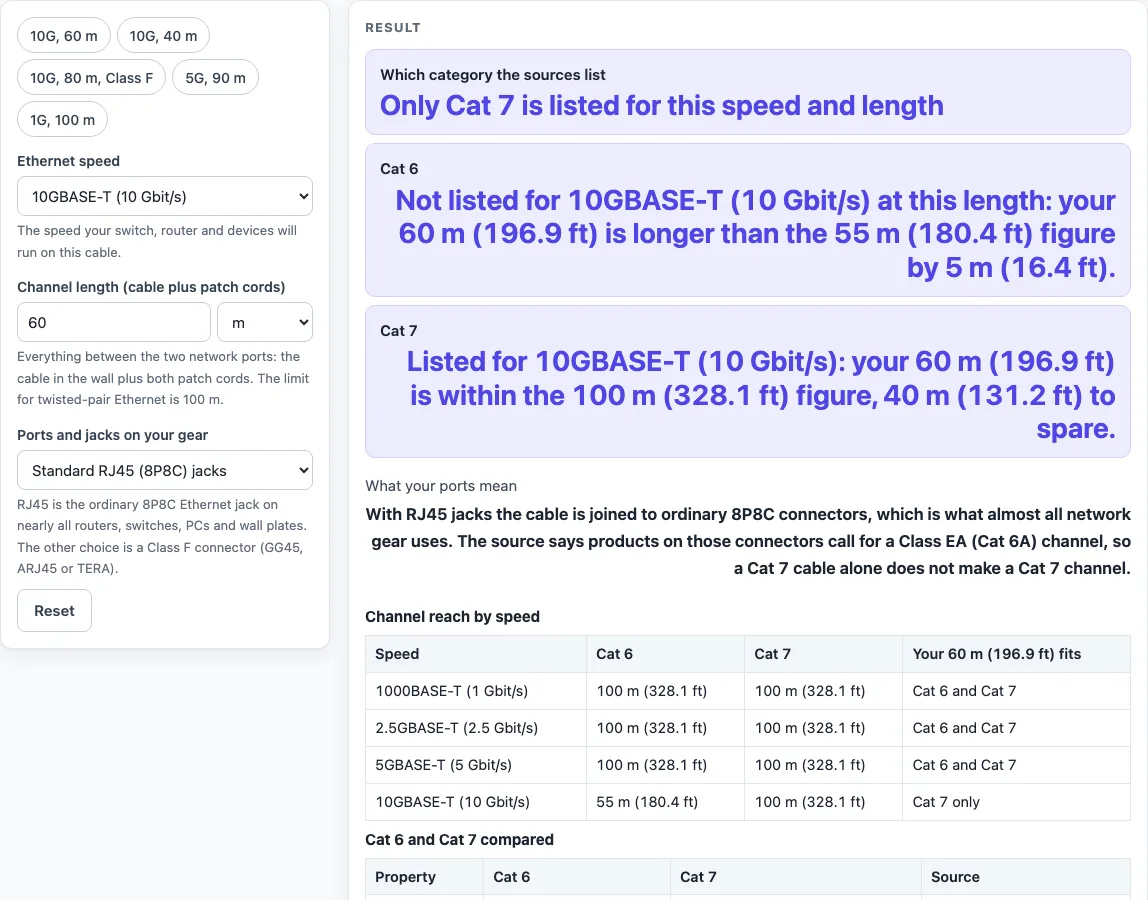
The tool opens on 10GBASE-T, 60 m, RJ45 jacks, so a result appears straight away. To skip the typing, use a preset: 10G, 60 m, 10G, 40 m, 10G, 80 m, Class F, 5G, 90 m or 1G, 100 m. Use Copy result or Copy link to share your answer, Print for a paper copy, and Reset to return to the opening settings.
Is Cat 7 better than Cat 6?
On reach, Cat 7 is listed for longer 10 Gbit/s runs. Cat 6 is listed to 55 m for 10GBASE-T, while Cat 7 is listed to the full 100 m. For 1000BASE-T, 2.5GBASE-T and 5GBASE-T, both categories are listed to 100 m, so Cat 7 adds no extra distance at those speeds.
Cat 7 is also specified to a higher frequency. Cat 6 is specified to 250 MHz (ISO/IEC 11801 Class E), and Cat 7 to 600 MHz (Class F). Each pair and the whole cable in Cat 7 are shielded (S/FTP), while Cat 6 is an unshielded twisted pair (UTP) design. Cat 7 was ratified in 2002 mainly to support 10 gigabit Ethernet over 100 m of copper.
What is the difference between Cat 6 and Cat 7?
Cat 6 and Cat 7 differ in their standards body, shielding, frequency and connectors. Cat 7 is an ISO/IEC class (Class F), not a TIA/EIA category, and the TIA does not recognise it. TIA published Cat 6 in June 2002.
The connectors are the practical difference. Class F was defined with GG45, ARJ45 or TERA connectors instead of the usual 8P8C (RJ45). Wikipedia says most makers of active equipment and network cards chose 8P8C for their 10 gigabit copper products, which therefore require a Class EA (Cat 6A) channel. As of 2019, some equipment has connectors that support a Class F channel. A Cat 7 cable alone does not make a Cat 7 channel if your devices use standard RJ45 jacks.
A 100 m channel is a 90 m permanent link plus up to 10 m of stranded patch cords. The length you enter in the tool should be the whole channel, not just the fixed cable.
Worked examples
| Input | Result |
|---|---|
| 10GBASE-T (10 Gbit/s), 60 m | Only Cat 7 is listed for this speed and length |
| 10GBASE-T (10 Gbit/s), 40 m | Both categories are listed for this speed and length |
| 5GBASE-T (5 Gbit/s), 90 m | Both categories are listed for this speed and length |
| 10GBASE-T (10 Gbit/s), 80 m | Only Cat 7 is listed for this speed and length |
Calculated by the tool above; open it with the same values to see each step.
Frequently asked questions
Is Cat 7 worth it for a home network?
The sources show where it helps and where it does not. For 1, 2.5 and 5 Gbit/s, Cat 6 and Cat 7 are both listed to 100 m, so Cat 7 adds no reach there. For 10 Gbit/s over more than 55 m only Cat 7 is listed, but ordinary RJ45 jacks mean a Cat 7 cable alone does not make a Cat 7 channel. Enter your own speed, length and ports in the tool before you decide.
Can Cat 6 do 10 Gbit/s?
Yes, but only over shorter runs. The published reach for Cat 6 at 10GBASE-T is 55 m. The tool’s default result at 60 m shows Cat 6 is 5 m (16.4 ft) too long, while Cat 7 is listed for that length.
Is Cat 7 the same as Cat 6A?
No. Cat 6A (ANSI/TIA-568.2-D) is the TIA category for 10GBASE-T at 100 m. Cat 7 is an ISO/IEC Class F channel with a different connector definition, and the TIA does not recognise it. The tool compares Cat 6 and Cat 7 only.
Why does Cat 7 show a warning when I choose RJ45 jacks?
With standard RJ45 (8P8C) jacks selected, the What your ports mean row says that a Cat 7 cable alone does not make a Cat 7 channel. Your devices have to support the Class F connection as well. Check the specifications of your switches, network cards and patch panels.
Does Cat 6 at 10 Gbit/s always work over 40 m?
Not guaranteed. At 40 m, the tool lists both categories for 10GBASE-T, with 15 m (49.21 ft) to spare for Cat 6. It also warns that Cat 6 at 10 Gbit/s depends on the installation, so you should test the link.
Does this tool certify my installed cable?
No. The tool shows listed reach figures, not the results of a test on your installed run. Installed links are qualified by testing.
Related tools
- Cat6 vs Cat6A: use this when you are deciding between Cat 6 and Cat 6A for 10 Gbit/s runs.
- Cat5e vs Cat6: use this when your current cable is Cat 5e and you want to see the step up to Cat 6.
- Ethernet Cable Length Limit: use this to check the maximum length for a given Ethernet speed.
- PoE Power Budget Calculator: use this when your network also powers devices over the cable.
- HDMI Cable Length Limit: use this to check how far an HDMI cable can run before the signal fails.
- Cables and Wiring: use this for general background on cable types and wiring.