Cat6 vs Cat6A
Choose an Ethernet speed and type your channel length. The page shows whether Cat 6 and Cat 6A are listed for it, by how much, and what separates the two categories.
Recent
Your last 10 settings, saved only in this browser. Nothing is uploaded.
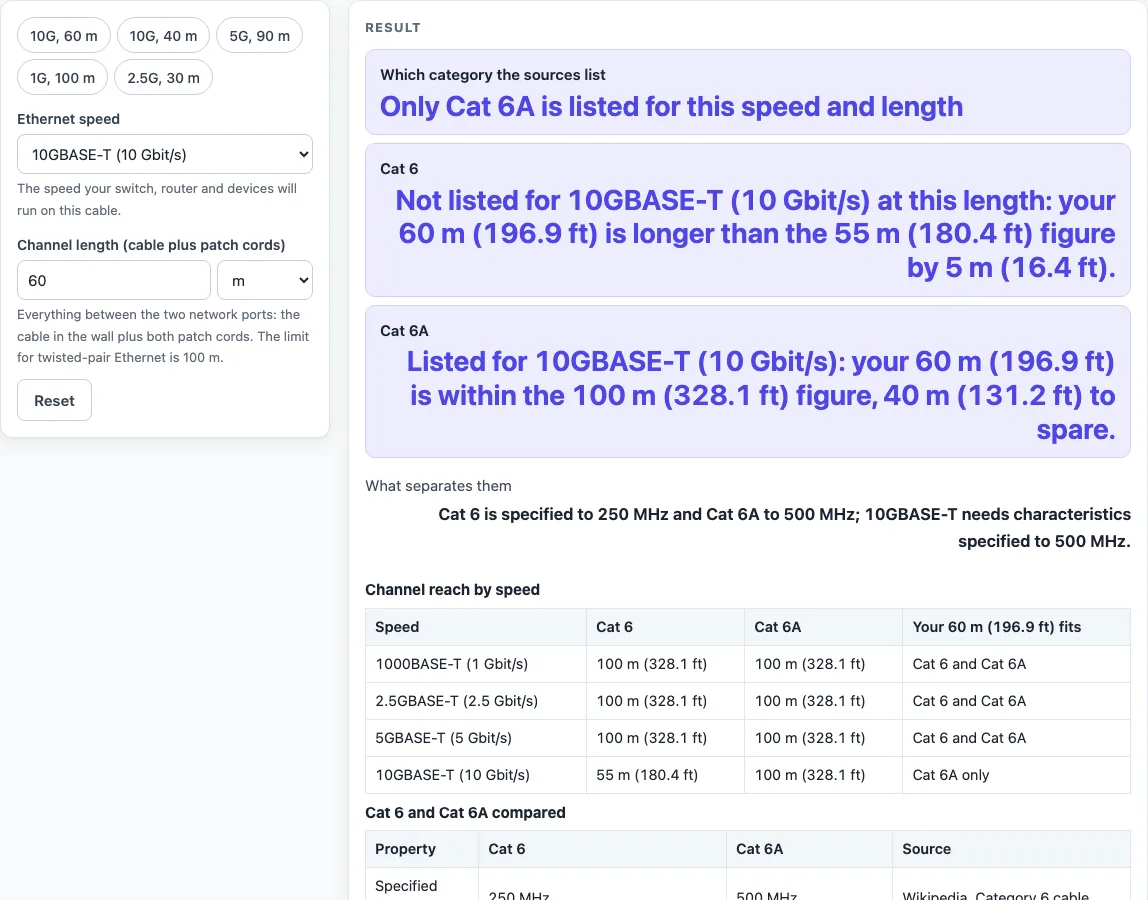
How to use the Cat 6 vs Cat 6A tool
- Open the tool. It starts on 10GBASE-T at 60 m, so a result appears straight away.
- Set the Ethernet speed control to the speed you need: 1000BASE-T (1 Gbit/s), 2.5GBASE-T, 5GBASE-T or 10GBASE-T.
- Enter your length in the Channel length (cable plus patch cords) field. Choose m or ft to match your measurement. Include both the solid cable and the patch cords.
- Read the Which category the sources list row. It names the categories that are listed for your speed and length.
- Read the Cat 6 and Cat 6A rows. Each says whether your length is within the listed reach for that speed and by how much, or beyond it.
- If a warning appears, such as the one for Cat 6 at 10 Gbit/s, test the installed link before you rely on that category.
- Scroll down to the two tables. The channel reach table lists every speed with a column for your typed length. The comparison table lists each category’s frequency, standard, 10GBASE-T reach, alien crosstalk, lower speeds and Cat 6e, with a source for each row.
The five presets are 10G 60 m, 10G 40 m, 5G 90 m, 1G 100 m and 2.5G 30 m. Use them to compare results quickly without retyping numbers.
What is the difference between Cat6 and Cat6A?
Cat 6 and Cat 6A are both twisted-pair copper categories used for Ethernet. The main difference is frequency: Cat 6 is specified up to 250 MHz, while Cat 6A is specified up to 500 MHz. That extra bandwidth is why Cat 6A is needed for 10 Gbit/s over the full channel length.
Cat 6A also has an improved alien crosstalk specification. Alien crosstalk is noise that one cable picks up from neighbouring cables in the same bundle. Cat 6 picks up high levels of this noise at high frequencies.
At 1, 2.5 and 5 Gbit/s, the tool lists both categories up to the 100 m channel. The difference shows up mainly at 10 Gbit/s. Cat 6 was published by TIA in June 2002. The Cat 6A standard is ANSI/TIA-568.2-D, defined in 2009, which replaced 568-C.2.
Do I need Cat6A for 10 Gbit/s?
You need Cat 6A for the full 100 m channel at 10 Gbit/s. 10GBASE-T needs transmission characteristics specified to 500 MHz, and only Cat 6A meets that for the whole channel. Cat 6 is listed for 10GBASE-T only up to 55 m.
For shorter runs, Cat 6 can work. Cat 6 can carry 10GBASE-T at shorter distances when the installed link is qualified under ISO TR 24750 or TIA-155-A. The tool’s default example shows the threshold. At 60 m, Cat 6 is 5 m (16.4 ft) past its 55 m figure, so only Cat 6A is listed. At 40 m, both are listed, with Cat 6 having 15 m to spare. Because that Cat 6 result depends on installation quality, the tool shows a warning and asks you to test the link.
Installation affects both categories. Keep the bend radius above four times the cable diameter, do not untwist the pairs, and strip the jacket back no more than 13 mm. Counterfeit copper-clad aluminium cable does not meet the specification. Shielded cable may be needed in places with high interference.
Sources (checked 18 October 2026): en.wikipedia.org · en.wikipedia.org · en.wikipedia.org
Worked examples
| Input | Result |
|---|---|
| 10GBASE-T (10 Gbit/s), 60 m | Only Cat 6A is listed for this speed and length |
| 10GBASE-T (10 Gbit/s), 40 m | Both categories are listed for this speed and length |
| 5GBASE-T (5 Gbit/s), 90 m | Both categories are listed for this speed and length |
| 1000BASE-T (1 Gbit/s), 350 ft | Over 100 m: neither category is listed |
Calculated by the tool above; open it with the same values to see each step.
Frequently asked questions
Can Cat6 run 10 gigabit Ethernet?
Yes, but only over shorter runs. Cat 6 is listed for 10GBASE-T up to 55 m. For the full 100 m channel, use Cat 6A.
How far can Cat6 carry 10GBASE-T?
The listed figure is 55 m. Beyond that, Cat 6 is not listed, and only Cat 6A is listed, up to 100 m. Cat 6 can carry 10GBASE-T over shorter distances when the installed link is qualified under ISO TR 24750 or TIA-155-A, so test the installed link.
Is Cat6A worth it for a home network?
The listed reach decides it. At 1, 2.5 and 5 Gbit/s, Cat 6 is already listed up to the 100 m channel, so Cat 6A adds no listed reach at those speeds. At 10 Gbit/s, Cat 6A is the category listed beyond 55 m.
What is Cat6e?
Cat 6e is not a recognised standard. It is a marketing label that manufacturers use for headroom above Cat 6. Look for a cable that names Cat 6 or Cat 6A.
Does Cat6A cost more or need different connectors?
The tool does not compare prices or connectors, because the sources used do not give them. It covers what the sources print: the specified frequency, the listed reach for each speed and the standards behind each category.
What happens if my cable run is over 100 m?
No category is listed, because twisted-pair Ethernet is limited to a 100 m channel. For example, 1000BASE-T at 350 ft (106.7 m) is over the limit, so neither Cat 6 nor Cat 6A is listed.
Related tools
- Ethernet Cable Length Limit — use it to check a permanent link and patch cords against the 100 m channel.
- PoE Power Budget Calculator — use it to work out whether your switch can power the devices on a PoE network.
- HDMI Cable Length Limit — use it to check how far an HDMI cable can run.
- DisplayPort vs HDMI — use it to compare the two video connection standards.
- USB-A vs USB-C — use it to compare the two USB connector types.
- Cables, wiring and installer documents — use it to find cable and wiring reference material.