Cat5e vs Cat6
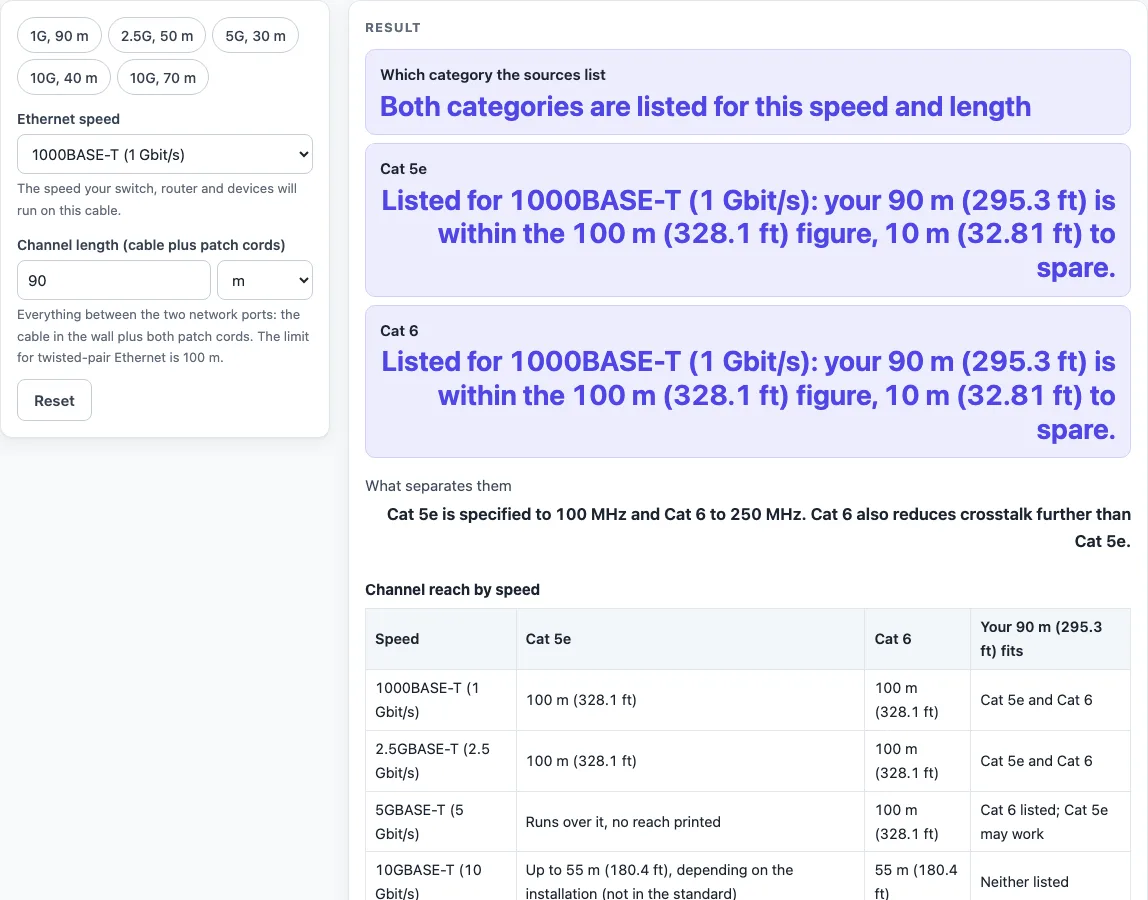
Choose an Ethernet speed and type your channel length. The page shows whether Cat 5e and Cat 6 are listed for it, by how much, and what separates the two categories.
Recent
Your last 10 settings, saved only in this browser. Nothing is uploaded.
Cat5e vs Cat6 is a free tool that shows which Ethernet cable category the named sources list for the speed and cable length you choose. It sets Cat 5e and Cat 6 side by side, so you can see what each one is printed for before you buy cable or wire a room. It runs in your browser, needs no sign-up, and nothing you enter is uploaded.
Results are either calculated from your inputs or taken from what the named source says. Where a source prints no figure for a category, the tool says so. Use it when you are choosing cable for home AV, network, PC or display gear.
How to use the Cat5e vs Cat6 tool
- Open the “Ethernet speed” control and choose one of four options: 1000BASE-T (1 Gbit/s), 2.5GBASE-T (2.5 Gbit/s), 5GBASE-T (5 Gbit/s) or 10GBASE-T (10 Gbit/s). The tool opens on 1 Gbit/s.
- Set the “Channel length (cable plus patch cords)” control. Choose metres or feet, then enter the total length, which is the installed cable plus the patch cords.
- Read “Which category the sources list” first. It names the category the sources print for your speed and length.
- Check the “Cat 5e” and “Cat 6” rows. Each one shows what its source says for that combination.
- Read “What separates them” for the difference between the two categories at your setting.
- Open the “Channel reach by speed” table to see the reach for every speed and which speeds fit your length.
- Open “Cat 5e and Cat 6 compared” to see each row next to the source it comes from.
The tool has five presets: “1G, 90 m”, “2.5G, 50 m”, “5G, 30 m”, “10G, 40 m” and “10G, 70 m”. Pick one to load that speed and length, then change either control to test your own run.
The tool opens on 1 Gbit/s at 90 m. Type a length in metres or feet; feet are converted at 0.3048 m per foot. If the length is over 100 m, the tool says neither category is listed, because that is the channel limit for twisted-pair Ethernet.
Is Cat6 faster than Cat5e?
Not at every speed. At 1 Gbit/s and 2.5 Gbit/s, both categories are listed to 100 m, so the sources give them the same reach. The difference shows at 10 Gbit/s, where Cat 6 is listed to 55 m and Cat 5e may reach up to 55 m depending on the installation, which the standard does not specify.
At 5 Gbit/s, the sources print 100 m for Cat 6. One source says 5GBASE-T runs over existing Cat 5e or Cat 6, but it prints no reach for Cat 5e. The tool therefore flags Cat 5e as having no printed reach and says to test the installed link.
Worked example: at 10 Gbit/s over 40 m, Cat 6 is listed with 15 m to spare against its 55 m figure. Cat 5e may work, depending on the installation. At 10 Gbit/s over 70 m, neither category is listed, because 70 m is beyond 55 m.
Can Cat5e do gigabit?
Yes, at 1 Gbit/s. Both categories are listed for 1000BASE-T to 100 m. The 100 m channel for this speed is 90 m of permanent link (solid cable between two connectors) plus up to 10 m of stranded patch cords in total.
For example, a 1G run of 90 m has 10 m to spare. Because both categories share this reach, gigabit reach alone does not separate Cat 5e from Cat 6. Check the length of your whole run, including the patch cords, against the 100 m channel limit.
Sources (checked 19 October 2026): en.wikipedia.org · en.wikipedia.org · en.wikipedia.org · en.wikipedia.org · en.wikipedia.org
Worked examples
| Input | Result |
|---|---|
| 1000BASE-T (1 Gbit/s), 90 m | Both categories are listed for this speed and length |
| 10GBASE-T (10 Gbit/s), 40 m | Cat 6 is listed; Cat 5e is not listed and may work depending on the installation |
| 5GBASE-T (5 Gbit/s), 30 m | Cat 6 is listed; Cat 5e is not listed and may work depending on the installation |
| 1000BASE-T (1 Gbit/s), 350 ft | Over 100 m: neither category is listed |
Calculated by the tool above; open it with the same values to see each step.
Frequently asked questions
What is the difference between Cat5e and Cat6?
Cat 5e is specified to 100 MHz. It has the same bandwidth and physical construction as Cat 5 but further mitigates crosstalk. Cat 6 is specified to 250 MHz and reduces crosstalk further.
Can Cat5e carry 10 Gbit/s?
The standard does not specify 10GBASE-T over Cat 5e, so it cannot be guaranteed. One source says it may reach up to 55 m depending on the installation. The category the sources name for 10GBASE-T over the full 100 m is Category 6A.
Is Cat6 backward compatible with Cat5e?
Yes. Cat 6 and 6A are backward compatible with Cat 5 and 5e. For Cat 6 to perform as listed, use Cat 6 rated jacks and patch cords, because otherwise performance is degraded.
Does the tool certify my cable run?
No. The tool lists what the sources print and does not certify a cable run. Installed links are qualified by testing.
Is Cat 6e a recognised standard?
No. Cat 6e is not a recognised standard, so this tool compares only Cat 5e and Cat 6.
Why does 10 Gbit/s at 70 m show neither category?
At 10 Gbit/s, Cat 6 is listed to 55 m, and Cat 5e may reach up to 55 m depending on the installation. At 70 m, both are beyond that figure. Over 100 m, neither category is listed at any speed.
Related tools
- Cat6 vs Cat6A: use it when you are considering the next step up from Cat 6.
- Ethernet Cable Length Limit: use it to check how far a run can go before you reach the channel limit.
- PoE Power Budget Calculator: use it when the cable run also has to carry power to devices.
- DisplayPort vs HDMI: use it when you are choosing a connection for a display rather than a network cable.
- HDMI Cable Length Limit: use it to check how far an HDMI cable can run for a display.
- USB-A vs USB-C: use it to compare USB connector types for your devices.