98 Inch TV Dimensions
Type a diagonal (it opens at 98 in) and a screen shape to see the width, height and area of the screen, plus viewing-distance and mounting-height figures from named sources.
Recent
Your last 10 settings, saved only in this browser. Nothing is uploaded.
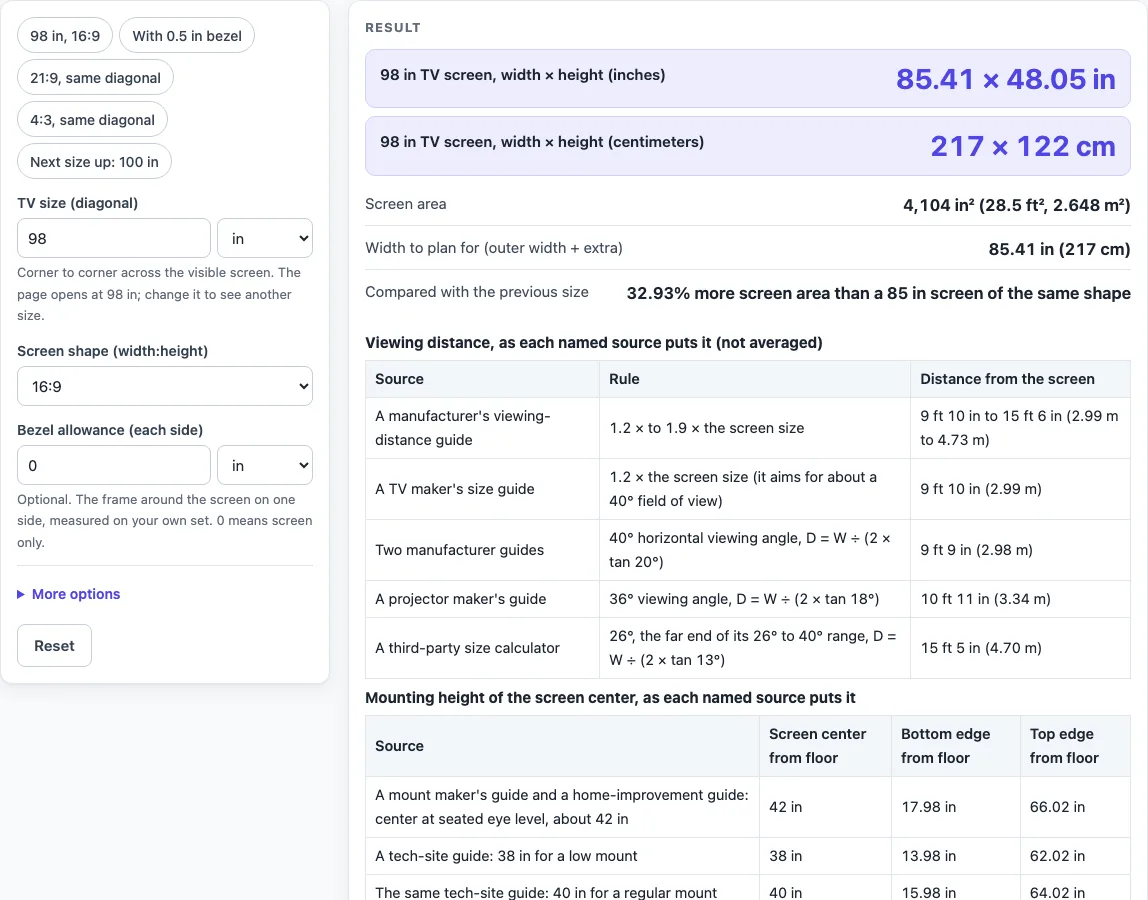
How to use the 98 Inch TV Dimensions tool
- Open the tool at the top of this page. It starts at 98 in in the 16:9 shape.
- Check “TV size (diagonal)”. It is set to 98 in. You can change the unit to in, cm, mm or ft.
- Check “Screen shape (width:height)”. 16:9 is the default. You can choose 21:9, 4:3 or 16:10, or pick a custom ratio and fill in “Shape, width part” and “Shape, height part”.
- Read the width, height and area in the results. With the defaults you should see 85.41 × 48.05 in (217 × 122 cm).
- Enter “Bezel allowance (each side)” if you want an outer size. For example, type 0.5 in. The row “Outer size with your bezel allowance” then appears. Leave it at 0 if you only need the screen.
- Open More options and enter “Extra width for stand or cabinet”. “Width to plan for (outer width + extra)” adds this value to the outer width. The tool does not know your set’s feet, so it does not invent a stand width.
- Check “Compared with the previous size”. For 98 in it shows 32.93% more screen area than an 85 in screen.
- Scroll to the viewing-distance table and the mounting-height table. Each source is listed on its own row, so compare the rows rather than looking for one answer.
Use the presets to compare sizes and shapes: “98 in, 16:9”, “With 0.5 in bezel”, “21:9, same diagonal”, “4:3, same diagonal” and “Next size up: 100 in”. Change one input at a time so you can see which value caused each change.
How is the width and height of a 98 inch TV worked out?
The width and height come from the diagonal and the screen shape. For a shape a:b, width = diagonal × a ÷ √(a² + b²), and height = diagonal × b ÷ √(a² + b²). These formulas come from Pythagoras. The diagonal is the longest side of a right triangle whose other sides are the width and height, so diagonal² = width² + height².
For 98 in at 16:9, √(16² + 9²) = √337 ≈ 18.36. That gives a width of 98 × 16 ÷ 18.36 ≈ 85.41 in and a height of 98 × 9 ÷ 18.36 ≈ 48.05 in. As a check, 85.41² + 48.05² ≈ 9,604, which equals 98². The area is width × height, about 4,104 in².
Area grows with the square of the diagonal. A 98 in screen of the same shape has 32.93% more area than an 85 in screen. Changing the shape at the same diagonal also changes the figures. The 21:9 shape gives 90.08 × 38.6 in, and the 4:3 shape gives 78.4 × 58.8 in.
Why might the listed size of a TV differ from the screen you measure?
The calculation covers only the visible screen. A TV maker’s support page says the listed size excludes the frame or bezel. A retailer’s guide says it excludes the bezel, casing and stand. A real set therefore takes up more space than the numbers above. With a bezel allowance of 0.5 in on each side, the tool adds twice that allowance to the width and height, giving an outer size of 86.41 × 49.05 in (219.5 × 124.6 cm).
A “class” size can also be slightly smaller than its label. A retailer’s guide gives a 55-class screen of about 54.6 in as an example. A reference page says class sizes should be within 1/2 in of the actual size. The tool does not correct for this.
Published figures can also differ from the calculation. A manufacturer’s approximate table gives 86 × 49.2 in, but does not state its basis. Differences of up to about 1 in appear between sources and the screen-only geometry. The tool shows these figures side by side and does not average them. Depth is not calculated, because it depends on the model, the stand or wall mount, and the connections.
Viewing distance and mounting height also depend on the source. For 98 in, a TV maker’s guide gives 9 ft 10 in and a manufacturer guide gives 9 ft 10 in to 15 ft 6 in. A mount maker’s guide and a home-improvement guide put the screen center about 42 in above the floor, so this 48.05 in tall screen runs from 17.98 in to 66.02 in. The next size up, 100 in, is 87.16 × 49.03 in, which is 1.75 in wider and 0.98 in taller.
Sources (checked 16 October 2026): support.tcl.com · blog.bestbuy.ca · en.wikipedia.org · samsung.com · us.dynabook.com · benq.com · blog.sanus.com · bobvila.com · slashgear.com · nist.gov · blog.bestbuy.ca · samsung.com
Worked examples
| Input | Result |
|---|---|
| 98 in diagonal, shape 16:9 | 85.41 × 48.05 in (217 × 122 cm) |
| 98 in diagonal, shape 16:9 | 85.41 × 48.05 in (217 × 122 cm) |
| 98 in diagonal, shape 21:9 | 90.08 × 38.6 in (228.8 × 98.05 cm) |
| 98 in diagonal, shape 4:3 | 78.4 × 58.8 in (199.1 × 149.4 cm) |
| 100 in diagonal, shape 16:9 | 87.16 × 49.03 in (221.4 × 124.5 cm) |
Calculated by the tool above; open it with the same values to see each step.
Frequently asked questions
Does the 98 inch TV dimensions result include the bezel?
No. The width, height and area are for the visible screen only. Enter a value in “Bezel allowance (each side)” to see an outer size, or measure the set’s frame yourself.
What viewing distance do the sources give for a 98 inch TV?
The sources differ, so each is shown separately. A TV maker’s guide gives 1.2 × the screen size, or 9 ft 10 in (2.99 m). A manufacturer guide gives 1.2 to 1.9 ×, or 9 ft 10 in to 15 ft 6 in (2.99 m to 4.73 m). The 40° viewing angle gives 9 ft 9 in (2.98 m), 36° gives 10 ft 11 in (3.34 m), and 26° gives 15 ft 5 in (4.70 m).
At what height should a 98 inch TV be mounted?
A mount maker’s guide and a home-improvement guide use a 42 in screen center from the floor, which gives a bottom edge of 17.98 in and a top edge of 66.02 in for this screen. A tech-site guide lists 38, 40 and 42 in for low, regular and high mounts, and about 50 in for a bedroom.
What is the area of a 98 inch TV screen?
The area is 4,104 in², which is about 28.5 ft² or 2.648 m². It is calculated from the default 16:9 width and height.
How does the published figure compare with the calculation?
A manufacturer’s approximate table lists 86 × 49.2 in for this size and does not state its basis. That is 0.59 in wider and 1.15 in taller than the calculated 85.41 × 48.05 in, and the page shows both without averaging.
Can I use this result to check whether a TV fits my stand or wall space?
The tool does not confirm fit. It calculates results from the values you enter. Measure the set, the stand and the space yourself, and use “Extra width for stand or cabinet” to add the stand width you measured.
Related tools
- TV Sizes and Dimensions: use when you want every common TV size in one place.
- 100 Inch TV Dimensions: use when you are comparing the size just above 98 in.
- 85 Inch TV Dimensions: use when you are weighing the size just below 98 in.
- 80 Inch TV Dimensions: use when you want a smaller large-screen option.
- 75 Inch TV Dimensions: use when you are checking a 75 in screen against a much wider one.
- 65 Inch TV Dimensions: use when you are comparing a 65 in screen with the 98 in figures on this page.
- TV Size Chart: use when you want several sizes compared side by side.
- TV Size for Room: use when you want sizes matched to your seating distance.