80 Inch TV Dimensions
Type a diagonal (it opens at 80 in) and a screen shape to see the width, height and area of the screen, plus viewing-distance and mounting-height figures from named sources.
Recent
Your last 10 settings, saved only in this browser. Nothing is uploaded.
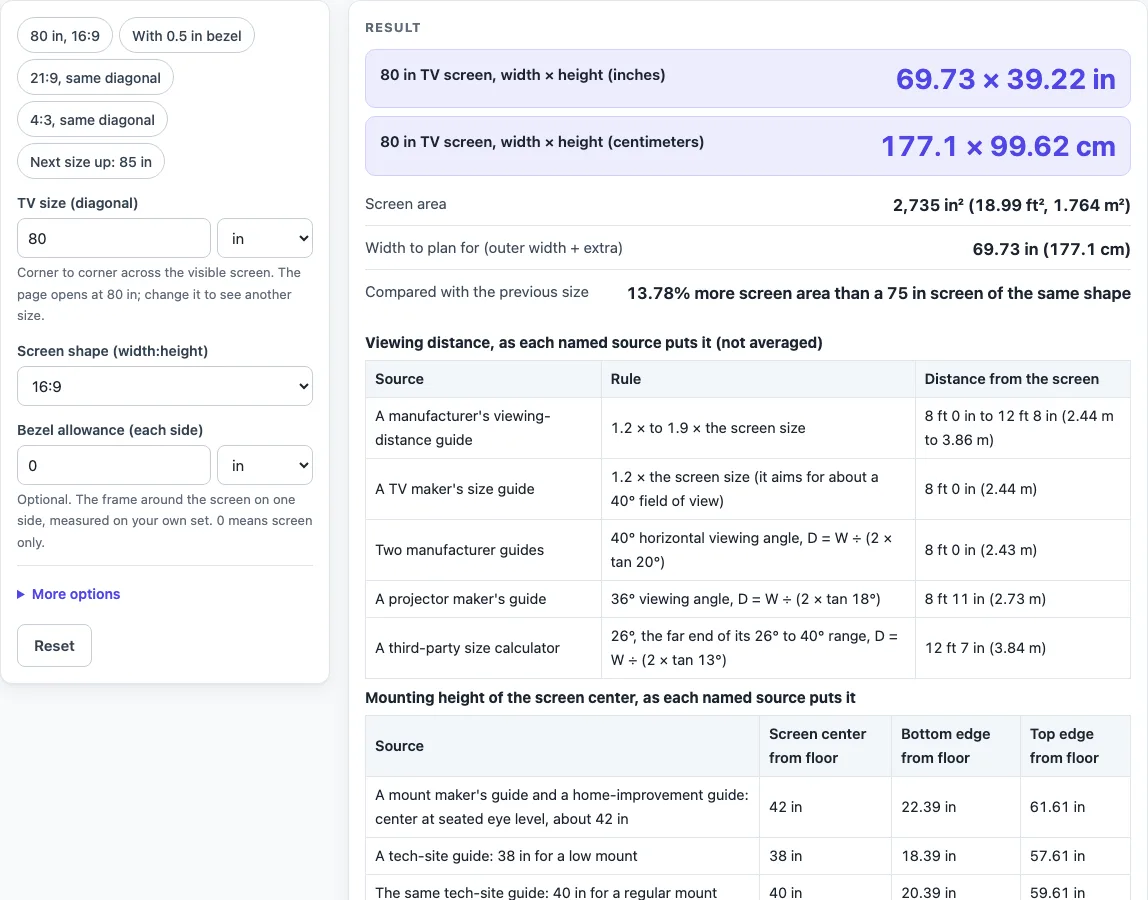
How to use the 80 inch tv dimensions tool
- Leave “TV size (diagonal)” at 80 in, or type another size and choose in, cm, mm or ft.
- Check “Screen shape (width:height)”. The default is 16:9. You can pick 21:9, 4:3 or 16:10, or choose a custom ratio and fill in “Shape, width part” and “Shape, height part”.
- Read “80 in TV screen, width × height (inches)”, the centimeter row and “Screen area”. At the defaults they show 69.73 × 39.22 in, 177.1 × 99.62 cm and 2,735 in².
- Type a value in “Bezel allowance (each side)”, such as 0.5 in. Read the “Outer size with your bezel allowance” row, which then shows 70.73 × 40.22 in (179.6 × 102.2 cm). This row only appears when the bezel is above 0.
- Open More options and type a value in “Extra width for stand or cabinet”. Read “Width to plan for (outer width + extra)”.
- Check “Compared with the previous size”. For 80 in it shows 13.78% more screen area than a 75 in screen of the same shape.
- Read the viewing-distance table and the mounting-height table. Each source is listed on its own row.
- Measure your TV and your space before you buy or mount anything. The tool does not check whether a set fits your wall or stand.
For quick comparisons, use the presets: “80 in, 16:9”, “With 0.5 in bezel”, “21:9, same diagonal”, “4:3, same diagonal” and “Next size up: 85 in”. Each preset fills in the controls for you, and you can change any value after you select it.
What does an 80 inch TV measure across the screen?
An 80 inch TV is measured diagonally, from one corner of the visible screen to the opposite corner. In the 16:9 shape, that diagonal gives a screen about 69.73 in wide and 39.22 in tall.
The listed size leaves out the frame, the bezel and the stand. A TV maker’s support page says its listed size excludes the frame or bezel, and a retailer’s guide says its figure also excludes the casing and stand. A “class” size can be a little smaller than its label, too. A retailer gives a 55-class screen of about 54.6 in as an example, and a reference page says class sizes should be within 1/2 in of the actual size. The page states this as a warning and does not correct for it.
How is the width and height of a TV calculated?
The width and height come from the diagonal and the screen shape, using Pythagoras’ rule. The diagonal squared equals the width squared plus the height squared. For a screen shape a:b, the formulas are:
- Width = diagonal × a ÷ √(a² + b²)
- Height = diagonal × b ÷ √(a² + b²)
For 80 in at 16:9, √(16² + 9²) = √337 ≈ 18.358. Width = 80 × 16 ÷ 18.358 = 69.73 in. Height = 80 × 9 ÷ 18.358 = 39.22 in. Area is width × height, which gives 69.73 × 39.22 ≈ 2,735 in².
Area grows faster than the diagonal. An 80 in screen has 13.78% more screen area than a 75 in screen of the same shape. The same 80 in diagonal gives different sizes in other shapes: 73.53 × 31.51 in in 21:9 and 64 × 48 in in 4:3. The next size up, 85 in, measures 74.08 × 41.67 in.
Published figures can differ from the geometry. A reference page’s rounded table lists 69.69 × 39.37 in for 80 in at 16:9, which is 0.04 in narrower and 0.15 in taller than the calculation. The page shows both values rather than averaging them.
Viewing distance also varies by source. For 80 in, a TV maker’s guide gives 1.2 times the screen size, or 8 ft 0 in, and a manufacturer guide gives 8 ft 0 in to 12 ft 8 in. The angle rows give 8 ft 0 in at 40°, 8 ft 11 in at 36° and 12 ft 7 in at 26°. Each is listed separately.
Mounting height is a further place where sources differ. A mount maker’s guide and a home-improvement guide put the screen center about 42 in above the floor, so this screen would run from 22.39 in to 61.61 in. A tech-site guide lists 38, 40 and 42 in for low, regular and high mounts. The screen is 39.22 in tall, so each edge sits 19.61 in from the center. Depth is not calculated, because it depends on the model, the stand or wall mount and the connections.
Sources (checked 16 October 2026): support.tcl.com · blog.bestbuy.ca · en.wikipedia.org · samsung.com · us.dynabook.com · benq.com · blog.sanus.com · bobvila.com · slashgear.com · nist.gov · blog.bestbuy.ca · samsung.com
Worked examples
| Input | Result |
|---|---|
| 80 in diagonal, shape 16:9 | 69.73 × 39.22 in (177.1 × 99.62 cm) |
| 80 in diagonal, shape 16:9 | 69.73 × 39.22 in (177.1 × 99.62 cm) |
| 80 in diagonal, shape 21:9 | 73.53 × 31.51 in (186.8 × 80.04 cm) |
| 80 in diagonal, shape 4:3 | 64 × 48 in (162.6 × 121.9 cm) |
| 85 in diagonal, shape 16:9 | 74.08 × 41.67 in (188.2 × 105.8 cm) |
Calculated by the tool above; open it with the same values to see each step.
Frequently asked questions
Does the 80 inch measurement include the frame?
No. The number is the visible screen only. A TV maker’s support page says the listed size excludes the frame or bezel, and a retailer’s guide says it also excludes the casing and stand.
Why is the outer size bigger than the screen size?
The outer size includes the bezel and any stand or cabinet. Set “Bezel allowance (each side)” to see the outer size. With 0.5 in on each side, the result is 70.73 × 40.22 in.
How far should I sit from an 80 inch TV?
Sources give different answers, so the tool lists them separately. A manufacturer guide suggests 1.2 to 1.9 times the screen size, which is 8 ft 0 in to 12 ft 8 in. A TV maker’s guide suggests 1.2 times, or 8 ft 0 in. A 40° viewing angle gives 8 ft 0 in, a 36° angle gives 8 ft 11 in, and a 26° angle gives 12 ft 7 in.
How high should I mount an 80 inch TV?
At a screen center of 42 in, a mount maker’s guide and a home-improvement guide give a bottom edge of 22.39 in and a top edge of 61.61 in for this screen. A tech-site guide lists 38, 40 and 42 in for low, regular and high mounts, and about 50 in for a bedroom.
Can I use the width to check if the TV fits my wall?
Use the “Width to plan for (outer width + extra)” result as a planning number, not a promise. The tool does not know your set’s feet or stand, and depth is not calculated because it depends on the model and mount. Measure the set and the space.
Why do my numbers differ from a published spec?
Published specs may use rounded values, a different bezel, or a class size. A reference page’s rounded table lists 69.69 × 39.37 in for 80 in, against the calculated 69.73 × 39.22 in. Compare the screen-only geometry with the spec sheet from the TV maker.
Related tools
- TV Sizes and Dimensions: use when you want every common TV size in one place.
- 75 Inch TV Dimensions: use when you are comparing the size just below 80 in.
- 85 Inch TV Dimensions: use when you are weighing the next size up.
- 70 Inch TV Dimensions: use when a 70 in screen is a smaller option for the same room.
- 100 Inch TV Dimensions: use when you want the figures for a much larger screen.
- 65 Inch TV Dimensions: use when you are comparing a 65 in screen with an 80 in one.
- TV Size Chart: use when you want several sizes compared side by side.
- TV Size for Room: use when you want sizes matched to your seating distance.