5GHz vs 2.4GHz
Enter the distance to the router, whether the device has a 5 GHz radio and whether you need speed or reach. The page picks a band and shows the path loss on each.
Recent
Your last 10 settings, saved only in this browser. Nothing is uploaded.
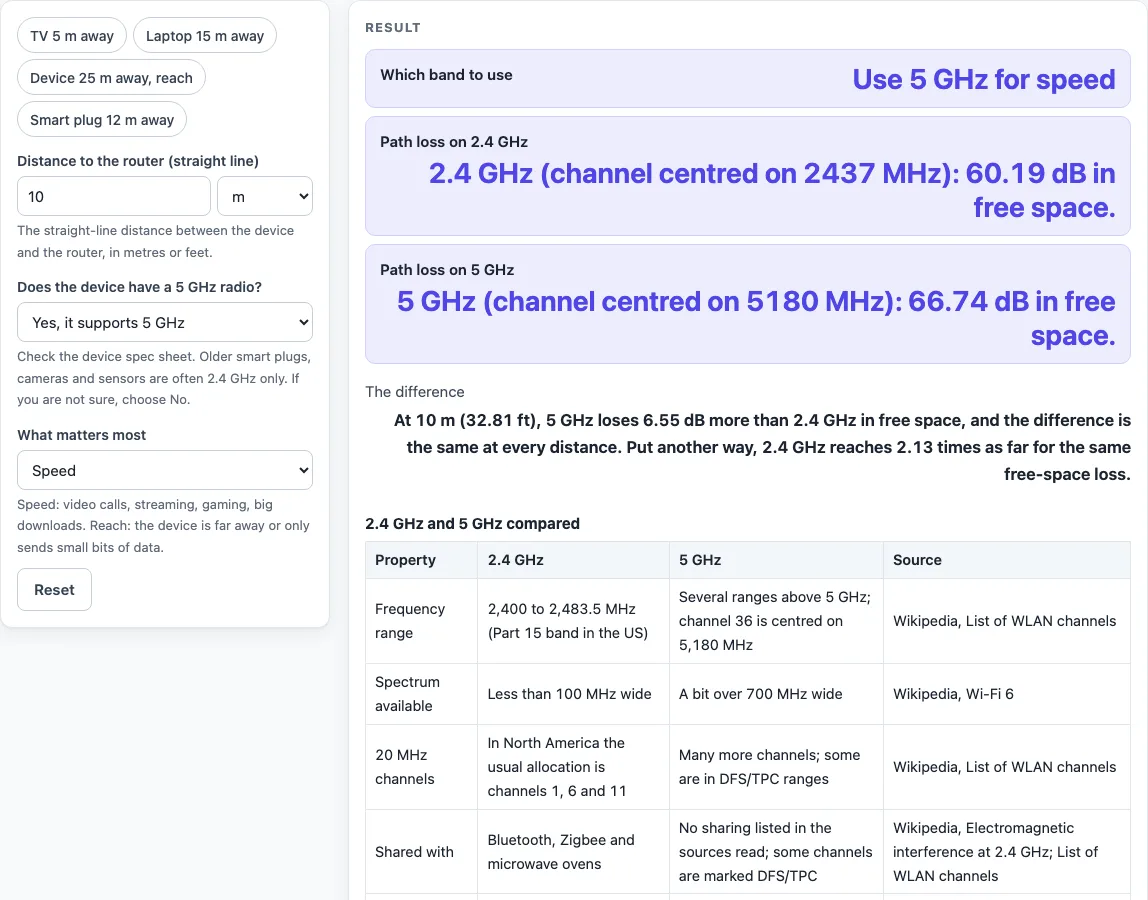
How to use the 5 GHz vs 2.4 GHz tool
- Enter the distance in “Distance to the router (straight line)”. Choose metres or feet. The tool opens at 10 m.
- Answer “Does the device have a 5 GHz radio?” Choose Yes, it supports 5 GHz, or No, or I am not sure. If you choose No or I am not sure, the verdict is 2.4 GHz whatever you pick in the next step.
- Choose “What matters most”: Speed or Reach. With a 5 GHz radio, Speed gives 5 GHz and Reach gives 2.4 GHz.
- Read the result rows: “Which band to use”, “Path loss on 2.4 GHz”, “Path loss on 5 GHz” and “The difference”.
The presets “TV 5 m away”, “Laptop 15 m away”, “Device 25 m away, reach” and “Smart plug 12 m away” are ready-made cases to try. Below the result, “Free-space path loss at other distances” shows losses at 3, 5, 10, 20 and 30 m. The table “2.4 GHz and 5 GHz compared” lists frequency range, spectrum available, 20 MHz channels, what each band is shared with, and Wi-Fi generations.
Change the distance to see how the path loss grows: each doubling of the distance adds 6.02 dB on either band, while the difference between the bands stays the same. The tool converts feet at 0.3048 m per foot before it runs the formula.
Which is better, 5 GHz or 2.4 GHz?
Neither band is better in every case. The tool gives 5 GHz when speed matters and 2.4 GHz when reach matters, but only for a device with a 5 GHz radio, and that rule is the tool’s own setting rather than a test of your network.
The two bands differ in their space and their neighbours. In the US, the 2.4 GHz band runs from 2,400 to 2,483.5 MHz, less than 100 MHz wide, and in North America the usual 20 MHz channels are 1, 6 and 11. Bluetooth, Zigbee and microwave ovens share that band. The 5 GHz band is a bit over 700 MHz wide, which is why it offers more room for channels. Some of its channels are marked DFS or TPC in the channel list, meaning extra regulatory rules apply. Wi-Fi 4, Wi-Fi 6 and later use both bands, while Wi-Fi 5 (802.11ac) uses only 5 GHz.
Does 5 GHz Wi-Fi have a shorter range than 2.4 GHz?
Yes, in the free-space calculation. Free-space path loss in dB is 20 log10(distance in km) + 20 log10(frequency in GHz) + 92.45, evaluated at the centre of 2.4 GHz channel 6 (2437 MHz) and 5 GHz channel 36 (5180 MHz). At 10 m, that gives 60.19 dB on 2.4 GHz and 66.74 dB on 5 GHz. The difference is 6.55 dB at every distance, because the distance term is the same on both bands. Put another way, 2.4 GHz reaches 2.13 times as far for the same free-space loss. At 20 m the losses are 66.21 dB and 72.76 dB.
The formula leaves out walls, floors and furniture, which add loss, and many common materials absorb or reflect Wi-Fi signals. The standards table gives approximate indoor ranges of 38 m for 802.11g (2.4 GHz) and 35 m for 802.11a (5 GHz). Those are standard figures, not results for your home.
Sources (checked 19 October 2026): en.wikipedia.org · en.wikipedia.org · en.wikipedia.org · en.wikipedia.org · en.wikipedia.org
Worked examples
| Input | Result |
|---|---|
| 10 m, 5 GHz radio: Yes, it supports 5 GHz, priority: Speed | Use 5 GHz for speed |
| 20 m, 5 GHz radio: Yes, it supports 5 GHz, priority: Reach | Use 2.4 GHz for reach |
| 30 ft, 5 GHz radio: No, or I am not sure, priority: Speed | Use 2.4 GHz: the device has no 5 GHz radio |
Calculated by the tool above; open it with the same values to see each step.
Frequently asked questions
Which is better, 5 GHz or 2.4 GHz?
Neither band wins in every case. The tool’s rules favour 5 GHz for Speed and 2.4 GHz for Reach, and only when the device has a 5 GHz radio.
Does 5 GHz Wi-Fi have a shorter range than 2.4 GHz?
In the free-space calculation, yes. At 10 m the loss is 6.55 dB higher on 5 GHz, and that gap stays the same at every distance. Walls and other objects are not included.
Why is my device only on 2.4 GHz?
The device may not have a 5 GHz radio. If the router combines both bands under one name, a device without a 5 GHz radio still joins 2.4 GHz.
Which band is less crowded?
The sources used here do not settle this for your home. The 2.4 GHz band is shared with Bluetooth, Zigbee and microwave ovens, and the 5 GHz band is wider. Your own neighbours and devices decide what you actually see.
Should I split my 2.4 GHz and 5 GHz networks?
The sources used here do not decide this. Most routers send both bands at once, and many let you name them separately so you can pick which band a device joins. Splitting is a choice you make on your router, and this tool does not configure it.
Does the tool measure my Wi-Fi speed or signal?
No. The tool does not measure your network. It calculates free-space path loss from the distance and the frequencies you give it, and it gives a verdict from your choices.
Related tools
- DisplayPort vs HDMI: use it when you are choosing a video connection between a source and a display.
- USB-A vs USB-C: use it when you are comparing two USB connector types for a device.
- Cat6 vs Cat6A: use it when you are choosing between two Ethernet cable categories.
- Ethernet Cable Length Limit: use it when you want to check how long an Ethernet run can be.
- HDMI Cable Length Limit: use it when you are planning how long an HDMI cable run can be.
- PoE Power Budget Calculator: use it when you are working out power for devices fed over Ethernet.