27 Inch Monitor Dimensions
Type a diagonal (it opens at 27 in) and a screen shape to see the width and height of the screen in inches, centimeters and millimeters, with pixel density and desk distance for that size.
Free · runs in your browser · nothing is uploaded
Recent
Your last 10 settings, saved only in this browser. Nothing is uploaded.
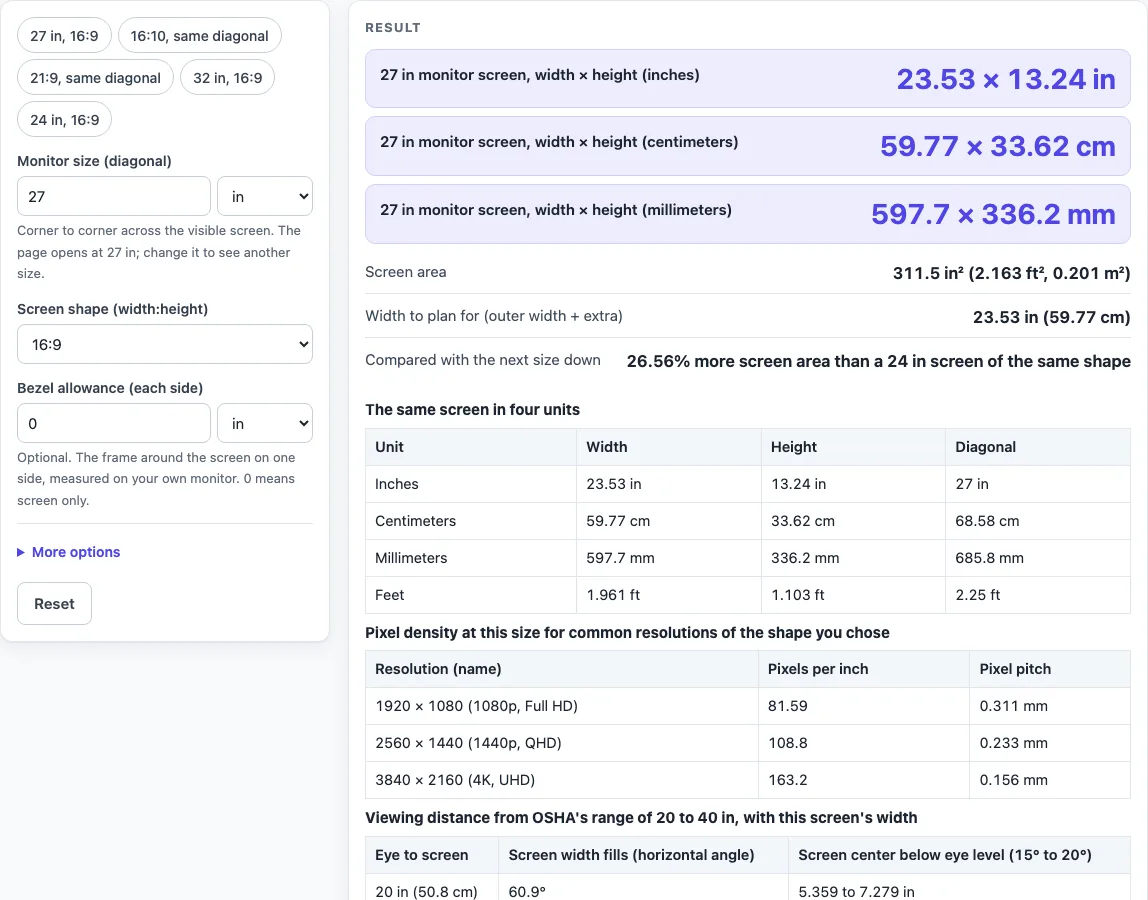
How to use the 27 inch monitor dimensions tool
- Leave “Monitor size (diagonal)” at 27 in, or type another size and choose in, cm, mm or ft.
- Pick the “Screen shape (width:height)”. The default is 16:9. You can also choose 21:9, 4:3 or 16:10, or a custom ratio through “Shape, width part” and “Shape, height part”.
- Read “27 in monitor screen, width × height” in inches, centimeters and millimeters, and the “Screen area”. At the defaults they show 23.53 × 13.24 in, 59.77 × 33.62 cm and 597.7 × 336.2 mm.
- Type a value in “Bezel allowance (each side)” to add a frame measured on your own monitor. With 0.5 in, “Outer size with your bezel allowance” reads 24.53 × 14.24 in.
- Open More options and add “Extra width for the stand or clamp” if you need a width to plan the desk around.
- Read the pixel-density table for the shape you chose, then the distance table and the neighboring-sizes table.
Check the “Compared with the next size down” row. For 27 in it reads 26.56% more screen area than a 24 in screen of the same shape. Copy the result or the link if you want to send the numbers to someone else, and use the print view for a desk-planning sheet.
The presets switch the shape or the size in one tap: “27 in, 16:9”, “16:10, same diagonal”, “21:9, same diagonal”, “32 in, 16:9” and “24 in, 16:9”. Depth is not calculated, because it depends on the model and its stand.
What are the 27 inch monitor dimensions in inches, cm, mm and feet?
The visible screen of a 27 inch monitor in the 16:9 shape, from the calculator at its defaults:
| Unit | Width | Height | Diagonal |
|---|---|---|---|
| Inches | 23.53 in | 13.24 in | 27 in |
| Centimeters | 59.77 cm | 33.62 cm | 68.58 cm |
| Millimeters | 597.7 mm | 336.2 mm | 685.8 mm |
| Feet | 1.961 ft | 1.103 ft | 2.25 ft |
The screen is measured corner to corner. For a shape a:b, width = diagonal × a ÷ √(a² + b²) and height = diagonal × b ÷ √(a² + b²). For 16:9, √(16² + 9²) = √337 ≈ 18.358, so the width is 27 × 16 ÷ 18.358 = 23.53 in and the height is 27 × 9 ÷ 18.358 = 13.24 in. Millimeters are inches × 25.4.
How big is a 27 inch monitor in 16:10 and 21:9?
The same 27 in diagonal gives a different width and height in each shape:
| Shape | Width × height (in) | Width × height (mm) | Screen area |
|---|---|---|---|
| 16:9 | 23.53 × 13.24 in | 597.7 × 336.2 mm | 311.5 in² |
| 16:10 | 22.9 × 14.31 in | 581.6 × 363.5 mm | 327.6 in² |
| 21:9 | 24.82 × 10.64 in | 630.3 × 270.1 mm | 263.9 in² |
A 16:10 screen is taller and narrower, and a 21:9 screen is wider and shorter. “21:9” is a marketing term: a reference page puts 2560 × 1080 and 5120 × 2160 at 64:27 (2.370:1), 3440 × 1440 at 43:18 (2.38:1) and 3840 × 1600 at 12:5 (2.4:1). The page treats 21:9 as exact, so for a specific ultrawide choose the custom ratio and type 43 and 18, for example.
What is the pixel density of a 27 inch monitor?
Pixels per inch (PPI) is the diagonal in pixels divided by the diagonal in inches: PPI = √(horizontal² + vertical²) ÷ 27. At 27 in in the 16:9 shape:
| Resolution | Pixels per inch | Pixel pitch |
|---|---|---|
| 1920 × 1080 (1080p, Full HD) | 81.59 | 0.311 mm |
| 2560 × 1440 (1440p, QHD) | 108.8 | 0.233 mm |
| 3840 × 2160 (4K, UHD) | 163.2 | 0.156 mm |
The 108.8 and 163 PPI match the worked examples on the pixel-density reference page. The 1080p reference page lists 1440p as 2560 × 1440 and says it is found on many 27-inch monitors. In the 16:10 shape the tool lists WUXGA 1920 × 1200 (83.86 PPI), WQXGA 2560 × 1600 (111.8 PPI) and WQUXGA 3840 × 2400 (167.7 PPI). Pixel pitch is 25.4 mm divided by PPI. Pixel density does not change the physical size of the screen: a 1080p and a 4K panel of 27 in have the same width and height.
How far should you sit from a 27 inch monitor?
OSHA’s computer-workstation guide puts the preferred distance between the eye and the screen at 20 to 40 in (50 to 100 cm), with the top of the screen at or slightly below eye level and the center of the screen 15 to 20 degrees below horizontal eye level. This is general monitor guidance, not advice for 27 in specifically. Worked into this screen’s 23.53 in width:
| Eye to screen | Screen width fills | Screen center below eye level |
|---|---|---|
| 20 in (50.8 cm) | 60.9° | 5.359 to 7.279 in |
| 30 in (76.2 cm) | 42.8° | 8.038 to 10.92 in |
| 40 in (102 cm) | 32.8° | 10.72 to 14.56 in |
The angle is 2 × arctan(width ÷ 2 ÷ distance), and the drop is distance × tan(15°) to distance × tan(20°). The 30 in row is an example between OSHA’s two limits, not a figure from the source.
How much bigger is a 27 inch monitor than a 24 or 32 inch one?
Area grows with the square of the diagonal, so a 27 in screen has (27 ÷ 24)² − 1 = 26.56% more area than a 24 in screen of the same shape, and a 32 in screen has (32 ÷ 27)² − 1 = 40.47% more than a 27 in one.
| Diagonal | Width × height (in) | Width × height (cm) | Width × height (mm) |
|---|---|---|---|
| 24 in | 20.92 × 11.77 in | 53.13 × 29.89 cm | 531.3 × 298.9 mm |
| 27 in | 23.53 × 13.24 in | 59.77 × 33.62 cm | 597.7 × 336.2 mm |
| 32 in | 27.89 × 15.69 in | 70.84 × 39.85 cm | 708.4 × 398.5 mm |
Why does a monitor’s spec sheet differ from these numbers?
The page works out the visible screen from a nominal diagonal. A reference page warns that the advertised size can differ from the true viewable diagonal, and gives a 32-inch-class monitor with a 31.5 in true diagonal as an example. The frame, the stand and the depth are not in the diagonal at all. If your spec sheet gives the true diagonal or the active area, type that diagonal to compare it with the nominal 27 in.
Sources (checked 24 October 2026): en.wikipedia.org/wiki/Pixel_density · en.wikipedia.org/wiki/1080p · en.wikipedia.org/wiki/16:10_aspect_ratio · en.wikipedia.org/wiki/21:9_aspect_ratio · osha.gov · nist.gov
Worked examples
| Input | Result |
|---|---|
| 27 in diagonal, shape 16:9 | 23.53 × 13.24 in (59.77 × 33.62 cm) |
| 27 in diagonal, shape 16:10 | 22.9 × 14.31 in (58.16 × 36.35 cm) |
| 27 in diagonal, shape 21:9 | 24.82 × 10.64 in (63.03 × 27.01 cm) |
| 32 in diagonal, shape 16:9 | 27.89 × 15.69 in (70.84 × 39.85 cm) |
| 24 in diagonal, shape 16:9 | 20.92 × 11.77 in (53.13 × 29.89 cm) |
Calculated by the tool above; open it with the same values to see each step.
How this tool works and where the numbers come from
Screen width and height are worked out from the diagonal and the screen shape: width = diagonal x a / sqrt(a^2 + b^2) and height = diagonal x b / sqrt(a^2 + b^2) (Pythagorean theorem), with 16:9 as the default shape. Inches convert to centimetres at 1 in = 2.54 cm and to millimetres at 1 in = 25.4 mm. Pixels per inch = sqrt(horizontal pixels^2 + vertical pixels^2) / diagonal in inches. The result is the visible screen only; a monitor’s frame, stand and depth come from its own spec sheet.
Sources
- Wikipedia. Pixel density (PPI formula and 27-inch worked examples; advertised size versus true viewable diagonal)
- Wikipedia. 1080p (1920 x 1080; 1440p QHD 2560 x 1440; 4K UHD 3840 x 2160)
- Wikipedia. 16:10 aspect ratio (WUXGA 1920 x 1200, WQXGA 2560 x 1600, WQUXGA 3840 x 2400)
- Wikipedia. 21:9 aspect ratio ("21:9" as a marketing term; 64:27, 43:18 and 12:5 resolutions)
- OSHA. eTools, Computer Workstations, Monitors (viewing distance 20 to 40 in; screen centre 15 to 20 degrees below eye level)
- NIST (2008). Guide for the Use of the International System of Units (SI), NIST Special Publication 811, 2008 Edition (1 in = 2.54 cm)
Frequently asked questions
What are the dimensions of a 27 inch monitor?
The 16:9 screen is 23.53 × 13.24 in (59.77 × 33.62 cm, 597.7 × 336.2 mm). That is the visible screen only; the monitor with its frame and stand is larger, so check the maker’s spec sheet.
How wide is a 27 inch monitor in cm and mm?
The 16:9 screen is 59.77 cm (597.7 mm) wide. The 27 in diagonal itself is 68.58 cm, or 685.8 mm.
How tall is a 27 inch monitor?
The screen is 13.24 in (33.62 cm, 336.2 mm) tall in 16:9, 14.31 in (36.35 cm) in 16:10 and 10.64 in (27.01 cm) in 21:9.
What is the PPI of a 27 inch monitor?
It depends on the resolution: 81.59 PPI at 1920 × 1080, 108.8 PPI at 2560 × 1440 and 163.2 PPI at 3840 × 2160.
Does the 27 inch size include the bezel?
No. The size is the diagonal of the visible screen, and the frame around it is not counted. Enter a “Bezel allowance (each side)” measured on your own monitor to see an outer size, for example 24.53 × 14.24 in with 0.5 in on each side.
How much desk width does a 27 inch monitor need?
At least the screen width of 23.53 in (59.77 cm) in 16:9, and more for the frame and stand, which differ by model. Measure the monitor, or use “Extra width for the stand or clamp” to add your own figure. Depth is not calculated and has to come from the spec sheet.
Related tools
- TV Size Calculator: use when you have a measured width and height and want the diagonal.
- TV Size Chart: use when you want several screen sizes compared side by side.
- 32 Inch TV Dimensions: use when you want the screen size of a 32 in TV in inches, cm and mm.
- TV Viewing Distance Calculator: use when the screen is a TV and you want viewing distances from named sources.
- How to Measure TV Screen Size: use when you need to measure a screen diagonal yourself.
- TV Sizes and Dimensions: use when you want every screen size in one place.