100 Inch TV Dimensions
Type a diagonal (it opens at 100 in) and a screen shape to see the width, height and area of the screen, plus viewing-distance and mounting-height figures from named sources.
Recent
Your last 10 settings, saved only in this browser. Nothing is uploaded.
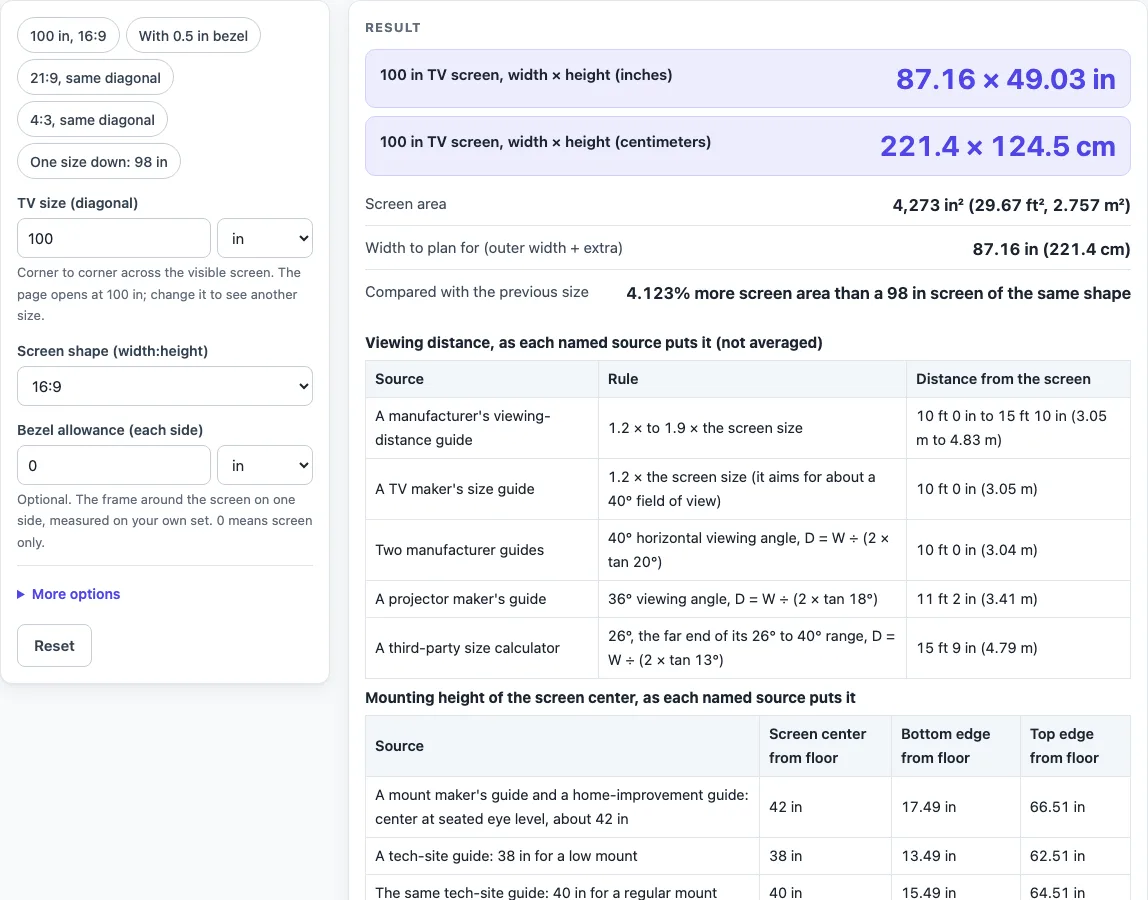
How to use the 100 inch TV dimensions tool
- In the “TV size (diagonal)” box, enter the diagonal. The default is 100 in. You can enter it in inches, centimeters, millimeters or feet.
- Check “Screen shape (width:height)”. The default is 16:9. Choose 21:9, 4:3 or 16:10 if you want a different shape. The 21:9 option is treated as exactly 21:9.
- For any other shape, pick the custom ratio and fill in “Shape, width part” and “Shape, height part”.
- Read “100 in TV screen, width × height (inches)”, the centimeter row and “Screen area”. At the defaults you will see 87.16 × 49.03 in and 4,273 in².
- If you want an outer size, enter a number in “Bezel allowance (each side)”. The page adds twice this amount to the width and to the height. At 0, the “Outer size with your bezel allowance” row stays hidden.
- Open More options and type any extra width for a stand or cabinet in “Extra width for stand or cabinet”.
- Read “Width to plan for (outer width + extra)”. This is the outer width plus your extra width.
- Check “Compared with the previous size”: 4.123% more screen area than a 98 in screen.
- Scroll to the viewing-distance and mounting-height tables. Each source is listed on its own row.
The presets are shortcuts. “100 in, 16:9” resets to the default, “With 0.5 in bezel” fills in a bezel allowance, “21:9, same diagonal” and “4:3, same diagonal” change the shape, and “One size down: 98 in” switches to the smaller diagonal. Adjust the fields after choosing one.
How is the width and height of a 100 inch TV calculated?
The width and height come from the diagonal and the screen shape. For a shape written as a:b, width = diagonal × a ÷ √(a² + b²), and height = diagonal × b ÷ √(a² + b²).
These formulas follow from Pythagoras: diagonal² = width² + height². For 16:9, √(16² + 9²) is about 18.36, so 100 × 16 ÷ 18.36 gives 87.16 in and 100 × 9 ÷ 18.36 gives 49.03 in. Multiplying width by height gives the area, about 4,273 in².
The same diagonal gives different shapes. A 21:9 screen with a 100 in diagonal is 91.91 × 39.39 in, and a 4:3 screen is 80 × 60 in. Area grows with the square of the diagonal, so the 100 in screen has 4.123% more area than a 98 in screen of the same shape. The 98 in preset at 16:9 gives 85.41 × 48.05 in.
Why do the listed sizes differ from the TV I buy?
The listed sizes cover only the visible screen. A bezel, casing or stand adds to the physical size, and that added part is not included in the results. A retailer’s guide says its figures exclude the bezel, casing and stand, and a TV maker’s support page says the same about the frame.
A “class” size can also be a little smaller than its label. A retailer’s example gives a 55-class screen of about 54.6 in, and a reference page says class sizes should be within 1/2 in of the actual size. The page states this as a warning and does not correct for it.
To estimate the outer size, use “Bezel allowance (each side)”. At 0.5 in per side, the 100 in screen gives an outer size of 88.16 × 50.03 in (223.9 × 127.1 cm). Depth is not calculated, because it depends on the model, the stand or wall mount, and the connections.
Viewing distance and mounting height come from several sources that disagree. For 100 in, a TV maker’s guide gives 1.2 times the screen size, or 10 ft 0 in (3.05 m), and a manufacturer guide gives 10 ft 0 in to 15 ft 10 in. The 26° row from a third-party calculator gives 15 ft 9 in. A mount maker’s guide and a home-improvement guide put the screen center about 42 in above the floor, so this screen runs from 17.49 in to 66.51 in. Each source is shown on its own row and nothing is averaged.
No published width and height for exactly 100 in was read, so the page does not show a comparison row. The nearest size with a published figure is 98 in, where a manufacturer’s approximate table lists 86 × 49.2 in against the calculated 85.41 × 48.05 in.
Sources (checked 16 October 2026): support.tcl.com · blog.bestbuy.ca · en.wikipedia.org · samsung.com · us.dynabook.com · benq.com · blog.sanus.com · bobvila.com · slashgear.com · nist.gov · blog.bestbuy.ca · samsung.com
Worked examples
| Input | Result |
|---|---|
| 100 in diagonal, shape 16:9 | 87.16 × 49.03 in (221.4 × 124.5 cm) |
| 100 in diagonal, shape 16:9 | 87.16 × 49.03 in (221.4 × 124.5 cm) |
| 100 in diagonal, shape 21:9 | 91.91 × 39.39 in (233.5 × 100.1 cm) |
| 100 in diagonal, shape 4:3 | 80 × 60 in (203.2 × 152.4 cm) |
| 98 in diagonal, shape 16:9 | 85.41 × 48.05 in (217 × 122 cm) |
Calculated by the tool above; open it with the same values to see each step.
Frequently asked questions
How far should I sit from a 100 inch TV?
Sources differ, so the page shows each one. A manufacturer guide gives 1.2 to 1.9 times the screen size, which is 10 ft 0 in to 15 ft 10 in (3.05 m to 4.83 m). A TV maker’s guide gives 1.2 times, or 10 ft 0 in (3.05 m). Angle-based rows give 11 ft 2 in (3.41 m) at 36 degrees and 15 ft 9 in (4.79 m) at 26 degrees.
How high should a 100 inch TV be mounted?
A mount maker’s guide and a home-improvement guide use a 42 in screen center from the floor. For this screen, that gives a bottom edge of 17.49 in and a top edge of 66.51 in. A tech-site guide lists 38, 40 and 42 in for low, regular and high mounts, and about 50 in for a bedroom.
Is there a published width and height for exactly 100 inches?
No published width and height for this exact size was read, so none is shown on the page. The results come from the calculation instead.
Will this tool tell me if a 100 inch TV fits my space?
No. The result is calculated from the values you enter and does not say whether a TV fits a space or a stand. Measure the set and the space before you buy or install.
What does a bezel allowance change?
It adds twice the allowance to the width and to the height. A 0.5 in allowance on each side changes the 100 in screen to 88.16 × 50.03 in (223.9 × 127.1 cm). The “Width to plan for (outer width + extra)” row adds any stand width you enter.
How much bigger is a 100 inch screen than a 98 inch one?
The 100 in screen has 4.123% more screen area. At 16:9 it is 87.16 × 49.03 in against 85.41 × 48.05 in for 98 in, so it is 1.75 in wider and 0.98 in taller.
Related tools
- TV Sizes and Dimensions: use when you want every common TV size in one place.
- 98 Inch TV Dimensions: use when you are comparing the size just below 100 in.
- 85 Inch TV Dimensions: use when you are weighing a smaller large-screen size.
- 80 Inch TV Dimensions: use when you want the figures for an 80 in diagonal.
- 75 Inch TV Dimensions: use when you are deciding between a 75 in and a 100 in screen.
- 65 Inch TV Dimensions: use when you are deciding between a 65 in and a 100 in screen.
- TV Size Chart: use when you want several sizes compared side by side.
- TV Size Calculator: use when you want the largest TV for an opening you have measured.